Every tool on WheelySpin, grouped by what you’re trying to do. They’re all free, work on phones, and pick results with fair cryptographic randomness.
Spin wheels
- Spin the Wheel – Random Picker WheelThe main wheel: add any entries and spin for a fair pick.
- Random Name PickerPaste a list and pick one or more names, no wheel needed.
- OBS Spin Wheel OverlayA transparent wheel overlay for OBS and Streamlabs.
- Embed a Spin WheelCopy a code to put a spinning wheel on your site.
- Randomness Audit: Is the Wheel Fair?Simulate 100,000 spins and check the fairness test.
Giveaway pickers
- YouTube Comment PickerDraw giveaway winners from a YouTube video's comments.
- Instagram Comment PickerPaste Instagram comments and draw a fair giveaway winner.
- Prize Wheel SpinnerAn online prize wheel for shops, events, classrooms and streams.
- Giveaway WheelSpin a wheel of entrants to pick giveaway winners live.
Numbers, dice and coins
- Random Number GeneratorPick numbers in any range, or spin a number wheel.
- Lottery Number GeneratorRandom lines for Powerball, Mega Millions, EuroMillions and more.
- Dice RollerRoll d4 to d100, with modifiers and advantage.
- D&D Stat RollerRoll six ability scores with 4d6, drop the lowest.
- Liar's Dice OnlineHidden dice, bids and a Liar! button, with live odds.
- Flip a CoinHeads or tails, with a running count and streaks.
- Random Letter GeneratorAn A to Z letter wheel for word games and class.
- Bingo Number GeneratorA bingo caller for 75-ball and 90-ball games.
- Random Date GeneratorRandom dates between any two dates.
- Rock Paper ScissorsPlay rock paper scissors against the computer.
- Tambola Number GeneratorCall housie numbers 1 to 90, with a board and calls.
Decision tools
- Yes or No WheelA 50/50 answer, with an optional maybe.
- Decision Maker WheelType your options and let the wheel decide.
- Magic 8 BallAsk a question and shake for one of 20 classic answers.
- Random Movie PickerSpin for a genre, a classic or a film from your watchlist.
- What to Wear WheelSpin for an outfit style, a main color or shoes.
- Chore WheelShare out housework fairly, one spin per person.
- Disney Movie PickerSpin for a Disney or Pixar movie to watch tonight.
- Boy or Girl WheelSpin boy or girl for gender reveal games and characters.
- Random Horror Movie GeneratorSpin for a horror movie to watch tonight.
Food decisions
- What to Eat WheelSpin for dinner, lunch, takeout or dessert.
- Random Recipe GeneratorSpin a cuisine, an ingredient and a method for a new dish.
- Random Fruit GeneratorSpin for a random fruit from 30 favorites.
- Random Restaurant PickerSpin to decide where to eat out.
Ideas and occasions
- Random Travel Destination PickerSpin for your next trip: cities, road trips or beaches.
- Random Activity GeneratorBored? Spin for something to do at home, outside or with friends.
- Workout WheelSpin for a random no-equipment exercise.
- Random Hobby GeneratorSpin for a new hobby to try.
- Gift Ideas GeneratorSpin for a present: any occasion, under $25 or experiences.
- Birthday Ideas WheelSpin for a way to celebrate a birthday.
- Date Night Ideas GeneratorSpin for a date idea, at home or out.
- Halloween Costume PickerSpin for a classic Halloween costume idea.
- Secret Santa GeneratorDraw Secret Santa names with private links.
- White Elephant GeneratorDraw a white elephant turn order with house rules.
- Fantasy Map GeneratorRandom fantasy world maps you can download.
- Random Animal GeneratorA random animal with a fun fact.
- Random Object GeneratorRandom everyday objects, 10 at a time.
- Random Character GeneratorA full character with traits, goals and secrets.
- Book Idea GeneratorA full story idea: title, hero, problem, twist.
- Random Yoga Pose GeneratorA random yoga pose with a simple cue.
- Random Fact GeneratorA random fun or weird fact.
- Superpower GeneratorRandom superpowers and weaknesses for heroes and stories.
- Christmas WheelFestive activities, movies, games and gift ideas.
- Random Dog Breed GeneratorSpin for a dog breed, with size and temperament.
- Random Emoji GeneratorA random emoji to copy, by category.
- Random Dinosaur GeneratorSpin for a dinosaur, with its period and diet.
Name generators
- Band Name GeneratorBand names by music style.
- Username GeneratorGaming, cute and aesthetic username ideas.
- Baby Name Picker WheelSpin your shortlist, or browse boy, girl and neutral names.
- Last Name GeneratorRandom surnames with their meanings.
- Fake Name GeneratorMade-up names and safe test profiles.
- Japanese Name GeneratorJapanese names with kanji and meanings.
- Elf Name GeneratorHigh, wood, dark and Christmas elf names.
- Dragon Name GeneratorDragon names with titles, from fierce to cute.
- Gnome Name GeneratorTinker, forest and garden gnome names.
- Vampire Name GeneratorGothic vampire names with titles.
- Viking Name GeneratorOld Norse names with bynames.
- Pirate Name GeneratorPirate names and pirate ship names.
- City Name GeneratorFantasy, sci-fi and real-sounding town names.
- Fictional Country Name GeneratorMade-up country names and official titles.
- Warrior Cat Name GeneratorWarrior cat names for every rank.
- D&D Name GeneratorFantasy names for D&D characters by race.
- Character Name GeneratorStory character names by genre.
- Random Name GeneratorRealistic male, female and full names.
Classroom tools
- Random Word GeneratorRandom nouns, verbs, adjectives and Pictionary words.
- Random Team GeneratorEven-sized random teams, with rules, team names and printing.
- Random Pair GeneratorRandom partners, with rotating rounds and no repeats.
- Brain Break WheelSpin for a 1–3 minute classroom reset.
- Icebreaker Question GeneratorRandom icebreaker questions for work, class and parties.
- Conversation StartersQuestions that get a good conversation going.
- Question of the DayA new question for everyone, every day.
- Random Country GeneratorSpin all 195 countries or one continent.
- Random US State GeneratorSpin for one of the 50 US states.
- Random Color WheelSpin for a color and copy its hex code.
- Flag QuizGuess the country from its flag: 195 flags.
- Times Tables WheelRandom multiplication questions, answers hidden.
- Periodic Table WheelSpin for a random element from all 118.
- Online TimerA countdown timer and stopwatch with an alarm.
- Random City GeneratorSpin for a random real city anywhere.
- Random Math Problem GeneratorRandom math problems to practise, with answers.
- Random Emotion GeneratorA random emotion with an emoji and its meaning.
- Word Scramble GeneratorScramble your words for a printable jumble or game.
Topic and prompt generators
- Random Topic GeneratorRandom topics to talk, write or learn about.
- Group Discussion TopicsGD topics for interviews and classrooms.
- Debate Topic GeneratorDraw a random debate topic for class or club.
- Argument GeneratorA motion with points for and against.
- Speech Topic GeneratorPersuasive, informative and how-to speech topics.
- Table Topics GeneratorImpromptu speaking topics with a 2-minute timer.
- Presentation Topic GeneratorPresentation ideas for school, college and work.
- Research Topic GeneratorResearch questions in science, health and tech.
- Drawing Prompt GeneratorGet a subject, action, setting and style to draw.
- Writing Prompt GeneratorStory, poetry and fantasy writing prompts.
- Essay Topic GeneratorEssay topics by type, for school and college.
- Journal PromptsPrompts for reflection, gratitude and goals.
Party games
- Truth or Dare GeneratorTruths and dares for kids, friends, parties, couples and adults.
- Spin the BottleA virtual bottle that picks the next player.
- Never Have I Ever GeneratorStatements for kids, friends and parties, one tap at a time.
- Would You Rather GeneratorTwo choices, one decision: kids, funny and deep decks.
- This or That QuestionsQuick-fire this or that picks for any group.
- Most Likely To QuestionsWho's most likely to…? Point on three.
- Two Truths and a Lie GeneratorRandom topics for two truths and a lie.
- Hot Seat QuestionsQuestions for whoever is in the hot seat.
- Paranoia QuestionsParanoia questions with a coin flip to reveal.
- Put a Finger Down Game"Put a finger down if…" statements for groups.
- Random Question GeneratorRandom questions for friends, couples, family and class.
- Random Trivia QuestionsTrivia questions with answers, by category.
- Punishment WheelFunny, harmless forfeits for losing a game or bet.
- Spicy Challenge WheelSpin for a pepper, from mild to Carolina Reaper.
- Twister SpinnerLeft foot, red! A Twister spinner on your phone.
- Charades GeneratorRandom words to act out, with a 60-second timer.
- Wheel of FortuneA game show wheel with points, Bankrupt and Free spin.
- Makeup WheelSpin a makeup look, color or challenge twist.
- Truth or Dare WheelSpin Truth or Dare and get a question straight away.
Personality and fandom
- Random Zodiac Sign GeneratorSpin for a star sign with its dates and traits.
- Spirit Animal GeneratorSpin for an animal and the trait it stands for.
- Hogwarts House SorterSpin for one of the four houses, with their traits.
- JJK WheelRandom Jujutsu Kaisen characters and techniques.
- Random Marvel Character GeneratorSpin for a Marvel hero, villain or X-Man.
- Demon Slayer WheelRandom Demon Slayer characters, Hashira, demons and breathing styles.
Sports wheels
- Random NFL Team GeneratorSpin for one of the 32 NFL teams.
- Random NBA Team GeneratorSpin for one of the 30 NBA teams.
- Random MLB Team GeneratorSpin for one of the 30 MLB teams.
- Random NHL Team GeneratorSpin for one of the 32 NHL teams.
- Random Sport GeneratorSpin for a random sport or Olympic event.
- Random NBA Player GeneratorSpin for a random NBA legend or star.
- Random Football Player GeneratorSpin for a random football (soccer) star.
- Random F1 Driver GeneratorSpin for a random Formula 1 driver.
- Premier League Team WheelSpin for one of the 20 Premier League clubs.
Gaming wheels
- Random Pokémon GeneratorSpin starters, the original 151, Eevee's evolutions or types.
- Random LoL Champion GeneratorSpin for a League of Legends champion or role.
- Among Us Map PickerSpin for an Among Us map or role.
- Valorant Agent WheelSpin a random Valorant agent or role.
- Brawl Stars WheelSpin for a random brawler or game mode.
- Genshin Impact WheelRandom Genshin characters, by rarity or element.
- Minecraft Challenge WheelRandom survival rules, build ideas and boss goals.
- Pokémon Type WheelAll 18 Pokémon types, each in its own color.
- DTI Theme WheelRandom Dress to Impress themes and challenges.
- Dandy's World Toon WheelSpin for a random Dandy's World toon.
- Marvel Rivals Character WheelSpin for a random Marvel Rivals hero or role.
- Clash Royale Card WheelRandom Clash Royale cards for a random deck.
- Overwatch WheelRandom Overwatch heroes by role, plus challenges.
What Random Tools Can You Use Online, and Which One Fits Your Choice?
An all-tools hub of random utilities puts spinning wheels, name and team generators, yes-or-no deciders, number and letter generators, and dice and card tools in one place, so you can match the tool to the decision instead of forcing every choice through a single wheel.
I have run staff draws, Friday quiz rounds and classroom call-outs from the same browser tab for years, and the habit that changed my results was not a better wheel but a wider shelf. A customizable spinner handles open lists well, yet a coin flip, a dice roller or a card flipper settles a narrow question faster, and a random date generator answers something no wheel was ever built for.
Pick by the shape of the question. Two outcomes call for a yes or no wheel; a hat full of people calls for a random name picker; a party leans toward spin the bottle or a would you rather wheel. I keep a shortlist of four or five favorites bookmarked, because the tool you open first decides how much setup you face.
Most browser tools open with no account and work on mobile as well as a laptop, while installable apps add unlimited wheels and keep working without signal. That split matters less than people expect. What matters is whether the tool shows its random selection on screen, because a group trusts a result it watched land.
What Is a Random Wheel Spinner, and What Can One Editor Do?
A random wheel spinner is a browser tool that turns your list of entries into slices, spins them, and stops on one result chosen by software rather than by a person.
Strip away the colours and you have a visible wheel sitting on top of a random number call. The visible spin is theatre; the advanced algorithm underneath has already made the pick. That is not a criticism, because the theatre is exactly why a classroom accepts the outcome without arguing.
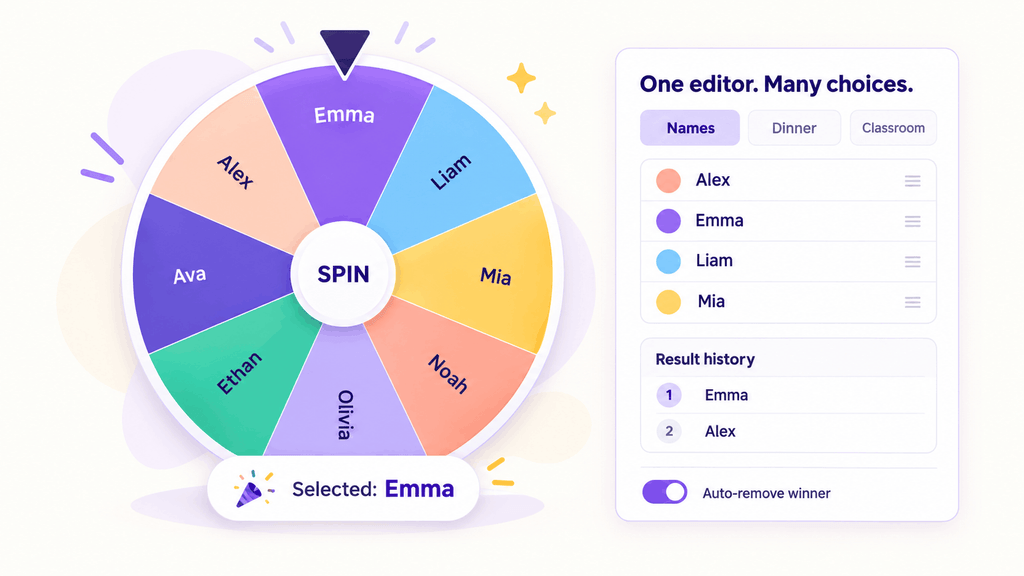
Early spinners held a handful of names typed by hand. A current random wheel spinner generator accepts pasted spreadsheets, acts as a name picker one minute and a dinner wheel the next, and some run three modes inside the same window. Those modes are where the real difference between products hides, far more than in the graphics.
In my own testing, the feature that decides whether I keep using a spinner is never the animation. It is whether the editor keeps a result history I can screenshot, and whether it can auto-remove the winner without me touching the list, because those two settings decide whether a second spin is fair.
How Do You Add Entries and Spin a Wheel Online?
To spin the wheel online, you add your entries, decide whether winners stay or leave, shuffle once, and press the spin control, and the order of those steps matters more than most people think.
The sequence below is the one I teach new giveaway moderators, because skipping step two is the most common reason a draw gets disputed afterwards.
- Custom text goes in first: type entries one at a time in list mode, or switch to text mode and drop in a whole block at once.
- Removing winners or keeping them is a rule you set before anyone sees a spin, never after.
- Shuffle entries once, which rearranges all entries so the order you typed does not decide where each slice sits.
- Anticipation does the rest: click the spin control and let the wheel slow down until it lands on a result by itself.
- Clear all only after you record the outcome, writing the winner down before you wipe or respin.
Two settings change step four more than any other. A spin count setting runs several draws back to back, and a manual stop option lets a presenter halt the wheel; that feels lively but invites accusations, so I leave it off for anything with a prize attached.
Pictures go through the same flow. An image picker takes uploaded photos instead of words and returns a random picture exactly as it would return a name, which works nicely for choosing a pet photo contest winner or a mystery art reference.
Which Random Tools and Wheels Can You Pick From?
The full spread of online random tools covers spinning wheels, pickers for people and teams, generators for numbers, letters and places, party game wheels, and small luck utilities such as dice and card tools.
I sort the catalogue into two shelves: tools you fill yourself and tools that arrive pre-loaded. A phone app with nine random pickers built around a lucky spin wheel sits on the first shelf, and that wheel supports weighted odds and emoji slices. A World Cup Wheel carrying 48 national teams sits on the second.
| Tool | Shelf | What it does | Detail worth knowing |
|---|---|---|---|
| Finger picker | Phone app | Chooses one of several fingers held on the screen | Needs every player touching one device |
| Team splitter | Phone app | Divides a group into sides | Handy when nobody brought a list |
| Random number tool | Phone app | Draws a number | Covers dice ranges, raffle tickets and lotteries |
| Tag list randomizer | Phone app | Reorders a list of tags | Good for turn order |
| Dice tool | Phone app | Rolls 1–9 dice | Lock dice between throws, shake to reroll |
| Card tool | Phone app | Turns over a 52-card deck | Optional jokers |
| JJK Wheel | Pre-loaded | A Cursed Technique Randomizer | Built for anime fans |
| Anime Characters | Pre-loaded | Character draw | 94 slices |
| Dandy’s World Toon Wheel | Pre-loaded | Toon draw | 40+ toons |
| DTI Theme | Pre-loaded | Dress-up theme draw | 362+ themes |
| Fictional Characters and Jujutsu Kaisen Characters | Pre-loaded | Roster draws | Copy, then prune |
Pre-loaded wheels save typing but lock you into someone else’s list. The character wheels I have tried rarely match the cast a group actually cares about, so my routine is to duplicate one and trim it before the game starts.
What Settings Let You Customize a Spin Wheel?
A spin wheel is customized through its settings menu, where you control how it spins, how it sounds, how the winner is announced and how the page looks.
On one editor I use, those controls live under editor tabs named Style, Timing and Sound, which keeps motion apart from appearance. A Mystery Wheel hides slice text until the stop, and a Mystery Result keeps the outcome covered until you reveal it, which I reach for whenever suspense is half the fun of a prize draw.
Slice colors are more than decoration. Each slice can take a custom pie color typed as a hex code, so a company wheel matches its brand palette exactly, and you can pick the shade with a colour picker if you do not know the code. Branding slots usually sit behind Premium, along with ready-made themes and the option to enlarge the result image in the result window.
Accessibility settings deserve a mention too. Read Aloud announces the result to a room that cannot see the screen, which I first relied on during remote events where half the group listened on audio only.
Where Does a Random Wheel Actually Help?
A random wheel helps most when a group needs a choice that nobody can accuse anyone of fixing, from calling on students to drawing giveaway winners.
Groups accept a result they watched happen, and that is the whole case for the tool. I never run a draw off-screen for that reason. The table below maps common settings to the wheels I open for each one.
| Setting | Wheels to open | Why it fits |
|---|---|---|
| Classroom | Student picker, student name picker, classroom wheel, random letter wheel trimmed to vowels or consonants | Calls on students without favourites |
| Home | Chore wheel, what should I eat wheel, movie picker, restaurant picker | Settles meal ideas and rotas |
| Fitness | Exercise wheel, workout wheel | Builds a session from moves you can do today |
| Parties | Truth or dare wheel, truth & dare wheel, truth-or-dare question generator, a bottle spinner with truth-or-dare prompts | Removes the “you pick” stalemate |
| Giveaways | Giveaway winner picker, Instagram comment picker for Instagram giveaways | Shows entrant names transparently |
| Teams | Team picker, random team generator, team generator | Sorts teammates and even chooses team names |
| Sports fans | MLB team, NBA team, NFL team wheels, plus sports and gaming wheels | Picks who you cheer for this week |
| Geography | Country picker, random country generator, random state generator, flag quiz on flags and country names | Doubles as a lesson and as travel ideas |
| Quick calls | Yes no maybe wheel for a three-way decision, decision maker wheel, random choice picker | Turns binary decisions and a random decision into a spin |
| Numbers and letters | Random number generator, random number wheel with an editable range, number picker, letter picker, random letter generator | Raffle numbers, spelling games |
| Art | Random color wheel | Feeds creative prompts and art activities |
One contrarian note from experience: the wheel is a poor fit for decisions where one person carries the consequences alone. I have watched friends spin for a job offer and then ignore the result, which tells you the wheel was really a gut check.
Is an Online Wheel Spinner Fair?
An online wheel spinner is fair when every slice holds an equal share of the circle and the random call comes from a sound generator, so the outcome depends on slice size alone.
Fairness is a property of the list as much as the code, and a canned answer wheel shows why. A classic set of 20 responses looks neutral, yet sorting its slices by leaning reveals a tilt toward yes:
| Leaning | Responses on the wheel | Share of the wheel |
|---|---|---|
| Affirmative | It is certain, It is decidedly so, Without a doubt, Yes – definitely, You may rely on it, As I see it, yes, Most likely, Outlook good, Probably, yes, Signs point to yes | 10 of 20 (50%) |
| Non-committal | Reply hazy, try again, Ask again later, Better not tell you now, Cannot predict now, Concentrate & ask again | 5 of 20 (25%) |
| Negative | Don’t count on it, My reply is no, My sources say no, Outlook not so good, Very doubtful | 5 of 20 (25%) |
Nothing in that wheel is broken; the generator is truly random and the list is lopsided. The same logic applies to duplicates, since a name pasted twice owns two slices, and I check for them before every school raffle.
A wheel still feels fairer than a manual choice, because nobody’s hand is on the outcome. Some hubs now publish a Randomness Audit page explaining their method, which I take as a good sign rather than proof; what I trust more is a draw run in public, where people watch the result land.
Do You Need to Pay or Sign Up?
Most online wheel spinners are free to use with no signup, and paid tiers mainly remove advertising and raise storage and sharing limits.
The free tier is generous for casual use. Free accounts on one popular editor hold 15 files, while paid accounts reach 120, and the Free plan collects up to 10 results on a shared results link. A free online wheel spinner paid for by advertising rarely bites a teacher running one class wheel.
Paid sharing changes what your audience sees. A shared wheel can carry your premium customizations and appear with ads hidden for visitors, which matters when you embed the spinner in a school or company page.
Phone apps follow a different model. One Tiny APK under 12 MB, with 10K+ installs, rated Everyone in the Tools category and updated Aug 25, 2026, has a data safety panel saying it may share device or other IDs with third parties, that data isn’t encrypted and that it can’t be deleted.
Should a Winner Stay, Disappear or Keep Score?
A winner should stay on the wheel for repeatable prize draws, disappear when each person may win only once, and keep a running tally when you are counting preferences over many spins.
- Normal: the result remains on the wheel and can come up in later spins; my choice for prize wheel games where the same prize slice may hit twice.
- Elimination: you remove a name once it wins, which suits classroom participation, elimination games, survivor-style rounds and draws needing multiple unique winners.
- Accumulation: each spin adds to a count beside the entry, so a week of lunch ideas turns into a simple poll.
The tally mode is underrated. The all-results view lists every outcome since your visit began, with a score summary in descending order, and a Results Link shares it; clear all records when the next poll starts. I ran a team retro this way, and the counts showed the group’s mood more honestly than a show of hands.
The removal mode has one trap that has caught me before. Some editors remove only the winning line, others every copy of that name, so a student entered twice may vanish entirely or linger for another turn. Check which behaviour your editor uses before a class draw, especially for anything designed for contests.
How Do Weights, Labels and Colors Change the Odds and Look?
Weights set how large each entry’s slice is compared with the rest, labels swap the text shown on a slice, and colors let you code entries at a glance.
A weight is a multiplier, not a percentage. Give one entry 3 and two others 1 each, and the heavy entry owns three fifths of the circle, which is weighted choice in its simplest form. Entries without a number count as one; editors call these unweighted entries, and they default to 1, the same as equal weights.
In a typed block you prefix a weight followed by a comma, as in 2,First Input, and both list mode and text mode respect it. Wrapping an entry in a tilde hides it without deleting it, which I use to park a prize that has run out of stock.
In Main Mode, each row takes text or image entries, and you can hide a row or delete entries outright. A label is cosmetic: the slice shows a short version while the result window keeps the full entry, which helps when long raffle prize names would shrink to unreadable type.
Weighted slices are also how streamers build tiered prizes and rare drops, giving the grand prize a thin slice and the stickers a fat one. For team assignments I avoid them entirely, since nobody wants to learn they were weighted.
How Do You Save, Share and Collect Wheel Results?
Wheel lists save automatically to your browser, can be stored as named files in an account, and can be shared as a view-only link or a locked link that gathers everyone’s results.
Browser auto-save writes the list to Local Storage, which survives a refresh on the same device but disappears when someone wipes site data. I learned that the hard way on a borrowed school laptop the night before a draw.
One editor lets you build up to five wheels and switch between them, yet only the active wheel is kept for your next visit; the rest are lost on refresh. Another offers a simultaneous multi-wheel view that spins 6 wheels at once. For anything you will reuse, Save to cloud: a JSON backup export keeps the configurations you tuned, and import/export moves them between machines.
Sharing is where care matters most. Public share links and cloud saves are publicly accessible, so I strip surnames and emails before I share wheel links, because sensitive participant data has no place on a shared spinner.
Can You Run More Than One Wheel at Once?
Yes, many spinner editors let you keep several wheels open at the same time, and at least one lets you spin a handful side by side in the same moment.
The classic setup is name wheels paired with prize wheels: one wheel picks the person and the other picks the reward. Running both together removes the awkward pause between “who” and “what”, which is where audiences drift off during giveaways.
Streamers push this further on Twitch and other live streams, running two wheels inside OBS Streamer Mode, which adds a one-click green screen and works with Streamlabs. A plain OBS mode on other editors does the same job with a transparent backdrop for stream giveaways.
Saving several wheels is easier as files. Progress autosaves to browser local storage, and clearing browser data erases it. A Private List stays visible only to you, a public view link lets others look while only you can edit, and a Collect file gathers visitor results and locks the file against edits.
How Do Titles, Result Labels and Scores Work?
Titles tell viewers what the wheel decides, result headings change the text shown with each win, and the results panel keeps a running score of every outcome since you opened the page.
A slice can show alternate text on the wheel and appear as a small title above the result, so “Grand Prize: Weekend Trip for Two” can sit on the slice as “Trip”. That trick keeps a busy wheel readable from the back of a room, and the all-results list below it shows recent winners for the audit screenshot. Toggles swap it with the inputs list, and the entries and results counts confirm nothing went missing between spins.
Tally mode on one editor writes the change as current+change, triggered by an ADD COUNT button, with counts carried over between spins, which suits repeated decisions like choosing a meal. The DONE button instead lets a result be picked again, the usual setting for contests and prize-wheel events.
Sharing has its own rules. Share as Guest makes a non-editable copy that expires after 60 days unopened or 365 days of inactivity, while Share from File gives a live link synced to your edits, and a collect link adds a results dashboard.
Can AI Fill a Wheel for You?
Yes, some spinner editors generate entries from a short prompt, letting you review the suggestions and add only the ones you want to the wheel.
AI generation is best treated as a first draft. I have used it for classroom prompts and game challenges, and for brainstorming topics at a planning meeting; for food decisions it tends to repeat the obvious, so I edit before spinning.
Once the ideas land, select mode lets you tick several at once, and drag-highlighting makes bulk changes quick when half the list needs a new colour. Then give the wheel a tool title and description, and set result titles, which cycle in order until Restart Sequence sends them back to the first.
Can You Go Full Screen or Install the Wheel as an App?
Yes, a wheel can usually be enlarged to fill a large display, and a browser can save it to your home screen so it opens like an app.
The enlarged view is my default for teams & offices. I project the wheel, hide the list, and let it set presentation order, choose speakers, assign tasks or break ties, which keeps entries off the projector and spares people from seeing their names queued.
A home-screen shortcut is not the same as offline use. A shortcut still needs a connection, while a true lightweight app keeps working without signal on phones, which matters on field trips and in basements with poor reception. The spin itself feels just as interactive either way.
What Does a Nine-Tool Random App Pack In?
A nine-tool random app bundles a wheel with eight smaller chance utilities, from finger and coin games to dice, cards and a bottle spinner, in one small download.
The appeal of a decision-making app like this is speed: I have settled who goes first at a board game night with the finger tool faster than anyone could open a browser. The bottle tool suits icebreaker games with a new group, and the wheel covers quick choices for everything else.
Read the app store listing, not just the download links, before installing one for children. One listing I checked declares that no data is collected, yet the app still carries ads and in-app purchases. That mix is common, and none of it is visible from the cheerful icons.
Which Ready-Made Wheel Templates Are Popular?
The most-shared ready-made wheels are tournament draws, character rosters from anime and games, and theme pickers for dress-up challenges.
Most hubs tuck these templates behind a View All link or a Discover Wheels page, next to everyday staples like a food wheel, a raffle wheel, a decision wheel and a prize wheel. Under the artwork every specialised wheel is just a saved list of names, which frees you to edit without guilt.
Tournament wheels double as draft order for an office sweepstake, which is how I use them each summer. For a site of your own, the embed wheel of names option places a working spinner inside a page, so visitors spin in seconds without leaving.
If no template fits, Generate with AI from a short description such as 5 Breakfast Ideas, then select items from the input suggestions. The daily quota varies by plan and resets after 24 hours, so heavy users plan ahead.
What Does an 8-Ball Answer Wheel Say?
An 8-ball answer wheel replies to a yes-or-no question with one of a fixed set of stock phrases, ranging from firm yeses to evasive non-answers.
It suits the moments when you can’t decide and would rather let the wheel decide with a laugh than a verdict. I have used one as a warm-up among icebreakers and classroom games, and the evasive replies got bigger laughs than the yeses.
If you want a straight answer, a plain yes/no digital wheel with optional extra choices is more honest, because you control how many slices each outcome gets. For quick random decisions the canned set is a toy first and a decision tool second.
Is an Online Wheel Spinner Free?
Yes, an online wheel spinner is normally free, with no fee to create, spin or share a basic wheel.
A free online wheel maker typically shows advertising, while paid tiers add an ad-free experience, HD images, more image storage, higher result-collection limits and embed features. A single editor with a More Tools menu often covers the rest, and I have not met a basic spinner charging hidden fees for the spin itself.
Can You Remove a Name After It Wins?
Yes, most spinners can drop a winner from the wheel automatically or let you delete the entry by hand.
The removal setting takes the winning slice out before the next round, which gives classroom calling without repeats. Watch the button wording: HIDE CHOICE removes one line, while HIDE ALL INSTANCES clears every copy of that name.
Can a Spin Wheel Pick Giveaway Winners?
Yes, a spin wheel works well for picking giveaway winners as long as the draw is shown live and the rules are fixed in advance.
Spin on YouTube, Instagram or at event raffles for live stream giveaways, multi-winner giveaways and contest winner selection. Document rules in the post, and avoid rerolls unless they were agreed beforehand, so nobody can claim the draw was rigged. A single result can be shared only at the moment it’s announced, so post a results-page link or download an image of the full draw as proof.
Does a Spin Wheel Work on a Phone?
Yes, browser spinners resize to handheld screens as well as tablets and desktops.
On a smartphone, open the wheel in Safari on iOS or Chrome on Android and use Add to Home Screen. On a computer, Chrome’s Save and Share menu offers Install page as app, and full screen enlarges the wheel while hiding the inputs section.
How Much of the Wheel Can You Customize?
Almost every visual part of a wheel can be customized, from slice styling to sounds and the spin button.
The Settings panel offers custom themes, wheel styles, segment styles, a full layout choice, wheel color themes, a page color, background transparency, sound controls and a countdown mode. Paid tiers add a background image, a custom spin button, a logo, a banner and the image size in the result popup, while confetti, button animation and custom start, spin, and end sounds finish the custom spin wheels effect.
What Is a Random Wheel Spinner Generator?
A wheel spinner generator is an editor that builds a spinnable wheel from a typed or pasted list, with one entry per slice.
Text entry works with one line per slice, and weighted text formats such as 3, Pizza, Pizza, 3 and 3: Pizza set odds as you type, while the wheel updates as you type. List entry gives direct control over each slice, including sorting and hidden slices.
How Do You Spin a Wheel Online?
You spin a wheel online by pressing its Spin button, or Ctrl + Enter on one editor and Space on another when you are not typing in a field.
The pointer marks the winner. Spin behavior settings set speed across levels 1–10, a duration of 1–30s, a random initial angle and initial spinning, and you simply repeat as needed.
Can a Wheel Work as a General Random Picker?
Yes, a wheel works as a general random picker for nearly any list of options, from a class roster to a contest entry list.
I use it for reading turns, tie-breakers, chores, group challenges, assign topics, and everyday decisions like choose food or pick a movie. The benefit for groups is that the whole room sees the same result.
Can You Build a Name Wheel From a Class List?
Yes, you can turn a class list into a wheel of names by pasting it straight into the editor.
Most editors accept unlimited names, and a demo wheel often ships with default slices such as Alice, Bob, Charlie, David, Eva, Frank, Grace and Henry, which is 8 slices to overwrite. That makes random name picking, picking students and classroom student selection a one-paste job for teaching.
Is a Random Picker Truly Random or Rigged?
A well-built random picker is not tampered with, because the pick comes from the browser’s own random generator rather than from anything the host controls.
One editor states that it calls browser-native crypto.getRandomValues() for true randomness; another says each spin is algorithmically generated and doesn’t favor any segment. Shuffle and removal options keep multi-round play honest, and keeping weights equal keeps normal draws even.
Can You Add Weights to a Wheel Spinner?
Yes, a wheel spinner can take weights so that some entries win more often than others.
A weight sets each entry’s share of the wheel relative to the total, so chance tracks slice size and probability becomes visible. That creates uneven odds on purpose, which is fine for prizes and wrong for name draws.
Can You Import a Spreadsheet or CSV Into a Wheel?
Yes, you can import a spreadsheet or CSV file into a wheel, and some editors also accept pasting rows straight from a sheet.
One editor takes CSV/TSV import files up to 300KB with headers such as input, name and option, capped at 1,100 slices, and a weight,input CSV built from ticket data loads a full prize-draw list in one go. Pasted spreadsheet rows and documents work too, and you can type or paste extra lines afterwards.
Once the import lands, the input actions menu tidies it: sort A to Z or by manual sort, delete empty inputs left by blank rows, or remove all and start over.