What Is a Random Question Generator?
A random question generator is a browser tool that draws one prompt at a time from a pre-written library, sorted into decks or categories, so a group, a class or a pair of people always has something worth answering without anyone inventing it on the spot. You press Next question, read it aloud, and the room takes it from there.
I started leaning on these tools to rescue dinners that kept sliding into small talk. What changed my mind was not the novelty of the prompts but the editing behind them: the better libraries skip the common questions you could write yourself and ask for an opinion, a memory or a choice instead.
Under the hood, the differences run deeper than the buttons suggest. Some tools pull from a human-reviewed library and give every prompt an equal chance, others let you Spin the Wheel to land on a category first, and a few post a Question of the Day with a countdown to the next one.
The settings stretch well past parties. People run these tools on Road trips, in Classrooms and at Team Meetings, and ready-made sets mean nobody has to sort prompts by audience first. Even the 21 questions game works, as long as you browse a few draws and keep the ones that land.
Running a meeting or the first day of class? The icebreaker question generator has decks written for work and school. For two-option dilemmas, try would you rather.
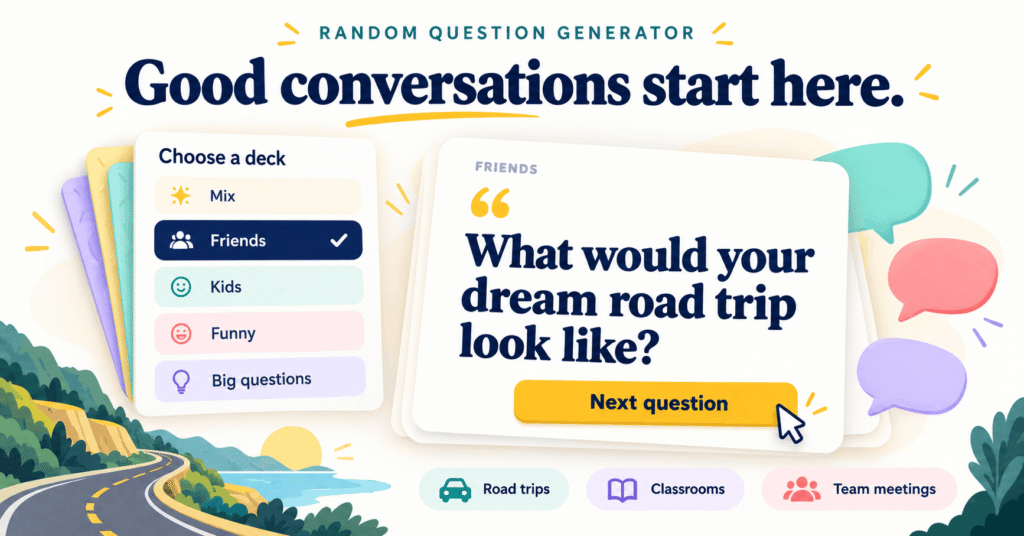
How Do You Use a Random Question Generator?
You use a random question generator by selecting a deck or category, pressing the draw button, answering the prompt out loud, and drawing again once everyone has had a say.
The button label changes from tool to tool. One bare-bones page just says Click for Question beside an animated duck, another tells you to Tap the button to get going, and a third shows New Random Question under its opening prompt. Almost all of them need JavaScript switched on, which is worth checking when a school laptop shows an empty box.
The routine I run with a new group has four moves:
- Mix first, so the pick pulls from all the conversation decks at once and the room can settle on a tone. Narrow it later with a Topic selector or category dropdown once you know the mood.
- Generate Another Random Question the moment a prompt falls flat. Skipping costs nothing, and I would rather burn three duds than force one.
- Take turns around the table, and on tools that accept player names, let the screen track the rotation for you.
- Copy Question when a prompt sparks something, then paste it into the family thread so absent relatives can answer later.
List-style tools flip that routine around. You type how many prompts you want, press once and get a full sheet. I keep the one-at-a-time draw for live talk and the sheet for prep, because a sheet tempts people to read ahead and pick the easy ones.
What Question Categories and Decks Can You Pick From?
Most random question generators let you pick from a fixed menu of decks or categories, ranging from light prompts for families to more serious ones for partners and colleagues, and each tool labels that menu its own way.
A compact deck-based tool keeps it to nine: Friends, Couples, Family dinner, Kids, Funny, Big questions, Exit tickets, Writing prompts and This or that. A larger library spreads 1,025 prompts across 16 categories, and it lists no per-category counts, so the size of any single shelf stays a guess.
Other topic menus read like a variety of topics sorted by tone rather than audience: general, serious, playful, tricky, private and relationship-based. Those menus were written with teachers, adults and workplaces in mind, which explains why a single office-friendly shelf sits right next to the playful ones.
In practice I ignore the headline count. A menu covering dozens of subjects helps less than one deck that matches the room, and the two-choice deck is the one I reach for when a group is tired, because picking between two options asks almost nothing of anyone.
Where Does a Random Question Generator Work Best?
A random question generator works best wherever people share time but lack a topic, such as car rides, long meals, lessons, staff huddles and solo writing.
The table below pairs the setting with the category I would open first and the reason it holds up.
| Setting | Category to open first | Why it fits |
|---|---|---|
| Mixer or party | Icebreaker | Low-stakes prompts warm up new acquaintances without putting anyone on the spot |
| Reunion | Deep Talk | long-time friends already know the surface facts, so go one layer down |
| Evening with a partner | Relationships | Prompts about shared plans beat quiz-style ones on a quiet night |
| Staff huddle | Team Building | Keeps prompts away from Personal ground colleagues may not want to share |
| Language lesson | ESL | Built for ESL speaking practice and discussion classes |
| Video lesson | All General | Broad, low-prep prompts suit teaching online with cameras on |
| Lesson opener | Students | Age-matched prompts that a teacher can read straight off the screen |
| Indoor afternoon | Fun & Funny | Silly prompts carry a rainy day better than serious ones |
| Pub-style quiz | Trivia | Right-or-wrong answers give a group a score to chase |
One thing the table hides is how fast a mood shifts. I have opened a reunion on the serious shelf and switched to silly prompts twenty minutes in, and a good tool makes that a single tap rather than a fresh setup.
Can You Spin for a Category, Set a Timer or Generate Questions in Bulk?
Yes, some random question generators let you spin for a category, start an answer timer and produce a whole batch of prompts in one press.
The spinner chooses the theme, not the prompt itself. That split matters at a Group game, because landing on Mixed Questions or Hard feels like part of the play, and the draw that follows still comes from that shelf alone.
The timer has a handful of fixed lengths, and a visible countdown keeps one talkative player from eating the whole round. I use the shortest setting for Morning meetings and the longest for anything reflective.
Batch mode suits prep rather than live play. My usual steps are:
- Number of Questions first: type the count you need, keeping in mind that one batch tops out at a fixed limit.
- Generate Random Questions with a single press, and the list appears instantly.
- Read Your Question list before the session and strike anything that clashes with the audience.
A sheet made this way travels well. I tape one inside a car door before long drives, and nobody has to unlock a phone to keep the talk moving.
How Do Saved Questions and the Daily Question Work?
Bookmarked prompts on a random question generator sit in your own browser storage for later, while the daily prompt is one shared pick that changes on a fixed timer for everyone.
The useful detail is where each feature keeps its data, so the table below sorts them by location.
| Feature | Where it lives | What I use it for |
|---|---|---|
| Heart-icon bookmarks | This device only | Keeping the prompts that worked with a specific crowd |
| Wipe button | Your browser only | A quick Privacy reset on a shared classroom laptop |
| Daily shared prompt | Same for every visitor | A common opener for a remote team |
| Copy card and Image buttons | Your clipboard or downloads | Dropping a prompt into a group chat or a slide |
| Copy All, Save All and Download .txt | A plain text file | Building a printable sheet for a workshop |
| Embed code | Your own websites | An embeddable question box sized by height in px |
Because bookmarks never leave the browser, clearing site data wipes them. I learned that after losing a month of keepers, so I now export the good ones before any laptop clean-up. That habit also lets me curate a short list for future games.
The Share button on the spin panel is quietly the most social feature. It turns one prompt into a thread where people answer across a whole day instead of in one sitting.
Can You Embed a Question Generator on Your Own Site?
Yes, at least one random question generator offers a copy-and-paste box for your own pages, where you pick a category and set the frame height before pasting the code.
In my view an embed should offer the same moves as the main tool: let visitors Choose Your Style, then Tap for Another when a prompt misses, while the category filter you set at install time decides which shelf they see.
The tool itself is free forever, and the daily Today’s Question card is the lighter option if you only want one prompt a day, since you can Save as Image and post it.
I would limit an embedded box to one shelf. A school blog showing Kids & Family prompts, or a club page set to class warm-ups, gives visitors a clear reason to press the button, while an all-category box reads as clutter.
Check that the prompts you expose pass the same clarity and suitability bar you would apply in person. A visitor sees whatever the shelf holds, and a clever Get Another Question button cannot fix a prompt that is wrong for your readers.
Can a Question Generator Run Quiz Rounds Too?
Yes, some random question generators include a quiz mode with trivia, exam-style and multiple-choice rounds, each followed by the answer and a short reason why it is correct.
Quiz mode changes the social contract. A conversation prompt has no right answer, while an MCQ round has exactly one, so the group stops sharing and starts competing. That is fine for game night, less fine for a first date.
The format borrows from school testing. Exam practice rounds, General Knowledge sets and a guide with 50 trivia questions split over five rounds all lean on the same rhythm: ask, pause, reveal. A prompt such as the capital of Iceland (Reykjavík) works because the reveal is instant.
I run quizzes with the Answer toggle hidden and use the Timer presets so every team gets the same window. The presets are 30s, 1 min, 90s and 2 min, and I use 90 seconds for multiple choice.
A Pause helps when a team disputes an answer, and a Reset between rounds keeps scores honest when one table dominates. A short quiz at the end of a lesson checks recall faster than a worksheet.
How Random Is a Random Question Generator, Really?
A well-built random question generator is as random as the browser’s built-in secure number source allows, and the better ones also block a prompt from coming back until every prompt in your chosen pool has appeared once.
That second rule matters more than people think. Pure chance with a short list will repeat a prompt within minutes, which feels broken even when the maths is fine, so good tools track what has shown up and only let a prompt return once the deck is used up.
The question wheel follows the same logic: it lands on a category, and Get a Question then draws evenly from that shelf alone.
Library quality is the other half of trust. A list written and checked by people, rather than text produced on the spot by a chatbot, keeps a Work shelf from drifting into Fun jokes and a Deep shelf from turning glib.
My own test is simple. I draw 21 prompts in a row and watch whether anything comes back early or slips off-theme, and two strikes are enough for me to move on.
Which Ready-Made Question Sets Suit Your Next Conversation?
Ready-made question sets bundle prompts for one situation, such as a date, a reunion, a new team or a meal with relatives, so you skip the sorting step entirely.
The labels on these bundles read like an events calendar: Date nights, Party Nights, a family table, a first team stand-up. Each set trims the full library down to prompts that fit the audience, which is why they work better on nervous groups than an open draw.
Partner sets are a good example of tone control. The ones I have used keep things sweet rather than spicy, and that restraint is deliberate, because a prompt that embarrasses one person ends the game for both.
The same sets carry over to long dinners and long-distance calls, where silence feels heavier than in person. Every set I have tried stays family-friendly unless its label says otherwise.
Two-option sets are worth a separate mention. A Would You Rather bundle helps a group learn about each other through quick choices, and the follow-up “why?” gives you deeper insight than the choice itself.
What Do Good Random Questions Actually Sound Like?
Good random questions sound specific, slightly odd and easy to start answering, which is why the strongest ones ask about a choice, a memory or an imagined scene rather than a hard fact.
Writers have used this quality for years. A strange prompt makes a strong first sentence of a story, slots into the first few paragraphs as a plot turn, or closes a piece as its ending, and it breaks writer’s block because it arrives from outside your own head.
I keep a Daily writing warm-up habit built on this: one draw, ten minutes of Journaling, no editing. The prompt rarely relates to the project at hand, and that is the point of the exercise.
The best conversation starters and the best story seeds turn out to be the same prompts. For Creative writing classes, the same draw works as a writing session opener or as plain writing practice. Students who freeze at a blank page will happily argue about a hypothetical during quick-write time, and the argument becomes the draft.
Are There Guides That Go Beyond the Generator?
Yes, some question tools pair the generator with written guides on icebreakers, workplace team building, family questions and trivia, which help when you want a planned list rather than a live draw.
Guides fill a gap the button cannot. A written list of icebreaker questions works like a pre-sorted draw, and some tool pages point visitors to a separate icebreaker generator for meetings and a would-you-rather tool for two-option dilemmas.
The same help pages hold an installation guide for the embed widget, and the category index gives every shelf its own Explore link.
The team-building guide is the one I recommend most, because it covers how far colleagues should be pushed to share. Meetings and class starters both benefit from that kind of boundary-setting, which is easy to forget when you are drawing prompts live.
The guides also suit anyone who wants paper over screens. A list you can print works in a power cut, a phone-free classroom or a cabin with no signal, places where a browser tool is no help at all.
Do Questions Repeat in a Random Question Generator?
No, a well-built random question generator does not show the same prompt twice until every prompt in the chosen deck or pool has appeared once.
The mechanics vary slightly. One tool cycles through each deck in full, while another marks every eligible prompt as shown and only refills once the selection is exhausted and the pool resets.
Behind that, the pick uses a cryptographic random source with an unbiased index, which the tool explains on its How It Works page. When you Choose a deck yourself, the cycle applies to that deck only.
That guarantee lasts for a single visit. Closing the tab or switching devices can start the cycle over, so a prompt from last week may well turn up again. Clear All only empties your saved list and has no effect on what you have already seen.
With hundreds of questions in a typical library, I have never hit a full cycle in one evening. On a small deck of thirty, though, a long road trip can get through it in under an hour, which is a good reason to switch decks halfway.
Are Random Question Generator Questions Family-Friendly?
Yes, most random question generator decks are written to suit a mixed-age table, though partner decks and adult party sets are worth checking before a child sees them.
The kids’ decks lean on easy picks and curious what-ifs, the fun Qs you might ask your kid on a school run. Some kids’ tools exist purely for connection and great conversations at home, and they rarely include anything a parent would skip.
The risk sits in the grown-up sets. Adult party dilemmas are fine at a party but out of place at breakfast, so I Preview any set before handing over a tablet. Funny sets that let you choose an audience solve most of this, and a guide of 60 fun questions aimed at families covers family game nights well.
For younger children, simple kids’ choices work better than open questions. A five-year-old will happily pick between two animals but will stall when asked to explain a feeling.
Can Teachers Use a Random Question Generator With Students?
Yes, teachers use random question generators for lesson openers, short writing bursts and exit slips, and a few tools include quiz features built for the classroom.
The most practical use I have seen is at the start of term, in lessons for English as a Second Language learners, where a page with one Start button and a Press Start prompt keeps things simple.
Class introductions go faster when the screen picks the prompt, because no pupil feels singled out by the teacher’s choice.
Quiz features add structure. Quiz practice with short rounds, difficulty selection and topic selection lets one tool cover both a warm-up and a revision session, and the explanations after each answer do some of the teaching for you.
Teacher lesson planning sets save the most time of all, and the matching study guides spell out participation boundaries so no pupil is pushed to share too much. I pick a set on Sunday, load the prompts into the week’s slides, and the openers are done before Monday.
What Are Some Random Questions to Ask?
Good random questions to ask mix an imagined scene, a personal memory and a simple pick, so each person can answer at their own depth.
A few prompts from one library show the range. “If a penguin opened a hat shop, which hat would be in the window?” works for any age, while “If you could be any animal for a day, which would you pick?” suits a kids’ table.
Memory prompts land harder. “What was your first impression of me?” and “What’s the first thing you remember about when we met?” both work between partners or old friends, though I save them for after the light round.
Sets such as Catch up with friends, New-group introductions and Team-meeting questions sort these by room, and prompts about everyday meaning draw out a bit more information than a quick pick.
Reflective prompts close an evening well. “What’s something you’re curious enough to try just once?” and “What would make an ordinary day feel successful even if nothing impressive happened?” give people room to think.
Does a Random Question Generator Include Common Questions?
No, most random question generators deliberately leave out the stock questions people already ask, such as job titles and hometowns, and favour prompts that pull out a longer answer.
The difference shows in the prompt itself. “What’s a dream you’d love to chase alongside your best friend?” asks for a story, while the stock version only asks for a fact.
That editing is deliberate. Prompts come from a maintained library checked for category fit, not from on-demand AI, which is why the tone holds steady from one draw to the next.
Odd framing does the same work. “Would you rather lead a fictional workshop on arranging books by mood or on giving houseplants grand titles?” sounds silly, but the answer tells you how someone thinks.
Even practical prompts get a twist. Asking what belongs at the top of a short guide for someone joining shared projects surfaces habits that a direct question about work style would miss.
Can You Use a Random Question Generator for 21 Questions?
Yes, a random question generator works well for twenty-one questions: generate a batch of that size in one go, or collect favourite prompts over several draws and reuse that set.
The batch route is the quickest. Use Bulk Generate, set the count to twenty-one, and you stay well under the max 50 cap on a single run.
The collecting route gives a better game. I mark keepers as favorites over a few evenings, and because Saved Questions are stored in the browser with no account needed, they are ready the next time the game comes up.
For a live game, Add players so the screen shows whose turn it is, which settles arguments faster than memory.
Either way, keep a few spares. Someone always passes on one prompt, and having three extras saves a scramble mid-game.
Are Random Questions Meant for Girls or Boys?
Random questions on a well-built generator are gender neutral, written to suit anyone rather than girls or boys or any particular type of person.
The aim is thoughtful answers, not a profile of the player, and tools built for this purpose aim for detailed answers from friends, family and people you want to get to know better. A prompt about a favourite place or a hard choice works the same for everyone, and that broad fit is what lets one deck serve a classroom, a family and an office.
Where a tool does narrow its audience, it does so by age or setting, never by gender. The labels you will see are about kids, couples, colleagues or friends, and the prompts inside each shelf stay open to whoever is holding the phone. If you can’t decide between two favourites, a quick spin on the random picker wheel settles it.