How Do You Use a Twister Spinner Online?
A Twister spinner online is a web page that picks one limb and one color for every turn, so a group can play Twister on any Twister-style mat without the cardboard spinner that ships in the box. You open the page, start a spin, read the result to the room, and keep going until one person is left standing.
The physical dial has been part of the game since 1966, and in every family set I have borrowed it is the first piece to go missing or turn up broken or bent at the pivot. A screen-based move generator does the same job, and it stays durable in a way thin card and a plastic arrow never will.
The sections below work through the calls a spinner can land on, the controls worth switching on, the rules people argue about, and the house variations that keep a party moving. I have also pulled in the numbers behind the game, because they explain why a fair pick matters more than most hosts expect.
What Calls Can a Twister Spinner Land On?
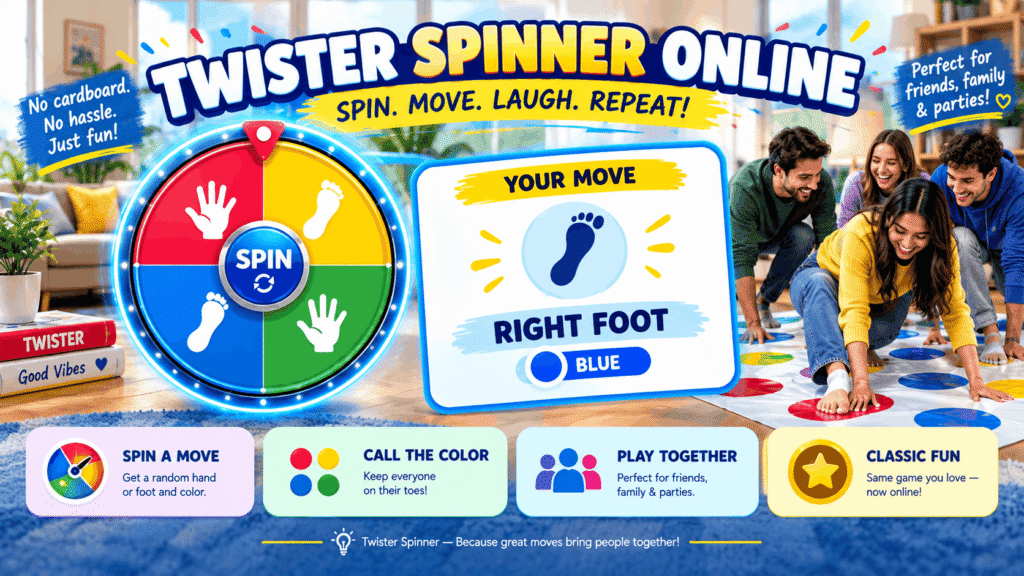
A Twister spinner can land on 16 calls, built by pairing one of four limbs with one of four colors: red, yellow, blue, or green.
That layout is a simple mathematical grid: 4 distinct colors crossed with 4 body parts gives the 16 unique limb-and-color combinations you will hear across a round. The Quick Stats Overview most players never think about is that a single exact pairing, such as Left Foot, Yellow, comes up with a 6.25% chance, or 1/16, on any spin.
| Limb | Colors it can be sent to | Share of all calls |
|---|---|---|
| Right Hand | Red, Yellow, Blue, Green | 4 of 16 |
| Left Hand | Red, Yellow, Blue, Green | 4 of 16 |
| Right Foot | Red, Yellow, Blue, Green | 4 of 16 |
| Left Foot | Red, Yellow, Blue, Green | 4 of 16 |
Each limb therefore carries a 25% chance per spin, and so does each color. Good pages show every slice colored to match the mat, which saves a second of squinting mid-stretch.
For younger players, I switch to Hands only or Feet only. Those modes cut the dial to eight calls, and small kids stop arguing about which hand is which.
How Do You Run a Round With the Online Spinner?
Running a round with an online Twister spinner takes five steps: line everyone up at the mat, spin, place the named limb, keep every earlier placement, and remove anyone who goes down.
- Starting Position: everyone should stand around the edge of the mat, with the screen where all of them can see it.
- First Spin: press the button (some pages label it Start play!), and the first person puts the named limb on a free spot of the named color.
- Subsequent Spins: players take turns, and each new placement is added without removing previous positions, which is where the knotting begins.
- Holding Position: a limb stays put until the spinner names that limb again on your next turn.
- Falling: anyone who drops or cannot reach the called spot leaves the round, and the last one upright wins.
The step groups skip is reading the result aloud. I name one person as the caller for the first two rounds, until everyone learns the rhythm, and then let the page’s audio callouts take over.
On smartphones the result text can be small from three metres away. Propping one of the household tablets against a chair leg works better, and anything larger is better again.
Which Controls Does an Online Twister Spinner Offer?
An online Twister spinner usually offers a play-mode choice, a spin button, an automatic caller, voice features, and an editor for the slices.
Mode comes first. Hands and feet keeps every call live, and it is the setting I leave on for adults. Some pages draw the result as two dials, one with 4 slices for the limbs and one for the colors, and a Spin All Wheels button turns both simultaneously. Others keep a single dial with the calls grouped by limb.
Speed matters more than people think. One page sets its spin time to 5 seconds by default; a simpler roulette layout skips the animation, so you tap anywhere on the screen or press any key and the call appears.
For hands-free play, look for Auto-Spin, which one guide runs on a gap of 7 seconds, or an Automatic Mode with a default of 30 seconds between calls. Pages with Voice Control let you say Twister spin instead of touching anything.
If you need to modify the slices, the Edit Wheel option lets you rename or remove calls. That matters most when you are streaming a challenge and want a custom penalty dial beside the classic one.
Is a Digital Spinner Better Than the Physical One?
A digital spinner is fairer than the physical dial because a coded pick cannot be steered by a finger or worn down by years in a box, and it never needs a replacement part.
The original spinner is a piece of card with an arrow, and the board game plate wobbles more with every party. A screen removes that drift, which is the whole point of fair game calls:
- True Randomness (RNG): the pick comes from code, so no hand angle or worn pivot leans toward one quarter of the dial.
- Digital Referee: an automatic caller means nobody sits on the sidelines running the spinner, which is how a group reaches 100% participation.
- No sign-up: opening the page takes seconds, and there is nothing to install on a shared family laptop.
Some people want more randomness than the old dial gave, and that is a fair ask. A plastic arrow that sticks shifts the odds toward whatever slot it settles on most.
I would still check what a page claims. A secure random generator built into the browser, or a stated True Random Number Generator (TRNG), gives an unbiased randomizer, while a page that says nothing about its source is just asking for trust. Remember too that a free page isn’t connected to the brand, and no human referee stands behind it.
What Are the Official Rules of Twister?
The official Twister rules say each player puts the named limb on a free spot of the called color, keeps every earlier placement, and is out once a knee or elbow lands on the mat or the player collapses.
- Follow Commands: the person whose turn it is moves only the limb the spinner names, and only to the color it names.
- Keep Playing without lifting: earlier placements stay where they are unless the spinner names that same limb again.
- Winner Takes All: the last person still upright wins the round.
Rule sheets disagree on crowded colors. Formal tournament rules forbid sharing circles, so when a color is fully covered the caller spins again; casual sets let two players squeeze onto one spot.
With a screen picking moves, you also skip the dedicated referee who used to settle every complaint about an easy call. In my games that alone ended half the arguments.
The rule that gives you a competitive advantage is the quiet one. If the spinner names a limb already sitting on that color, you do nothing, and that extra stability is worth far more than overextending for a showy reach.
Where and With Whom Can You Play Twister?
Twister works anywhere there is a cleared floor and a screen, which covers house parties, family evenings, school gyms, summer camps, and live streams.
PE teachers and camp leaders like the automatic caller because they can walk among kids instead of holding a dial. In classrooms and at community events, the box rating of aged 6 to adult means mixed ages share a round, and that inclusivity is the game’s quiet strength.
One guide cites Consumer engagement surveys that rank Twister among the top three activities for shared movement. I cannot check that survey, but when I am hosting a party I pick a variation to fit the crowd:
| Variation | What changes | Where it fits |
|---|---|---|
| Speed Twister | A call every 5 seconds, no waiting to settle (Chaos guaranteed!) | Teen parties |
| Team Twister | Players work in pairs and follow the same call | Couples or best friends |
| Elimination Twister | Each combo can be called only once | Long sessions |
| Blindfolded Twister | One player follows verbal directions from teammates (Hilarious results!) | Small groups |
| Musical Twister | Spin when the music stops, like musical chairs | Kids’ parties |
| Air Twister | A limb is held in the air if its color is already full | Crowded mats |
| Elimination Rounds | Players drop out round by round | Tournaments |
The table only works if the host commits; I announce the variation before the first spin and never switch mid-round.
How Do You Make Your Own Twister House Rules?
You make Twister house rules by changing one thing at a time: how fast calls arrive, whether a call can repeat, or what happens when a color fills up.
Pace is the easiest lever. Formal Standard rules have no time limit on a pose, but many groups add a 5-10 second spin interval for harder gameplay; a predetermined interval on the automatic caller gives you faster rounds without anyone timing by eye.
Repeats are the second lever. An Elimination Mode removes each call after it lands, and Weighted Choice lets you make a color come up more often when you want people stretching for one side. Where house rules allow shared spots, say so up front.
For streams, the Streaming & Content Creation crowd runs Twister Until We Fall marathons, Punishment games for losing tournaments, Viewer-voted difficulty modifiers, and Charity stream challenges. Save your edited dial with Auto-Save & Sync, pass it on through Share Links or a Share QR code, and move it between devices with Import / Export.
How Do You Win at Twister?
You win at Twister by keeping your weight low and central, claiming spots near your own body early, and holding back from long reaches until a call forces one.
The mat starts as a large floor mat with plenty of room and becomes increasingly crowded and difficult to navigate by the fifth or sixth call. Players who twist and turn early end up tangled up later, so I plan each move one call ahead.
Twister rewards gross motor skills, physical flexibility, and Perfect Balance more than speed. Short Coordination and balance training before a party, even a minute of contorting into bridge shapes, cuts the wobbles and near-falls that end rounds.
Watch the collision probability too. Once the mat is extremely crowded, every placed limb blocks someone, and the limb placements you chose early decide who can still reach specific colors.
My favourite moment is when the spinner gives you the same move you already hold, and you rest while others strain. That pause is often how one person ends up as the one balanced player and the last to remain the last person standing.
What Is the Game of Twister?
Twister is a balance game in which players put their hands and feet on colored spots of a floor mat, as a spinner directs, until only one player stays up.
The game tests physical skill more than luck. A standard mat has 24 circles, laid out as 6 rows of 4 colors, and the last player standing takes the round. The Wikipedia entry on the game is a good starting point if you want the full background.
Twister was controversial at launch as a body-contact game, yet it grew into a global cultural phenomenon. In its first year it sold over 3 million units, helped by a famous appearance on The Tonight Show.
It now sits in the National Toy Hall of Fame and remains a staple of the Hasbro catalog, with a 50th anniversary in 2016. The game has been a party hit for over half a century, and the 1960s card spinner has met the modern era through phones and tablets.
What transforms the game for me is how little it asks: a mat, a caller, and a few people willing to look silly. Hasbro still sells the boxed set, and the screen-based spinner simply replaces its weakest part.
What Do the Numbers Say About a Twister Spinner?
The numbers behind a Twister spinner are small and tidy: 4 limbs, 4 colors, 16 calls, and a mat sized for two to four players.
A full dial has 16 slices, with 4 per slice type, and those 16 possible calls come from the four primary body parts crossed with the colors. The mat carries 24 colored circles, so the board space runs out long before the calls do.
Player count shapes everything. The official guidance of 2-4 players exists for a reason, and More than 4 on one mat turns tactics into chaos. A 3-player game fills 50% faster than 2-player mode, which is why I turn on voice calls the moment a third person joins.
Mat compatibility is the last number worth knowing. The standard 4×4 setup keeps compatibility with official mats, and a digital page delivers instant randomization with zero physical wear and tear on any of it.
What Happens When a Color Is Already Full?
When every spot of the called color is taken, most groups simply spin again, though some let two players share one spot.
The official guidance is one person per circle, and if all circles of a color are taken, the caller spins once more. The probability of that rises fast in larger groups, because each color only has six spots.
Imagine a call of Left Foot, Red with all six red spots occupied. Under the Two Players, Same Spot house version, players may share the same colored circle; under strict rules the next spin decides.
Back-to-back fills happen too. A Right hand, Yellow followed by Left foot, Green can block two colors in a row, and since each spin is independent, the same color can come up twice in a row and stall a round. I agree on the rule before the first spin so nobody argues mid-stretch.
How Does Twister Work With Two or Three Players?
Twister with two or three players works the same way as a larger game, but the board fills more slowly with two and noticeably faster with three, so tactics shift.
With two, both players answer the same call on a shared mat, and some guides label these Twister 2 and Twister 3 formats. A screen helps here because No Cheating Possible is true: nobody can nudge the needle toward an easy spot.
Strategy changes with fewer bodies. Spread Out Early to avoid awkward tangles, keep spots close to your body, and stop over-reaching for distant colors. Stay Low, because a low center of gravity makes you harder to knock over.
A player is officially ‘Out’ for a knee or elbow touch, for failing to move the right limb, or if they fall over entirely. Small-group games make a good icebreaker at birthdays, and with a designated screen running three-player rounds, nobody has to stand aside to call, while the guidance of two to four players per mat still holds.
How Should You Set Up a Safe Play Area?
A safe Twister play area is a cleared floor with nothing hard nearby, players in socks or barefoot, and a screen where everyone can see it.
Lay out the mat in a safe playing area away from table corners. The vinyl mat with its four rows of colored circles slides on hard floors, so I tape the corners down. Play in socks or bare feet, never in shoes.
Warm up first. Stretching for a minute helps, since Flexibility Wins and Core Strength Matters: strong core muscles let you hold bridge positions much longer.
The last mat I used was unearthed from an attic, and it had a crease right through one row. Technically yes, you can play without one: colored paper stuck down with tape works indoors, and chalk outdoors works on a driveway.
What Does a Real Game Night With the Spinner Look Like?
A real game night with an online Twister spinner looks like a living room of people laughing on a mat while a phone or TV calls every move.
The Classic Party Game still works for teenagers and adults, and it creates the best photo opportunities of any party game I know. We started with 2 players going Head-to-Head, then brought in a third so all three players shared each call.
Our old cardboard dial was notorious for vanishing, and the one we found had loose arrows and so much friction it barely turned. A screen Never Wears Out, and that alone won over the doubters.
Party hosts and families both get the same thing out of it: laughter and an engaging hour with a larger group where you rotate players in after each fall. By the end, everyone agreed the best part was the total lack of gravity.
Can the Spinner Call Moves Without Anyone Pressing It?
Yes, an online Twister spinner can call moves on its own when you turn on an automatic spin option, so a new move appears every few seconds.
In Settings, pick an auto option and the page spins on its own, hands-free, on a configurable timer. Set the spin length to 3 seconds for brisk calls, and use Auto rerun to keep the cycle going. The Instant Results mean no settling time between calls, which helps keep the pace fast.
Physical Education teachers use this in physical education lessons and other school settings. The Auto-Voice caller lets them move around the room helping with motor planning and social cooperation, and voice calls work without touching the screen.
The spoken calls give a reliable way to keep every round moving while the teacher focuses on the kids.
How Many People Can Play Twister at Once?
Twister is designed for two to four people on one mat, because more than that leaves too few spots to share.
The mat’s 24-circle layout, with 6 circles per color, fills quickly. Communication helps when you play in teams, and clear calls cut collisions between players reaching for the same spot.
At social gatherings, interaction matters more than winning. One sample party story begins with “five of us” meeting at Jake’s place one Saturday for a long-overdue reunion; they rolled out the mat and played until they lost track of the rounds.
With five people, someone is always waiting. The elimination rule eliminates the first to fall, and the waiting player swaps in, so the group in that story planned a rematch for next month.
Does the Twister Spinner Work on a Phone or Tablet?
Yes, an online Twister spinner works on a phone or tablet through the browser, so you can play without installing anything.
A phone or laptop both run the page in any browser. There is no download and no app storage used.
Place the device at eye level so everyone can read it, or connect a Bluetooth speaker so the calls reach the whole room. That makes a real difference in a large or noisy space.
I usually prop the phone on a shelf and let the speaker carry the calls, which frees everyone to focus on the mat. Keep the screen awake in your display options, or it may dim halfway through a long round.
Is This the Official Twister Spinner?
No, an online Twister spinner is not the official one; it is a free page you can use with any mat, and it has no tie to the brand.
It is a browser-based application built to maximize convenience. There is no installation, no app store visit, and no updates to download.
Unlike the real spinner in the box, a page never bends or gets lost. You simply open it and play.
I treat it as a stand-in for the card dial rather than a branded product, and it has never let a game down. If you own the boxed set, keep its mat and rules sheet; the page only takes over the job of choosing calls.
Can You Control the Spinner With Your Voice?
Yes, many online Twister spinners let you trigger a spin by speaking, and they read each call out loud.
An audible voice-over calls each move, and a timer runs the gaps, so the game needs no human intervention and no one has to sit out as caller. Turn up the volume so every player hears the result.
This makes Twister a screen-free activity for the players, even with a device in the room. It helps pull families away from screens and toward healthy competition, with technology only as a facilitator.
Because the calls are heard rather than read, Twister needs zero reading. It crosses language barriers and age gaps, which suits mixed groups.
Why Does the Same Call Come Up Twice?
The same Twister call can come up twice because every spin is a fresh draw, with no memory of the last one.
A fair dial is memoryless. Pages that use Cryptographically Secure Randomness, such as crypto.getRandomValues(), run a randomized algorithm that does not track history, so no two rounds look alike.
That means Left foot green can follow Left foot green, or Right hand red can show up several times in a row. Right Hand, Blue or Right hand, Red may repeat, and Left foot, Blue may land again.
Physical spinners can be biased or get stuck, which makes repeats look suspicious. A digital page avoids both.
Can You Play Twister Without the Mat?
Yes, you can play Twister without the mat by making a home-made grid of colored spots.
You can draw colored circles on paper or use chalk outside. Pick a flat area with a non-slip surface such as carpet or a gym floor.
Leave a 5-foot safety zone around the grid so nobody hits furniture. Then load the spinner and play as usual.
I have done this at a picnic with chalk on concrete, and it worked as well as the boxed mat. Space the spots about a hand’s width apart so reaches feel like the real game, and test one stretch yourself before inviting the group.
How Long Must You Hold Each Position?
You must hold each Twister position until the spinner names that limb again, since the standard game sets no clock on a pose.
Place the limb on an empty circle of the called color, then hold until your next call. A hands-free timer can push the pace if you want. Those four steps of spinning, placing, holding, and avoiding a knee or elbow touch are the whole game.
Most rounds last between 5 and 15 minutes, which makes Twister a good filler game. Moving the correct limb to the correct color is all that counts.
For massive parties, link multiple mats and let Automatic Spin run a continuous game.
Can You Change the Spinner’s Body Parts or Colors?
Yes, you can change the body parts or colors on most online Twister spinners through an edit option.
The default dial replicates the classic logic of the boxed game, so it is 100% compatible with any version of the mat. Each call combines one limb and one color.
To make changes, open the Entries list. You can Shuffle, Sort, or Clear them, and a Winners tab tracks results. A Simultaneous Multi-Wheel layout splits limbs and colors.
Use custom rules sparingly and keep the dial consistent through a session. In my experience, players accept an odd call far more easily when the dial was agreed before the first spin, and they start to grumble when it changes halfway through.
Who Is the Online Twister Spinner Made For?
The online Twister spinner is made for anyone who needs a fair caller, from parents at home to teachers in a gym.
For Family Game Night, Parents get bonding time, kids learn left/right directions, and the game Burns energy before bedtime.
PE Class & Youth Groups use it for Indoor physical activity on rainy days, Team-building exercises, and Inclusive games. The automated caller means no referee required.
The same kind of page also handles giveaways and everyday decisions, so it earns its bookmark. I have seen grandparents run it from an armchair while the kids played, which is the easiest way to include someone who would rather watch than stretch.
How Do You Play Twister, Step by Step?
You play Twister by spinning for a call, placing the named limb on a matching spot, holding it, and staying off your knees and elbows.
Press Spin, then read the move out loud. Each player places that limb on a free spot of that color.
Touching the Mat with any joint other than a hand or foot puts you out, and sitting disqualifies you too.
Keep going until one person can remain the last person standing without falling.
If you are teaching the game to a new group, run one practice round where nobody gets knocked out. People learn faster once they have felt how a single awkward reach changes everyone’s balance, and the real rounds start with fewer arguments.
Do You Need to Install an App?
No, you do not need to install an app to use an online Twister spinner, because it runs in a web page.
Open the Wheel page and it is ready to go. It is a web-based tool with a no-friction start. Bookmark this page for next time.
The page is mobile-responsive and runs on iOS, Android, Windows, and desktops. You can also pick a language, which helps when the group is not all fluent in English.
The only thing you need is a working connection when you first load the page. After that I keep the tab open for the whole evening so nobody has to hunt for it between rounds.
Can You Zoom In on the Spinner?
Yes, you can zoom in on most online Twister spinners, because the wheel is drawn sharp enough to enlarge.
The page uses a high-resolution canvas, so you can zoom in and the bold pointer and labels stay crisp on TVs and projectors.
Pro Tip: Cast to TV for big rooms. The Highly Visible results on a glowing screen read well in dim party lighting.
A Mobile-First design with high-contrast text and large buttons optimized for touch helps on small screens.
Streamers can add the page to OBS as a Browser Source, control it from a Custom Browser Dock, and use an OBS Streamer Mode.