How Do You Pick a Winner From Instagram Comments?
An Instagram comment picker chooses a giveaway winner by collecting every comment on a post, removing entries that break your rules, and selecting one or more winners at random, with a shareable record that followers can check. Wheelyspin is one of best in his category.
Most pickers move through the same three beats, which one service labels Scan Comments, Find Attendance and Determine Winner. You either drop a Post or Reel URL into the tool and let the comments get fetched automatically, or you paste the comments yourself when the tool can’t read Instagram directly.
I ran my first giveaway by scrolling a post and writing handles on paper. That manual copying took an evening, and I still suspected I had skipped someone. A picker turns the same job into a filter pass and one click, then hands you a shareable winner card or lets you record video of the moment the name lands.
The part people underestimate is proof. A pick made with cryptographically secure random selection means little if followers can’t see it, so the stronger tools add a public verification link, a results page, or a pinned comment that shows the list as it stood. Filters matter just as much, because bot accounts get the same shot as real fans unless you tell the picker otherwise.
How Do You Use an Instagram Comment Picker Step by Step?
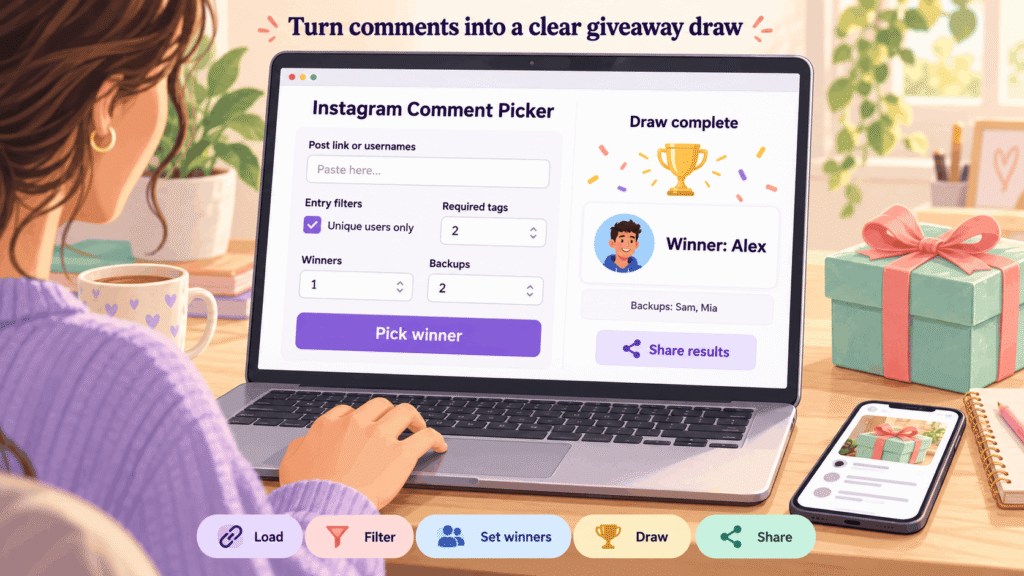
Using an Instagram comment picker comes down to five moves: load the comments, set the entry filters, choose how many winners you need, run the draw, and publish the result.
General wheels handle custom random choices or splitting people into groups, but a comment picker adds the loading and filtering a giveaway needs. Before step one, settle on a trusted picker so you don’t switch tools halfway through a campaign, and give the draw page clear tool titles and descriptions if you plan to show it on screen.
- One URL paste: drop the post link in, or paste a list with the username first on every line if the tool only takes text.
- Advanced filters: decide what counts as a valid entry, such as non-duplicate users only or a specified number of tags, before anything runs.
- Number of winners field: set it, plus a couple of backups, since a prize nobody claims needs a second name.
- Wheel Spinning Mechanism or list shuffle: click once and let the tool choose, and don’t rerun it because you dislike the result.
- Results Link: open it to publish every name together, or share each Single result as it appears.
One habit worth copying is messaging the people you chose before you announce them. An account that ignored the clear entry rules can then be swapped out quietly instead of in a public correction, and some tools also hand you a video plus an image certificate for the announcement post.
How Do You Get Instagram Comments Into a Picker?
You get Instagram comments into a picker either by pasting the post link so the tool loads them, or by copying the comments yourself and pasting them in as a list.
Instagram doesn’t let outside sites read comments without a login, which is why the paste method exists at all. With it, the pasted text stays in your browser, and the tool only sees what you hand over. The format rule is strict: one comment per line, handle at the start, nothing wrapped across two lines.
The link method is faster but has blind spots. It skips Story comments completely, and on other networks it can drop Login-walled comments or anything Held-for-review. On X, a busy thread can trip rate-limits, and a good tool tells you how many replies it actually saw, so compare that number with your own count before the draw.
For a contest post with thousands of replies, I export first. A comments exporter saves the full dataset as Excel or JSON, and that file doubles as a backup if anyone disputes the result. Tools with a paste-in input box accept the export too, as long as each line still opens with a name.
Which Filters Keep Fake Entries Out of an Instagram Giveaway?
The filters that keep fake entries out of an Instagram giveaway are duplicate removal, a minimum age for accounts, a required number of tagged friends, a required hashtag, and exclusions for past winners and your own account.
Every filter is a trade-off. One entry per person stops a superfan from commenting fifty times, yet some brands want the reverse and let effort count. A minimum number of tagged friends works the same way: the tool reads the @mentions in each line, and a rule of two means anyone with fewer @-mentions drops out. I always list names to exclude before touching anything else.
Bots are the bigger headache. An age floor on how old an account is removes a large share of them, and a campaign-specific tag beats a generic one that strangers already flood. Sites that bundle a Hashtag Generator make it tempting to grab a trending tag, but for a giveaway a rare tag works better because nobody else is posting it.
Exclusions finish the job. Add your username to the Exclude these names setting, then upload previous winners’ usernames so the same people don’t win every month. Matching is case-insensitive, which saves fixing capital letters by hand, and every caught entry is removed before the shuffle, so it never sits on the list at all.
How Does a Comment Picker Make the Draw Truly Random?
A comment picker makes the draw random by shuffling the eligible entries with a secure random generator, so no entry’s position on the post or time of posting changes its odds of winning.
One tool calls its method a seeded shuffle: a random seed fixes the order of the whole list, then a position is read off. Because the seed is saved, anyone can replay the draw and land on the same name, and the verification page lists the comment list at draw time and the winning index so followers can replay the shuffle themselves. The same kind of engine sits behind generators like Random Numbers on giveaway sites.
Wheels look less rigorous but do the same job on screen. Spin speed from level 1 to level 10 and a spin duration of 1s to 30s change the show, not the odds, and the same goes for a Mystery Wheel that hides entries or a Mystery Result that waits for a reveal. I prefer a slow spin on a livestream, because the audience watches names pass while the result still comes from the generator underneath.
Fairness also depends on what goes in. A shuffle can’t repair a list stuffed with duplicates, so filters come first and randomness second. Manual selection fails for a simpler reason: you know some of the commenters. A public draw record showing the eligible comments is what makes a result look impartial to a doubtful audience, far more than any algorithm name.
How Do You Announce and Prove an Instagram Giveaway Winner?
You announce and prove an Instagram giveaway winner by sharing the result through a link or a recording of the draw, and by keeping a record that shows the entry list, the method used, and the winning position.
Proof pays off in reach, not just trust. A 2024 SocialBakers study, cited by one picker, found that contests with a public, verifiable selection process drive 3.5× the engagement of contests that just post a name, and the same tool says it can show that proof in under a minute. Plan the proof before the draw, in this order:
- Screen-record the whole draw so nothing happens off camera.
- Record of the draw result: save the export, filters and time, even if you never publish them.
- Pin it to your giveaway post: the verification page or results URL goes where every entrant will look.
- Contact winners directly before announcing, so a no-show doesn’t force a public redraw.
Announcement formats vary by tool. Some send a video and certificate to post, while others show each pick in a popup where you can disqualify a rule-breaker and spin again. Some draw only unique winners and number them, so #2 and #3 become ready backups.
Wheel tools add confetti, sounds and rotating result titles, and a Full Screen View on tablet and desktop looks clean on a live stream. Once the winner answers, I arrange prizes, add the result to the original caption so late visitors see it, and then announce publicly in a story.
How Many Comments Can a Free Instagram Comment Picker Handle?
A free Instagram comment picker typically handles a few hundred comments per draw; one widely used tool sets a 300-comment limit per giveaway, and paid tiers raise or remove that ceiling.
The limits differ in how they bite. One tool reads only the newest comments, so on a busy post the earliest entrants silently fall off the list, which is the worst kind of unfairness because nobody notices it. Another caps its Free tier and refuses bigger posts outright, which at least tells you where you stand.
Free tools still cover plenty. Some include filters and multiple-winner selection at no charge, others keep all features open, and one sets no fixed limit on winners beyond the higher prize costs of giving more away. Once you need larger giveaways, larger entry lists, scheduled exports, API access or downloads in CSV/JSON, the upgrade conversation starts.
Upgrades also unlock premium-only wheel touches such as custom logos and spin buttons, which matter only if the draw is part of your branding. Giveaway platforms bundle free extras too, like Roll Dice, Flip a Coin, a Random Teams Generator and a Font Generator, and trying one is a quick way to judge a site before trusting it with a real campaign.
Which Platforms and Post Types Can a Comment Picker Read?
Most comment pickers read public Instagram posts and Reels, and many also handle Facebook, YouTube, TikTok and X, while Instagram Stories and private content stay out of reach.
Multi-network tools list YouTube videos, TikTok, Twitter, LinkedIn, Bluesky and Twitch alongside Instagram. On YouTube and TikTok they work one video at a time, and on X they read the replies to one tweet, but coverage of TikTok videos and Twitter/X posts still depends on the content being publicly viewable. Paste a link from the wrong network into some tools and they send you to a matching tool, even for Reddit.
Paste-based pickers are the most flexible, because they don’t care where the text came from. As long as each line begins with the person’s name, comments from any app work, and I’ve used that trick for a contest run in the replies to an email newsletter.
Reels deserve a note, since some older guides still treat them as a separate format. Link tools handle feed posts and Reels the same way, and one platform’s FAQ states plainly that Reels are supported.
Can You Customize the Spinning Wheel and Hide the Result?
Yes, a wheel-based Instagram comment picker lets you change the look and pacing of the spin, and its mystery modes can hide the entries or the outcome until you reveal it.
Customization is mostly for the people watching, not for the result. A branded wheel design with your own logo or banner reads better on a live stream, a slow spin adds excitement for the audience, and a wheel visually shows randomness in a way a silent list shuffle never does.
The hiding options are the clever part. One mode masks every entry behind a question mark, and another keeps the outcome covered until you click reveal, which builds real fun and anticipation during a live draw. I use the hidden-outcome mode when the winner is likely watching, because their reaction on camera is the best content the whole giveaway produces.
Keep promotional wheels apart from giveaway wheels. A Wheel of Fortune built to Spin the Wheel for store discounts lets you set prize amounts and winning chances, which suits a shop promo and breaks a giveaway where every entrant needs the same odds. Paid tiers add more customizations and an ad-free experience, which helps when you screen-share the wheel.
Do You Need a Professional Instagram Account to Connect a Picker?
You need a business-type Instagram account linked to a Facebook Page only for comment pickers that connect to your account; pickers that read a public link or a pasted list work without any connection.
Connected tools ask for your Instagram/Facebook credential, and in return they can browse your posts and pull the connected account’s comments straight into the draw. A paste-based picker never accesses your account, and a link-based one works on public posts without signing in. Most connected tools also make you sign up or log in on their own site first.
Watch what any tool asks for. A reputable link tool never requests account passwords, and I close any tab that does. For a social media account that a whole team manages, I lean toward link tools, because nobody has to hand a login around the office.
Trust labels are worth reading too. Some pickers describe themselves as an independent giveaway tool that isn’t endorsed by Instagram or Meta, which is accurate and also a reminder that any connection you grant goes to an outside company.
How Do You Run a Fair Instagram Giveaway?
You run a fair Instagram giveaway by publishing the rules and dates in the post before entries open, using filters that enforce those rules, and picking the winner with a random draw that followers can verify.
Fairness starts with the prize. A makeup giveaway run by a beauty influencer draws people who actually want makeup, while a generic gadget pulls in prize hunters who unfollow the next day. When a local boutique ties the prize to a product launch, the entrants are already customers in waiting.
Then write rules a filter can enforce. The entry method, eligibility, a closing date with a timezone, and the start and end dates belong in the post itself, next to a disclaimer that Instagram has no role in it. Each rule should map to one picker setting, as the table below shows.
| Rule in the post | Picker setting | What it removes |
|---|---|---|
| Tag two friends | Mentions of N friends, counting @username tokens | Comments with fewer tags |
| Use the campaign tag, e.g. #summergiveaway2026 | Hashtag match | Replies without the tag |
| Include a code word | Required keyword | Generic copy-paste replies |
| One entry per person | Duplicate-comment dedup | Extra comments from one user |
| Real accounts only | Account age set to N days | Automated bots, most of which are under 30 days old |
| No repeat winners | Exclude past winners | Last campaign’s winners |
| Host can’t win | Block the host | Your own account |
One caveat from my own campaigns: switching dedup off to weight engagement sounds generous, but it rewards whoever has the most free time, not your best customers.
What Rules Must an Instagram Giveaway Follow?
An Instagram giveaway must spell out how to enter, who can enter, what the prize is and when it runs, state that Instagram has no part in it, and follow the prize laws where entrants live.
Dates trip up more creators than any other rule in my experience. Publish a start date, an end date and a winner announcement date together, so nobody argues that a late comment should have counted. Writing the timeline down also protects you when a winner disappears and you need to redraw.
Platforms police tagging as well. One compliance guide says Facebook, Instagram and TikTok prohibit contests that require sharing or tagging people who don’t follow you, so a tag a friend rule should ask for real friends, not random accounts. In the US, the FTC wants conditions disclosed and nothing that looks like a lottery; a Legal Terms Generator can draft the boilerplate, but it won’t know your state’s rules.
Keep a copy of everything, because disputes from skeptical winners are settled on records. Share screenshots or a results image of the draw, and post a public link to the winners. A Visible shuffle seed lets you prove the draw instead of asking people to trust the tool, and clear terms in the post remove most suspicion of bias before it starts.
Who Benefits From Using an Instagram Comment Picker?
Small brands, creators and non-profits benefit most from an Instagram comment picker, because a visible random draw builds trust with entrants and saves hours of manual checking.
The trust payoff is the one I’d bet on. People who see a fair draw come back, and the real followers a well-matched prize attracts are the base of long-term audience growth, which one picker’s guide calls the whole point of transparency. A store that pairs the right prize with a simple comment to win usually gets more genuine replies than one asking for a five-step entry.
The scale is bigger than most people expect. One giveaway platform says it is trusted by 11,362+ brands and influencers and has hosted over 20M giveaways run by creators and stores, and another reports 2.964.000+ giveaways held. Those figures are self-reported, but they show how routine tool-picked giveaways have become.
The analysis side is underrated. Exporting the comments lets you study sentiment, spot top participants and run demographic clustering, while an Instagram Engagement Calculator shows whether the giveaway moved your analytics or just attracted prize hunters.
Stores can push further with on-site promotions. A wheel embedded on a website with an exit-intent popup can capture leads and collect participant data, and versions exist for WordPress and Shopify.
What Other Giveaway Tools Sit Alongside a Comment Picker?
Giveaway platforms usually pair the Instagram comment picker with name pickers, team splitters, dice, coin flips and promotional games, and the extras worth using are the ones that help you plan, run and measure a giveaway.
One platform advertises 13+ apps for online giveaways and sweepstakes, along with a 4.8 rating from 1,000+ reviews, and most of those apps have nothing to do with Instagram. I treat them as a toolkit for later promotions: a quiz one month, a scratch game the next, keeping a highly engaged audience between comment draws. Wheel builders on the same sites let you swap colors, themes and backgrounds to match a brand.
Non-Profit Organizations use the set differently. A charity running a giveaway to raise awareness cares more about reach among supporters than about sales, so a fair public draw outweighs any game mechanic. Small Businesses tend to mix both approaches: a wheel promo on the site and a comment draw on Instagram.
Feature pages promise that a picker enhances engagement, increases trust among followers and saves time and effort. In my experience the last two hold up, while engagement depends on the prize far more than on the tool. I wouldn’t call any picker a game-changer, but a visible commitment to fairness does quiet the “rigged” comments.
Should You Use a Comment Picker or a Comment Exporter?
Use an Instagram comment picker when you only need a winner, and use a comment exporter when you also want to keep and study the comment list; the two work together, because a picker can run on an exported file.
Size usually settles the choice. Free pickers cap the list, and once a post outgrows the cap, exporting first and picking from the file is the cleaner route. One multi-platform tool shows how the ceilings scale by plan:
| Tier | Results per draw | Cost |
|---|---|---|
| Free (no signup) | 100 results per draw | Free |
| Personal | 5,000 | Paid |
| Premium | 50,000 | Paid |
| Business | 250,000 | Paid |
Other free tools stop at the most recent 400 comments or allow 300 comments each on free giveaways, while their paid tiers offer unlimited comments. Pricing and API limits usually sit on separate pages, so check them before a big launch, and watch for a signup wall, since some free alternatives lock you out after one or two picks. Hidden fees, premium paywalls or a credit card prompt on a “free” tool are the other red flags.
For large posts, a dedicated comment export tool, which some sites literally name Export Instagram Comments, beats copying into a text editor or spreadsheets by hand. The export keeps every entry for later study, and the picker still runs on that same file whenever you are ready to draw.
Do You Need to Log In to Instagram to Pick a Winner?
You don’t need to log in to Instagram for paste-based or link-based comment pickers, but connected pickers need a professional Instagram account linked to a Facebook Page. To link one, open Edit profile, find Public business information, tap Page, and either Create Facebook Page or Connect an existing Page. I only bother with that route when a tool can’t read the post any other way.
How Do You Create a Giveaway in a Comment Picker?
You create a giveaway in a comment picker by opening the tool, loading the post, setting the rules and running the draw, and some platforms ask you to register first. Most of these tools run as a web app, and a User-Friendly Interface lets beginners set one up quickly; one site even says your next winner is one paste away. The same flow on bigger platforms also launches Trivia, Scratch and Win, Slot Machine and Secret Santa promotions. Whatever you build, add a line saying the promotion isn’t administered by Instagram.
How Does a “Tag 2 Friends” Rule Work in a Comment Picker?
A tag-two-friends rule works by counting the tagged handles in each comment and keeping only the comments that reach the number you set. Some tools label the setting filter by mentions, and others simply let you require entrants to mention a friend. Tag-a-friend entries are allowed only when tagging real people, nobody should be asked to tag themselves in content they aren’t in, and some platforms prohibit tagging non-followers as a condition. Tagging friends in comments is fine, but don’t require sharing on personal timelines.
Can You Exclude Your Own Account From the Draw?
Yes, you can exclude your own account from an Instagram giveaway draw, and some pickers do it for you. On tools with a host block, your page is excluded automatically. Elsewhere you add your handle to the exclusion setting yourself; matching runs against the @-handle, so any matched entries disappear before the pick.
Does an Instagram Comment Picker Work for TikTok or Facebook Comments?
Yes, many Instagram comment pickers also work for TikTok and Facebook comments, either through a link or a pasted list. Link tools read single videos on TikTok and YouTube and the replies to a single tweet on X, though YouTube comments that are shadow-blocked are left out. Multi-platform input means one link format covers every network, with no separate exports to manage.
Is an Instagram Comment Picker Free?
Yes, most Instagram comment pickers are free for small giveaways, with paid upgrades for bigger comment counts. One tool calls itself 100% Free, another runs a Freemium Plan, and a third lets you run multiple giveaways at the same time at no cost as long as each stays small. Paid plans exist to lift comment caps and support the site, and seasonal offers such as a BLACK FRIDAY DEAL at 50% off show up on some.
Can You Run Several Instagram Giveaways at Once?
Yes, you can run several Instagram giveaways at once, as long as each one stays within the free comment limit of the tool you use. Each campaign needs its own eligibility criteria, entry requirements, prize details and duration, plus its own selection method and a note that the platform is not a sponsor. Some sites list Upcoming Giveaways so entrants can track them, and a picker that fetches and selects in one step keeps parallel draws from getting mixed up.
Can You Customize Instagram Giveaway Rules?
Yes, you can customize Instagram giveaway rules in most comment pickers, from who qualifies to how many people win. The tool filters giveaway participants against the criteria you set, and the entry rules before the draw decide who stays in. Start from the promotion you want, choose a prize that suits your audience, and remember that local laws on prize promotions add age and regional requirements that no tool checks for you.
Is an Instagram Comment Picker Really Fair?
Yes, a well-built Instagram comment picker is fair, because every filtered entry has the same odds in a random draw. One tool uses a Fisher–Yates shuffle seeded by a CSPRNG, which gives unbiased selection across small and large contests. A draw only becomes provably fair to followers when you share the verification link, and every entrant gets an equal chance only after duplicates are gone.
Can You Pick More Than One Instagram Giveaway Winner?
Yes, you can pick more than one Instagram giveaway winner by setting the winner count before the draw. Some tools let you select them all at once, while wheel tools spin repeatedly in the selection order you choose, from last place to champion or the reverse. Click Pick winners, keep a few reserves, and treat them as runners-up. For raffle winners of big prizes, note the prize value in USD, since prizes over $5,000 may trigger 1099-MISC reporting in the US.
Can You See Your Post’s Comments Inside the Picker?
Yes, you can see your post’s comments inside a picker once your Instagram account is linked to it. Linking needs a professional profile: tap the menu icon in the top-right, open Settings and privacy, then Account type and tools, tap Switch to professional account, and pick a category. After you select a post, the tool shows how many comments will be loaded, and the winners list later lets you read each winning comment and tap Visit Profile.
Can You Pick Winners From Instagram Reels?
Yes, you can pick winners from Instagram Reels with most comment pickers, using the Reel link just like a regular post. Link tools cover IGTV as well. If you copy by hand, do it on a computer and expand all the comments first, because hidden replies won’t come along otherwise. A single pick can go out through the share icon to your story or feed, though the comment itself stays excluded from sharing.
How Do You Filter Spam Comments in an Instagram Giveaway?
You filter spam comments in an Instagram giveaway by turning on filters before you run the pick, so only comments that pass them reach the shuffle. Start with remove duplicate names so repeat commenters count once, then block unwanted accounts and clear invalid entries. A tag 2 friends requirement works if you set the rule to 2 with minimum mentions, which leaves only comments that tag at least two people. Those checks catch many fraudsters without hurting real entrants.
Can You Exclude Past Giveaway Winners?
Yes, you can exclude past giveaway winners by uploading a list of their handles before the draw. Exports in CSV/Excel carry timestamps and comment text, so the last campaign’s winner file is easy to reuse. Paste-based tools take names in the same format as a comment line, such as @maria_k. Follow the steps in order and remove spam first, so the exclusion list only has to deal with real accounts.
Is an Instagram Comment Picker FTC-Compliant?
An Instagram comment picker is not compliant on its own, because compliance depends on the terms in your giveaway post and the picker only supplies the draw record. Tools that market themselves as FTC-compliant mean that record helps show a random pick. The FTC expectations are to disclose material conditions, make eligibility clear, and avoid any hint of a federally-registered lottery. A publicly verifiable result plus platform-rule compliance covers the tool’s side of the job.
Will Your Followers See the Comment Draw?
Your followers see the comment draw only if you publish the verification page or a recording of it. A transparent giveaway picker makes the draw transparent and verifiable, and pinning the page shows followers it ran without bias. Even so, the record doesn’t determine compliance on its own; one tool says its record meets FTC and EU consumer protection requirements only when paired with clear terms in the post.
Does a Comment Picker Work on Private Accounts or Groups?
No, a comment picker can’t read private accounts or private groups, because it reads only public comments. For private Facebook Groups, export the comment list manually and run the picker on the CSV, where any column works for a names file. Public Page posts and Group posts on Facebook are fine, and replies are included by default. Private accounts on Instagram stay out of reach for every link-based tool I’ve tried.