WheelySpin is a free online spin the wheel tool: type your options, spin, and get a fair random pick in seconds, with no sign-up.
More Free Random Tools
- Random Name PickerPaste a list and pick one or more names, no wheel needed.
- Yes or No WheelA 50/50 answer, with an optional maybe.
- Random Number GeneratorPick numbers in any range, or spin a number wheel.
- Random Team GeneratorEven-sized random teams, with rules, team names and printing.
- Flip a CoinHeads or tails, with a running count and streaks.
- Prize Wheel SpinnerAn online prize wheel for shops, events, classrooms and streams.
- Truth or Dare GeneratorTruths and dares for kids, friends, parties, couples and adults.
- Dice RollerRoll d4 to d100, with modifiers and advantage.
How Do You Spin the Wheel Online and Get a Random Result?
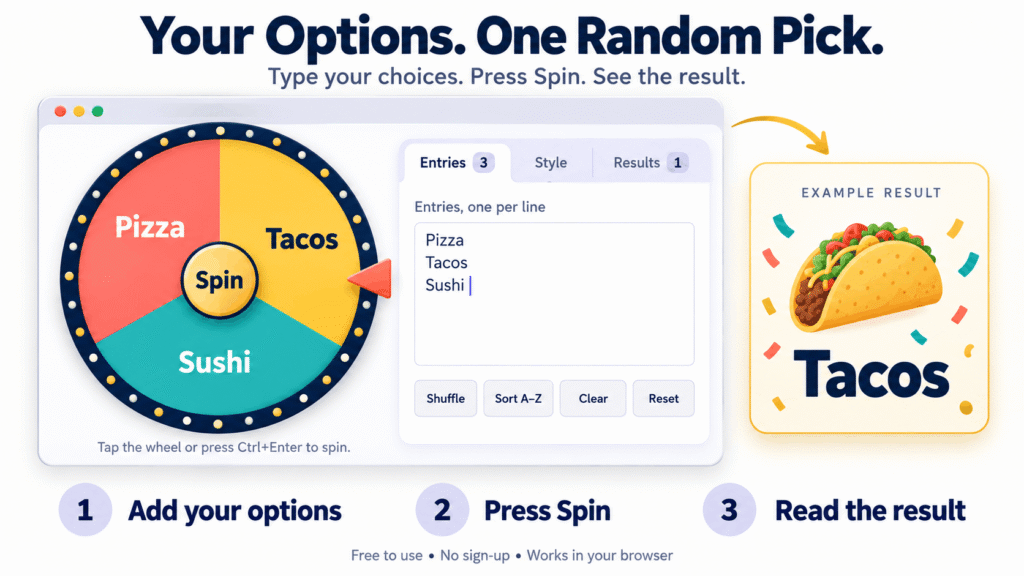
To spin the wheel online, type your options into the entry box, one per line, then press Spin or click the wheel, and WheelySpin lands on a random result picked by your browser’s secure random generator.
Most spins begin with a small argument: who goes first, what’s for dinner, whose name gets called next. A wheel spinner settles it because nobody has to make the call personally, and that’s faster decision-making than another round of debate. A decision-making tool works best when everyone can watch it work, and in our experience the arguing stops once the slices start moving.
We built WheelySpin for those small decisions and for the bigger ones that need a visible, fair pick. This page holds the main wheel, and the rest of our 130+ free tools sit one click away for dice, teams, games and giveaways. Every result is unpredictable, every list stays in your own browser unless you choose to save or share it, and the whole site is 100% free on phones, laptops and classroom screens.
If you feel overwhelmed by a long list of choices, start small. Put three options on the wheel, spin once and notice how you feel about the result. That reaction often tells you more than the spin itself.
Getting started
What Is a Spin the Wheel Tool?
A spin the wheel tool is a digital wheel that splits your options into equal slices and lets a random spin choose one of them.
People call the same thing a wheel of names, a random name picker or a decision wheel. Each option becomes one of the visual segments, also called sectors, an animated spin plays, and the pointer marks the winner. With equal probability for every slice, the wheel is unbiased by design and transparent to everyone watching.
That shared view is what older methods miss. A plain list of names next to a number generator is accurate but dull, and nobody leans in. The wheel adds anticipation, and the pause before it stops keeps people watching, which matters when a whole room has to agree on a result.
Under the slices, a random algorithm does the work while the animation shows what it decided. That’s why WheelySpin stays customizable without touching fairness: colors, pictures and spin length change the look, never the odds. Teachers use it for quick spins between lessons, and families use it for casual fun at the table.
How Do You Set Up and Spin Your Own Wheel?
Setting up a wheel on WheelySpin takes five quick steps: add your options, adjust the look, mix the order, choose what happens to winners, and spin.
The default choice wheel on this page is ready in seconds, so you can test it before typing anything. When you want your own list of options, the entry box beside the wheel is the only place you need:
- Paste or type your options, one item per line. Names, team names, giveaway prizes and any custom text work, and the wheel updates instantly as you type.
- Customize the colors and spin length if the default look doesn’t suit the room. Short labels read better than long sentences on a crowded wheel.
- Shuffle the order before a public draw if people want to see the list mixed up.
- Remove winner is the box to check if every name should come up one by one; leave it off to allow repeats.
- Tap the wheel or press Spin, then wait for it to settle on the result.
Fixing a mistake takes seconds. To remove a slice, delete its line, and if you delete the wrong one, Ctrl/Cmd + Z or your browser’s Edit menu brings it back. You can edit the list between spins, which helps when you ask the next question and a late student walks in.
Before pasting a class list from a spreadsheet, check for a stray blank line at the end so the wheel stays tidy. With that habit in place, the same setup works as a classroom name picker every morning.
What Can You Use a Spin Wheel For?
A spin wheel works for any choice where several options are equally acceptable and someone has to pick one, from classrooms and shops to parties and team meetings.
In teaching, the wheel replaces cold calling with something students see as fair. A teacher with a shy class can spin for selecting students, assigning turns or finding volunteers, and the responsibility for who gets called shifts to the wheel. Classroom questioning feels less personal that way, and classroom participation feels shared rather than forced.
Educators also spin for writing prompts, math problems and random groups for projects and presentations. Businesses run a lucky draw at the counter or a monthly giveaway for a loyal customer, and both need a raffle selector people believe. The same goes for contest winners in business promotions.
At home, the wheel is a decision maker for everyday decisions: planning meals, the to-do items you keep postponing, or yes-or-no decisions you’ve stalled on. At work, it sets the order of speakers, helps you assign tasks at team events and remote events, and handles pairing names with tasks without anyone feeling singled out.
Hosts get the most variety out of it. Spin friends’ names for party games, use the wheel as an n-sided die in board games and role-playing games, or split players into teams or pairs. It also picks dares, songs for karaoke and dance-offs, and partners for Secret Santa gift exchanges.
Which Features Does the WheelySpin Wheel Include?
The WheelySpin wheel comes with winner removal, shuffling, larger slices for favorites, pictures, several wheels at once, link sharing, a mute button, a projector-friendly view and offline spinning, all free.
You can ignore the Settings entirely, because the defaults are fine for a quick pick. The extras give you more control when a draw matters, while the core stays a single random wheel anyone can use. Every tool on the site comes with unlimited spins and no hidden fees.
| Feature | What it does | Handy for |
|---|---|---|
| Remove winner | Can automatically remove each winner for an elimination mode | Multi-round draws |
| Shuffle | Mixes the slice order before a spin | Public draws |
| Weighted slices | A bigger slice gets proportionally higher odds; the rest keep their normal width | Rare prizes |
| Pictures | A picture instead of numbers or text | Visual quizzes |
| Several wheels | Two or more wheels spin simultaneously on the same screen | Matching players with prizes |
| Link sharing | Share a link that carries your names | Group messages |
| Sound and spin duration | Ticks, a mute button and a 2 to 60 second spin length | Quiet rooms |
| Full screen | The wheel fills the display | Projectors |
| Offline use | Keeps spinning if the internet connection drops | Patchy Wi-Fi at events |
| Stream setup | A transparent overlay for OBS or Streamlabs, added as a browser source | Streaming software |
| Embed | Embed code for WordPress, Wix or Squarespace | Your own site |
Pasting a long list works as a bulk import, and lists stay in your browser’s local storage, not on our server. Clearing site data wipes them, so keep a copy of any list you’ll reuse. Together they cover everything from a quick lunch decision to a raffle run live.
Fairness and free use
Should the Winner Stay on the Wheel or Be Removed?
Remove the winner when every option should be picked once, and keep it on the wheel when the same option is allowed to win again.
With winners removed, the wheel becomes a queue. It sets a presentation order, works as a team picker that fills rosters without doubles, or helps you assign topics until every student has one. Knockouts and daily challenges work the same way, because each spin shrinks the field until one option is left. In education, removal is a natural fit for turn-taking.
Keeping winners suits random winner selection where every spin is a fresh draw, like a prize for each round of a quiz. It also fits in-game challenges: a random handicap such as pistol only can come back, and that’s part of the fun.
Repeat winners will happen in this mode, which is how fair odds behave, so agree on the rule before the first spin rather than after an awkward class draw.
One habit we like: run brainstorming topics with removal on until three are left, then talk through the finalists before you spin again for the winner. The first pass clears the field, and the second gives every finalist an equal shot.
Is an Online Spin Wheel Truly Random?
An online spin wheel is truly random when its result comes from a secure random generator, and WheelySpin uses the one built into your browser for every normal spin, or a secure server-side generator when you choose a verified spin.
The wheel you watch, with its multiple segments, is the visible half of the process. It rotates, slows down and stops in real time, but the final position comes from the randomization algorithm, not from how hard you clicked. That’s also why the order makes no difference: moving a name to the top of the list doesn’t change its chances.
Most doubt about online wheels comes from beliefs that sound reasonable but don’t hold up:
| Common belief | What actually happens |
|---|---|
| The same name can’t win twice in a row | Each draw is spun independently, so repeats are normal |
| There are patterns you can learn to spot | Unlike traditional random generators, secure ones leave no usable sequence |
| The site has the result pre-determined in advance | The pick happens when you spin, in your browser or, for a verified spin, on our server |
| Slices near the top have a bias | Position on the wheel has no effect on the odds |
True randomness often looks less random than people expect. Toss a coin and heads will come up three times in a row about once in every eight tries, and a wheel behaves the same way.
We’d rather you trust the outcome because you understand it than accept it because it spun nicely. That’s also why a coin flip done in front of everyone settles disputes better than coin tosses nobody saw.
Why Does a Spinning Wheel Feel Fairer Than Picking by Hand?
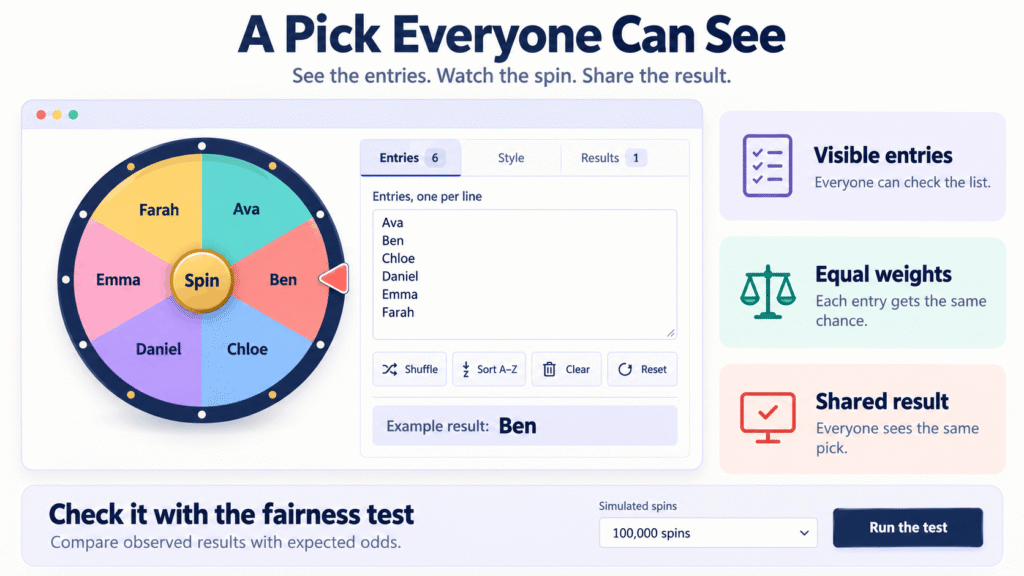
A spinning wheel feels fairer than picking by hand because everyone sees the same pick happen at the same moment, so nobody has to take the chooser’s word for it.
Manual selection always leaves room for suspicion of favoritism, even when the person choosing is honest. A presenter drawing from attendees who filled in a survey knows the problem: hand-picking looks rigged to someone, while a wheel looks neutral. The transparency comes from the equal segment each person gets and from a spin that is visual and interactive.
Small team rituals benefit too. In a daily standup, spinning for who speaks first means no team member is always stuck opening, and icebreakers feel less staged when the wheel picks the question. It’s also a calm way of breaking ties in a vote, since nobody casts the deciding voice.
The old prize wheel at a carnival worked on the same instinct, though a physical wheel can be braked. A digital wheel removes that worry, which makes it useful for remote teams in serious situations like sharing out on-call shifts. Fair selection also has to be easy to follow for people who join late.
We don’t ask you to take any of this on faith. Our fairness test simulates 100,000 spins in your browser and shows how often each slice lands, so you can prove it to a skeptical group yourself.
Is WheelySpin Free to Use Without an Account?
Yes, WheelySpin is free to use without an account: you open the page and spin the wheel, with nothing to pay and no form to fill in.
That was a deliberate choice. A free spin the wheel generator that asks for an email before the first spin isn’t really free, so the site runs with no sign-up, no downloads and no paywalls. You don’t need coding skills, and you can be spinning within a few seconds of the page opening. We think a random picker wheel should be that simple.
There’s also no software to install, which matters on school laptops and work computers where no installation is allowed. Any internet-connected device will do, whether it runs Android, iOS, Windows or macOS, in Chrome, Safari or Edge. A retailer running in-store promotions can spin on the counter laptop without setting anything up.
Skipping accounts is good for privacy, too. We don’t permanently store the names you type on our servers unless you ask for a verified spin, which is our way of protecting your information: we can’t lose what we never hold. That keeps data security simple, and our privacy policy lists the cookies the site itself uses.
Common questions
Can You Use the Wheel in OBS or Streamlabs?
Yes, WheelySpin has an OBS Spin Wheel Overlay with a transparent background that you add as a browser source in OBS or Streamlabs, so the wheel spins on top of your stream.
The overlay page carries the same wheel as this one, minus the page around it. On live streams, that keeps attention on the spin and the participants waiting for it, not on a website frame. Set the source up once, save the scene, and it’s ready whenever you need to select winners or settle a vote.
Gaming channels use it for viewer engagement in online games: a wheel of random challenges between matches, or a Truth or Dare round on Twitch streams. The engaging interaction comes from everyone watching the same slowdown. In our view the fun element lasts longer when the wheel shows up every few rounds rather than every few minutes.
The overlay isn’t only for games. Hosts of online streams such as webinars can use it for a closing raffle, paired with a countdown timer so the audience knows when the spin is coming.
Does the Wheel Work on Phones and Tablets?
Yes, the WheelySpin wheel works on phones and tablets, so you can spin the wheel in the browser you already have, with the same features as on a computer.
WheelySpin runs in any web browser on smartphones and desktop computers too, and modern web browsers handle the animation smoothly. The page loads instantly on a decent connection, and because there’s no login required, a student can open the link you write on the board without registration.
On a small screen size, fewer slices read better, so trim long names before a phone-based draw. Passing one phone around also works well for group activities and small gatherings, whether you’re picking movies or weekend activities.
If you use the wheel daily, bookmark it or save it to your home screen so it opens with one tap. Everything sits on one page, and once that page is already open, the wheel keeps working even if the signal fades on a train or in a basement classroom.
How Do You Customize the Wheel’s Look, Sound and Speed?
You customize the WheelySpin wheel in its settings, where you can change the colors, add pictures, set the spin length and turn sounds on or off.
Start with the look. Themes swap the whole palette at once, so you can match brand colors for a giveaway, pick bright designs for children on classroom reward wheels, or set a party vibe for game nights. The visual layout stays the same, with the entry box beside the wheel, so nobody has to relearn where things are.
Pictures change how people read the wheel. You can add images or your own photos to slices, and emojis work right inside the text. Pictures and long names compete for room, though: we keep most wheels at 20 to 50 segments, and fewer slices give better visibility from the back of a room.
Timing and sound set the mood. The spin time is a slider from 2 to 60 seconds, so you can keep it quick, normal or long, and the longest builds suspense for prize draws. Tick sounds can be toggled on or off from the wheel controls, and your device’s volume does the rest.
To make the wheel bigger, use browser zoom to scale it to the browser window and fill the available screen space, or use full-screen mode.
How Many Entries Can You Add to One Wheel?
One WheelySpin wheel holds up to 100,000 entries, which covers a whole year group or a large giveaway with room to spare.
You don’t have to type names one at a time for large groups: copy multiple lines from Google Sheets or a document and paste them into the list field in one go. For thousands of names, the wheel still works, but slices get thin, so for readability split them across wheels or use the Random Name Picker, which picks from a pasted list with no wheel to draw. Big lists still make a fair random picker wheel, because every entry keeps an equal chance unless you change the slice sizes.
Can You Use WheelySpin as a Wheel of Names?
Yes. Paste your list of names into the entry box, one per line, and spin the wheel to pick a name at random. Turn on “Remove the winner after each spin” so every name comes up only once, which works well for classroom turns, giveaways and team draws. You can shuffle the list, give each name its own color and share the wheel with a link, all free and without an account. Each result is also listed in the Results tab, so you can check who came up.
Can You Use a Spin Wheel to Pick Giveaway Winners?
Yes, a spin wheel is a fair way to pick giveaway winners, because when you spin the wheel live, entrants watch the draw happen instead of trusting a hidden result.
For social media giveaways, WheelySpin has a YouTube Comment Picker for YouTube giveaways and an Instagram Comment Picker for Instagram contests, each working as a giveaway winner picker for its platform.
Streamers running viewer giveaways can paste a large number of names from chat and spin live during the broadcast, which suits livestream contests. For multi-winner giveaways or multi-stage raffles, tick Remove winner, and record the spin if your contests need proof.
Can You Spin More Than One Wheel at the Same Time?
Yes, WheelySpin’s Several wheels option puts more than one wheel on the page and spins them together.
A multi-wheel setup answers a combined question in one go: gamers use one wheel for character builds, one for skills and one for a starting weapon. At home, a food wheel of pizza, sushi, tacos and other foods next to a wheel of dessert ideas makes choosing a meal a one-spin job. Each wheel also spins on its own when you tap it, so you can run separate wheel spins side by side.
How Do You Save or Share a Custom Wheel?
WheelySpin saves your lists in your browser automatically, and the share button gives you a link you can send to anyone.
Paste that link into WhatsApp, Telegram or a Facebook group, and the people who open it see your names on the wheel, though pictures stay on your device.
Lists are managed securely by the browser itself, so clearing your browser history or cache can erase them, and they won’t follow you if you switch devices. For a website rather than a chat, the Embed page gives you a snippet instead.
Does the Wheel Have Sound Effects?
Yes, the WheelySpin wheel plays a tick as the slices pass the pointer, and a mute button turns it off. You can also choose from 9 tick sounds, 17 winner sounds and 150 spin-music tracks.
The ticks follow the wheel’s speed, rushing at the start and slowing to single clicks near the end, which is half the suspense. On family game nights we leave them on, while for solo decision-making or quiet self-care prompts at a desk, muting them keeps things calm.
Why Did the Same Result Come Up Twice?
The same result came up twice because every spin is a fresh draw, and a fair wheel has no memory of what it picked before.
Like a fair coin, each spin is an independent event, and past results have zero influence on the next one. To prevent repeats in elimination games, tournaments or survivor-style rounds, tick Remove winner before you spin so each picked option leaves the wheel.
Is Your Data Safe When You Use the Wheel?
Yes, the names you type on WheelySpin stay in your own browser and aren’t uploaded to our servers during a normal spin.
With no account needed, there’s no profile for anyone to break into, and the lists themselves involve no data collection: they don’t leave your device unless you share them, run a verified spin, or let people join by QR code or live chat, as our privacy policy explains. Your browser keeps a local copy of each list, and shared links carry only the names you chose to put in them.
How Do You Make One Slice Bigger Than the Others?
You make one slice bigger with the weighted slices option, which also raises that option’s chance of being picked.
A slice’s segment size is proportional to its weight, so its portion of the circle matches its odds. With eight items at equal weight, you get eight equal slices, each with a 1 in 8 chance, because odds on an even wheel are one divided by the number of options.
The quick alternative is to duplicate an entry: on a five-name wheel, listing one name twice gives it 2 chances in 6. Put a grand prize on a single slice among many small rewards and it stays rare.
Can You Add the Wheel to Your Own Website?
Yes, the Embed a Spin Wheel page gives you code to paste into your own site, so visitors can spin without leaving your page.
A café could put its food choices on a “spin for today’s special” wheel, a gym could embed a workout wheel, and a club could add one to its organization page for weekly duties. An embedded wheel also gets more visibility than a link buried in a post.
Does the Wheel Work Offline?
Yes, once the WheelySpin page has loaded, the wheel keeps spinning even if you lose your connection, so you can spin the wheel on a train or in a classroom with patchy Wi-Fi.
To keep it one tap away on an iPhone, open the page in Safari and choose Add to Home Screen. That’s handy for classroom presentations in rooms with weak Wi-Fi, though loading the page fresh still needs a connection.
How Do You Make the Wheel Bigger on Screen?
Press the full-screen button and the WheelySpin wheel fills your display, which is the easiest way to make it bigger so everyone in the room can watch you spin the wheel.
Full-screen mode enlarges the wheel so a projector shows the spin rather than the inputs around it. On an iPad, the responsive layout fits the wheel to the screen when you rotate it, and the touch-friendly wheel is easy to spin with a finger.
How Do You Remove a Slice or Undo a Change?
To remove a slice, delete its line from the entry box, and the WheelySpin wheel redraws without it.
The list is a plain textbox, so your browser’s normal undo brings back anything you delete by accident. If two adjacent slices look too similar after an edit, try another theme to change the visual appearance.
Can a Spin Wheel Result Be Rigged?
Nobody can rig a WheelySpin result ahead of time, because the outcome comes from a secure random generator at the moment you spin, in your browser or on our server for a verified spin, not from a list anyone prepared.
The wheel uses crypto.getRandomValues(), a cryptographically secure function, rather than the standard Math.random(), and it draws on entropy that your operating system gathers from sources such as hardware timings. Because the stopping position is generated algorithmically through random number generation, the wheel doesn’t favor any segment.
The seed is never exposed, so nobody can plan a result. Even in a multiplayer mode with shared state, where people add names by QR code or from live chat, nobody on another device can nudge your spin; they can only add entries everyone can see. The only honest way to tilt a wheel is entering the same item multiple times, which everyone can see.