Drawing Prompt Generator: How Do You Get a Random Idea for What to Draw?
A drawing prompt generator is a free online tool that hands you a random subject, theme, or constraint with one click, so you skip the blank page and start sketching within seconds.
I keep one open in a browser tab beside my sketchbook, and the habit matters more than the tool itself. Some generators split ideas by mood, with a Cozy setting for gentle, homey scenes and a Full chaos setting that piles odd elements into one brief. Others keep things to a simple prompt button and an advanced prompt button, which is a fair way to match difficulty to how tired you are after work.
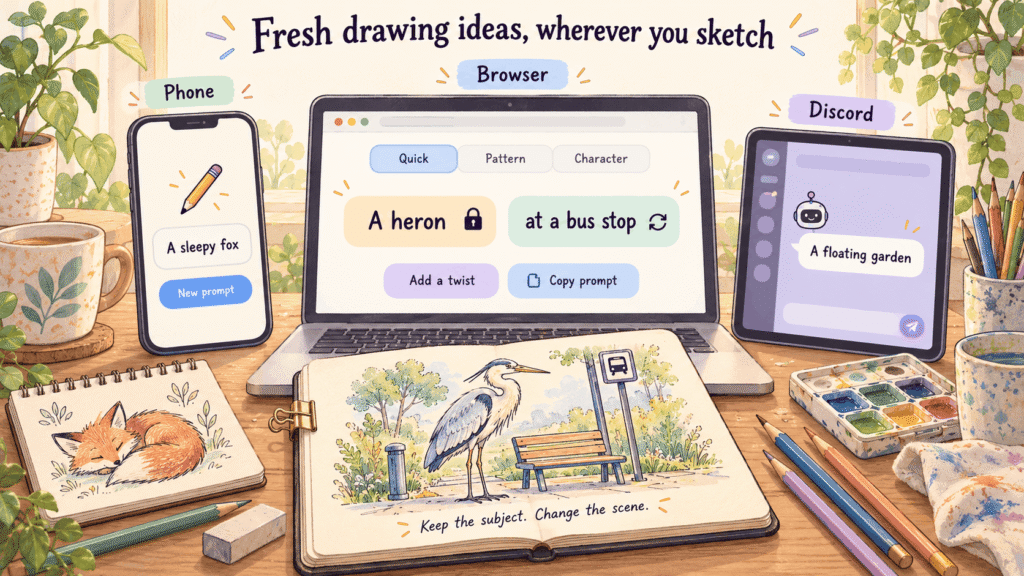
The format you pick decides how often you will really use prompts. A phone app suits a commute, a browser tool suits a desk, and a bot suits a group that already talks every day. The table below compares the three formats that kept turning up while I tested generators for this piece.
| Format | Where it runs | Prompt library | Extras worth knowing |
|---|---|---|---|
| Android application | Android phones | Over 1,000 prompts | Bonus prompts as rewards, plus an unlock for the Myths & Legends category |
| Web application | PC and iOS browsers | Varies by site | Opens on any device with no install |
| Discord bot | A Discord server | Original drawing prompts posted to members | Premium features for server owners |
How Does a Drawing Prompt Generator Pick Your Idea?
A drawing prompt generator picks your idea by combining randomized parts, usually a subject, a setting, and a style limit, from lists that someone wrote in advance. For a simple still life, spin the random fruit generator and draw what lands.
The randomness is the whole point. When I don’t know what to draw, my hand drifts back to the same mug and the same houseplant on my desk. A generator breaks that loop by handing over an art idea I would never have chosen, and the better ones lean into weird ideas on purpose because odd pairings force fresh shapes.
Under the hood, most art prompt generator tools run on slots. One slot holds subjects such as animals, buildings, or botanicals, another holds a setting, and a third adds a rule like “line drawing only.” Three short lists can produce hundreds of combinations, which is why a small tool rarely feels repetitive.
That slot design explains why the tools work for artists and designers alike. A designer reads the rule as a client brief, while an illustrator treats it as a warm-up. A drawing idea generator removes the choosing step, and in my experience choosing is where most sessions stall before people start making art. The prompt stays open-ended, so a fast thumbnail and a finished piece both count as answers.
Where Can You Use a Drawing Prompt Generator: Phone, Browser, or Discord?
You can use a drawing prompt generator in a phone app, in any web browser, or inside a chat server through a bot, and the core controls carry across all three formats.
Browser tools tend to give the most control. You choose a mode first, such as Quick for a fast sketch, Pattern for repeat designs, or Character for people and creatures. A button can add a twist to the result, and a copy prompt button lets you paste the brief into a group chat or a note. For a character sketch, the superpower generator gives your hero a power to draw.
The smartest feature I have seen is partial rerolling. You lock the part you like, tap the reroll button for the rest, and use reroll arrows to swap one part at a time. Each piece sits on its own chip, so an instant fine-tune keeps “a heron” while trading “underwater” for “at a bus stop.”
Older lists rarely vanish when a site upgrades. One generator I use still links to its legacy prompts, which I prefer for sketching because the wording is plainer. Phone apps trade that fine control for speed, and they suit a short illustration session in a waiting room better than a desk tool does.
Where Can You Share Art Made From Drawing Prompts?
You can show off artwork made from drawing prompts in prompt-focused discussion servers and on photo apps where the prompt writer has set a shared label.
Sharing changes how you use a prompt. When other people see your result, you stop treating drawing prompts as private homework and start treating them as a conversation. I get inspired far more by seeing how five people interpret the same brief than by any single list, because there is no right or wrong way to read a prompt.
The Weird mode results get the most replies in the groups I follow, followed by anything with a strict Palette limit. A limited set of color palettes makes a collage or a quick painting easier to compare side by side, since everyone worked from the same colors.
Group challenges help a habit grow. One prompt writer sells a 7 days course for starting an art habit, and a week is short enough to finish. Pick a free afternoon or a quiet morning for each entry. The people who take art seriously but keep the learning light and fun tend to stay the longest.
Are There Free Drawing Prompt Lists and Prompt Books?
Yes, free drawing prompt lists exist alongside paid prompt books, and many free generators come from working artists who write the prompts themselves.
Who writes the list matters more than people assume. One generator I tried says each prompt is written by a human artist rather than a script, and it invites you to keep clicking for a new art idea until one gives you creative inspiration. Its stated aim is to help you create something beautiful today, which is a more modest goal than most tools set. If you would rather write than draw, the story prompt generator gives you a scene to start from.
Free tools do not always stay stable. One prompt site I checked was under extended maintenance and revamping, with some functions limited. Its main community hub still ran giveaways and contests, with over 500 members taking part, and a Join the Community button sat right on the front page.
None of these resources assume you own an art degree, a tidy studio, or a settled style. A drawing prompt generator works the same with watercolor, gouache, or mixed media, and the same brief can turn into repeating patterns on a tablet or a pencil study on paper.
Do You Need an Art Degree to Start Drawing From Prompts?
No, formal art training is not required to start drawing from prompts, because most prompt lists and books are written for beginners and hobbyists first.
The marketing around prompts says so plainly. Free lists are labeled beginner friendly, and one prompt book I looked at is pitched at all skill levels. That book runs 128 pages, costs $16.00 USD, is independently published in English, and measures 7.5 x 0.29 x 9.25 inches, small enough to carry.
The real test is whether a prompt feels achievable. A unique and inspiring brief that you can finish in twenty minutes beats a clever one that you abandon. Prompts aimed at creative blocks work best as daily practice, and teachers rely on them for classroom use because the brief replaces a blank instruction.
For a new digital artist, prompts are a cheap way to kickstart an art journey and draw every day without a course. Make something small, then post it to Instagram with the prompt writer’s hashtag or tag them. Choosing to share art this way gives you a record of your progress. To choose between your top picks, paste them into our free wheel spinner and let it decide.
What Should You Learn Once Prompts Get You Drawing?
Once prompts get you drawing, short technique classes are the natural next step, because they teach one skill per session and end with a finished result.
I noticed that bite-sized classes fit the same slot in a week as a prompt does. One educator who reports teaching more than 500,000 people to draw, paint, and work on iPads groups short classes into four tracks:
- Paint Something: watercolor florals, gouache landscapes, and polaroid mini-paintings.
- Draw Something: plants, houses, and pets, built on learning to see things differently.
- Procreate: digital projects meant to make you open the app daily, with downloadables included.
- Letter Something: modern calligraphy and hand lettering, pitched as less frustrating than expected and making work look intentional.
Digital learners have a free on-ramp too. A free digital art starter kit I downloaded pairs a drawing prompt list with three digital art brushes for that same iPad app and for Photoshop, plus a video tutorial, all behind a get free access button.
Classes also feed back into the prompt groups. Members chat about what they learned, suggest features for the generator, and join community events that pair a class technique with that week’s prompt.