What Is a Random Color Wheel and How Does It Pick a Color?
A random color wheel is an online spinner split into colored slices that stops on one shade by chance, giving you an unbiased color pick for a drawing, a layout, a game or a group of students in a few seconds.
I first leaned on one when a client kept rejecting every accent color I proposed. Letting the slices decide ended a three-meeting stalemate faster than another mood board would have, and the client liked the “fate picked it” story. The physical version, a painted disc and a pointer, has been around in toy boxes for decades; the browser version adds a readout of the exact shade, a history log and a link you can send.
The habit is far bigger than color work. One large general-purpose spinner site reported 462,479,318 wheel spins and 1,280,253 hours of spinning for 2026, and color wheels are one of the simplest things people build on that kind of tool. Most of them still open with a familiar strip of green, teal and indigo slices.
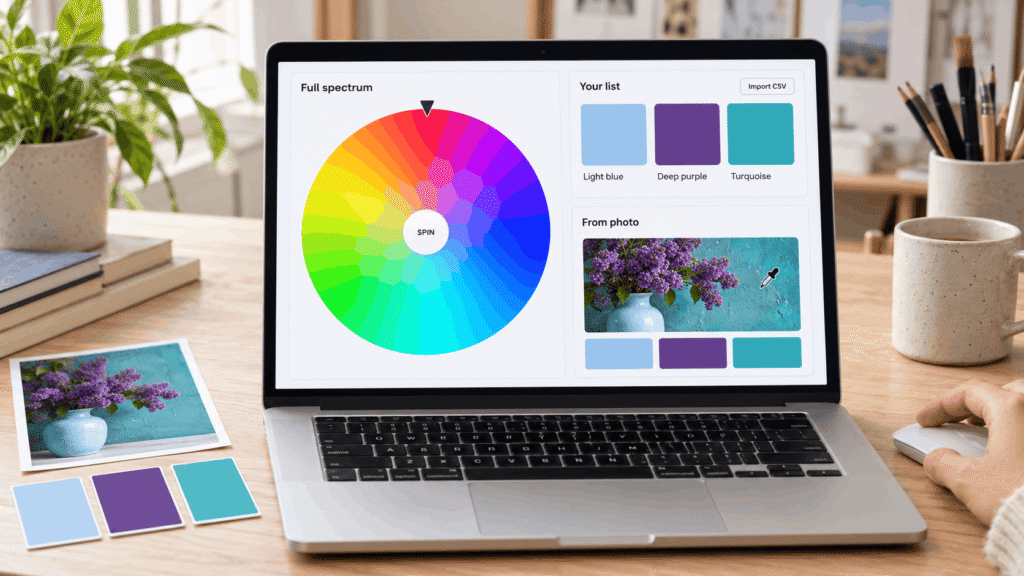
What separates a color spinner from a name spinner is input. Beyond the stock slices, you can usually load your brand colors, let a random color generator roll across the whole hue range, or sample shades from an uploaded image and spin only those.
What Ways Can You Feed Colors Into the Wheel?
A random color wheel usually accepts colors in three forms: a continuous hue range you spin across, a typed list of named shades, and shades sampled from a photo.
The continuous full spectrum option is the one I use when I have no preference at all. It replaces the endless scrolling of manual color pickers, where thousands of options sit one pixel apart and nobody commits to any of them.
Typed lists suit people who already have a shortlist in mind. Most builders accept values in RGB, let you paste a CSV file, or pull rows in through a Google Sheets import when the list already lives in a spreadsheet. A café I helped had exactly three house shades, light blue, deep purple and turquoise, and the typed list kept every spin on-brand.
Photo sampling is the underrated route. You upload a picture, the tool builds an extracted palette from it, and you add extra shades by clicking the image wherever the hue you want sits. Designers use it to stay inside a moodboard, and teachers covering color theory use it to show how a single photograph hides a dozen related tones.
Which Colors Come on a Random Color Wheel by Default?
A random color wheel typically opens with either a 16-slice spread borrowed from modern interface design or a longer crayon-style list of everyday shade names, and both can be swapped before your first spin.
The shorter interface-style spread is built for quick color selection: its slices step evenly around the hue circle, so no region of the spectrum is overrepresented. A seven-band rainbow set is even leaner, which works for little kids learning names but feels thin for design warm-ups, where you want neighboring hues to compete.
The longer crayon-style list mixes neutrals with playful names that kids remember after one round. In my experience the neutrals are where people argue, because a dark slice or a pale one lands and somebody insists it “doesn’t count.”
Treat any ready-made set as a draft rather than a rule. Open the color list, use the Edit option to trim shades you never want, reorder the rest so similar hues don’t sit side by side, and you have a custom spread in under a minute.
How Do You Spin a Color Wheel and Use the Result?
To use a random color wheel, load the shades you want, start the spin, and copy the hex value of whichever slice the pointer stops on.
- Presets first: start from 7 Rainbow, 8 Basic, 10 Popular, 12 Complete, 16 Material or 12 Primary, depending on how many slices you want on the board.
- Tapping or clicking the spin control sends the pointer around; on most tools one tap is all it takes.
- Hex code next: read the value shown with the landed slice and grab it with the Copy button.
- Design projects last: paste the value into your layout, sketchbook notes or game sheet before you forget which slice it was.
The two settings I change before handing the wheel to a group are speed and duration. A fast, short spin keeps a class moving; a slow, long one builds suspense at a party, and the pointer drifting past three slices before settling makes the pick feel earned.
When a landed shade looks wrong on a phone screen, check it on a second display before rejecting it. Slices render with whatever screen profile the device uses, so a muted tone can look washed out on one monitor and perfect on another.
What Can You Use a Random Color Wheel For?
A random color wheel is used for art prompts, design exercises, party games and classroom activities, anywhere a fast, unbiased color decision keeps people moving instead of debating.
For artists, the wheel is a practical cure for creative blocks. Assigning yourself whatever shade lands removes the blank-canvas question, and the art challenges that follow tend to produce stranger, better work than a hand-chosen hue. I have seen more honest inspiration come from a forced olive than from a favorite blue.
In classrooms, the same spin runs sorting games and quick quizzes; at home it doubles as the caller for twister and the engine of a touch something red game for toddlers. Some families even use it for outfit picks on dress-up days, which settles the “what are we wearing” debate in one spin.
It also helps to see the color wheel as a cousin of the random name picker, the raffle selector and the general-purpose decision maker used at events and in businesses. The mechanics are identical; only the slices change, which is why color wheels pick up features from those tools so quickly.
Which Settings Let You Customize a Color Wheel?
Color wheel settings usually control how the spin moves, what you hear, what happens once a color is announced, and how the page around the wheel looks.
The motion controls matter more than most people expect. Switching the pointer mode from automatic to hand-stopped makes kids feel they chose the outcome, and they accept it more readily. On a continuous-hue wheel, I like to refine the landed shade with the small color wheel beside the outcome, because a raw stop often falls on a muddy in-between tone.
Picking a color combination before you start changes the look of every slice, and each time a new shade lands the palette regenerates around it. That loop is handy for palette drafting: spin five times, keep the two shades that work, and rebuild around them.
To Customize the basics, most tools put the spin time and the press Spin button behavior on one panel, along with a tool title and a short description above the wheel. A tool that is customizable but still easy to use keeps those basics on the first screen and buries the rest one click deeper.
What Happens to a Color After It Lands?
After a color is picked, a random color wheel either leaves it in place, takes it out of play, or adds to its running tally, depending on the result mode you chose.
Leaving the shade in place is the default, and it is the only setting where pure chance can hand you the same color back. Taking it out of play gives no-repeat picks, which is what you want when every color must be used once. You can usually pull just the slice that lands or every slice that shares its name.
The tally setting is closer to a scoreboard. Each landing raises that color’s accumulated counts, the scores view shows the totals, and a toggle flips between the plain history and the tally. I ran a week-long daily drawing theme this way: whichever shade topped the board by Friday became the final piece.
Group play leans on the tally setting too. Assign colors to teams, actions or points and the wheel becomes a scorekeeper for games and challenges. Small touches like confetti, custom sounds, end sounds and a button animation make each landing feel like a moment rather than a silent text update.
How Do You View, Share and Save Your Color Results?
Most random color wheels keep a log of every color that comes up during a session and let you send either one outcome or the whole log to other people.
The log lives in two views. One lists colors in the order they came up, and a tally view shows how often each one appeared; the Add Count button can bump a color manually when you are tracking something outside the wheel.
Saving works in layers. Local saving keeps a wheel in the browser’s Local Storage on the same device, while cloud saving lets you open it elsewhere. Some tools hold up to five wheels, but only the active wheel survives a page refresh, and others can run 6 wheels at once in a simultaneous spin, which is fun for picking a full outfit in one go.
For anything you will reuse, Import / Export is the safety net. A JSON file lets you back up and restore full configurations, slices and settings included. Sharing a custom wheel as a shareable URL is quicker, but a file copy does not depend on the site keeping your link alive.
Can You Hide the Colors Until the Spin Ends?
Yes, a random color wheel can cover every slice so nobody sees the colors before the spin, and a second option keeps the landed color secret until the host shows it.
On a game night, hiding slices turns a plain pick into a guessing game. The result popup stays blank until the host clicks, and the revealed outcome gets a bigger reaction than any visible pick ever does. I pair it with scavenger hunts: the color appears, and everyone races around the room to grab an object in that shade.
A hidden pick also works outdoors. Turn it into a photo walk where the group must find five things in the uncovered color before heading back, which keeps people looking closely at fences, doors and plants they usually ignore.
Labels add structure to the secret. Switch on the title section and set result titles so each pick reads “Round 1,” “Round 2” and so on; the titles cycle in order, and Restart Sequence sets them back to the first one when a new game begins.

Can You Run More Than One Color Wheel at a Time?
Yes, several color wheel builders let you keep more than one wheel and flip between them, and some spin a handful side by side.
The practical reason is splitting jobs. One wheel decides the base shade, another sets a primary color constraint, and a third picks the medium; layered design constraints like that produce briefs nobody would write by hand.
The easiest setup is loading the two most common default sets as separate wheels. The longer set has 20 slices, built from the 18 default colors in its starting list plus two extras added on the wheel itself.
| Default set | Slices | Colors on the wheel |
|---|---|---|
| Interface-style spectrum | 16 | green, teal, cyan, light blue, blue, indigo, deep purple, purple, pink, red, deep orange, orange, amber, yellow, lime, light green |
| Crayon-style named list | 20 | pink, lavender, sky, cyan, lime, dandelion, yellow, tan, white, salmon, purple, blue, turquoise, gold, brown, grey, black, green, navy, magenta |
Running both at once shows how differently they behave. The interface set steps evenly around the hue circle, while the crayon set leans toward warm neutrals, so it lands on earthy tones more often.
How Do You Add Titles and Labels to a Color Wheel?
A random color wheel can show a heading and a short note above the slices, plus a label that appears alongside each color the wheel lands on.
Titles matter most when the slices are hidden. When the Mystery Wheel setting replaces all inputs with question marks, a heading is the only thing telling players what they are spinning for, and if the Mystery Result option also hides the result, the label is the first thing anyone reads.
Labels are also how round-based games stay organized. “Pick for the next round” or “Who speaks first” reads clearly from the back of a hall, and I have used a color wheel to open a standup, where each color maps to a person on the team. To split a class into color teams, the random team generator sorts names into groups in seconds.
The heading survives a switch to full screen view. The wheel enlarges, the inputs section hides, and the history and tallies remain accessible from a side button, so an audience sees a clean title and a large wheel with nothing else competing for attention.
What Does Full Screen Change on a Color Wheel?
Full screen mode makes the wheel fill a tablet or desktop display and tucks away the editing panel so an audience sees only the spin.
Phones and other small mobile devices usually do not get the option, because the screen is already filled by the wheel. On a laptop hooked to a projector, though, the difference is obvious: the slices read clearly from twenty feet away, and nobody gets distracted by the list being edited.
Streaming is where a clean, enlarged wheel earns its keep. You can add the page to OBS as a browser source, and some tools add a Streamer Mode with a one-click green screen background that keys out cleanly. The same setup works in Streamlabs.
From my own streams, the trick is leaving a margin around the wheel inside the capture box. Tight crops cut off the pointer at certain zoom levels, and viewers miss which slice actually won.
How Popular Are Online Spinners Right Now?
Online spinners are used at a very large scale, with one major general-purpose site counting its spins in the hundreds of millions and its total spinning time in the millions of hours.
Much of that volume comes from live video. Streamers on Twitch, YouTube Live and TikTok spin for chat giveaways, in-game challenges and character builds, and a color spinner slots right into that habit for art streams.
Feature lists show how far these tools have grown. Big platforms now offer multiple wheels on one page, weighted entries, support for large lists, an interface in 65 languages, a library of 150+ licensed music tracks and sound effects, and an Unsplash image gallery for backgrounds.
Everyday decisions keep the numbers climbing. People spin to pick a giveaway winner, to choose which student will answer a question, to sort to-do items or to settle dinner plans. Color spinners borrow the same mechanics, which is why a color tool feels familiar the first time anyone opens it.
Are There Color Wheel Apps for Your Phone?
Yes, color wheel apps exist for phones, and one Android listing I checked is a small, advertising-supported app whose store page discloses data collection you should read before installing.
The app itself is simple: you get a large selection of shades to paint the sectors, you set the colors, and you hit a red button to spin. That is a perfectly fine flow for a game night, but it is still a separate install with its own permissions.
Browser tools need only JavaScript turned on and nothing downloaded, and the browser-native ones keep your lists on the device. Web spinners that publish a privacy policy often cite GDPR, CCPA, SB 190 and SB 1392, along with industry-standard encryption and regular backups.
My rule of thumb is to use the browser for anything involving names or class lists and keep the app for casual party spins, where the data you type in is just a set of shades.
What Is a Random Color Wheel Used For?
A random color wheel is used to make a fast color choice for art, design, games and teaching whenever any reasonable shade will do and deciding by hand would stall you.
Teachers use it for quick grouping, while hobbyists and DIY enthusiasts use it to build a palette for a craft or room makeover. Artists often spin and then draw something with only that shade. It works as an interactive tool for creative brainstorming and helps anyone who needs to decide quickly, fitting into a design workflow without slowing it down.
Can You Change the Colors on the Wheel?
Yes, a random color wheel lets you change its slices by renaming, reordering, removing or adding shades before you spin.
Most editors let you rename a slice, enable or disable it for a round, or delete it outright. You can add entries one at a time in a textbox, mix predefined shades with custom colors, and combine manual input of single colors with whole preset palettes.
Can You Make Some Colors Show Up More Often?
Yes, many random color wheels let you give a color extra weight so it lands more often than the other slices.
Adjusting weights means the wheel is no longer fair in the equal-odds sense, but each spin stays unpredictable. The weighting sits on top of the same algorithm, typically an RNG or secure random generator, so the heavier color just gets a larger share of the odds.
What Is Elimination Mode and When Should You Use It?
Elimination mode removes each color from the wheel once it is picked, so no shade repeats until you reset; use it for palettes and games that run in rounds.
The table below compares the three result modes most color wheels offer.
| Result mode | What happens after a pick | Good for |
|---|---|---|
| Normal Mode | The color stays on the wheel | Single quick picks |
| Elimination Mode | Hide choice pulls that slice; Hide all instances disables every slice with identical inputs | Building a set where each shade appears once |
| Accumulation | The color’s tally carries forward to later spins and shows in the Score tab | Week-long challenges and scorekeeping |
Use elimination when a repeat would spoil things, since it prevents repeats and removes the winner after each spin.
Can You Share a Custom Color Wheel?
Yes, you can share a custom color wheel by generating a link that opens the same slices and settings on another device.
- Share button: press it to create a link for the wheel.
- Normal link or collect link: the first opens a copy, the second gathers participant results from everyone who spins.
- Facebook or Twitter: post the link directly, or copy it into a chat.
For outcomes rather than the wheel, the share icon sends a single pick, and a results page link shares the full results history from your current visit on a shareable results page, with downloading of a results image included. Some tools also publish short share links, and you can clear all records before starting fresh.
Can You Get the Hex Code of the Color You Land On?
Yes, a random color wheel that shows swatches usually displays the hex value of the landed color with a copy option beside it.
Each slice shows its real color, but shades you add by typing names get a display swatch automatically, and some tools attach no hex value to those new names. For an exact value from a photo, an image color picker that extracts shades is more reliable. For color harmonies, use a design tool instead.
Is a Random Color Wheel the Same as a Color Theory Wheel?
No, a random color wheel is a chance-based picker, while a color theory wheel is a reference diagram for how hues relate.
A digital spinner is built for randomized decision-making, not for complementary colors or harmony suggestions. Some specialized tools blend both, offering three ways in through different input methods, such as manual selection from a hue circle or picking whole images.
Can You Add More Colors to the Wheel?
Yes, you can add more colors to a random color wheel by typing their names or sampling them from a picture.
Typed shades go in in seconds, and image color extraction fills the wheel from a photo. Most tools are free, need no signup and let you spin as many times as you like, saving favorite combinations so you can move forward without overthinking every slot.
Is Your Data Private When You Use a Color Wheel?
Your data on a color wheel is only as private as the specific tool makes it, so check how a website stores your lists and what a mobile app shares before you type anything personal.
One color wheel app on Google Play with 10K+ downloads, listed under Simulation and rated Everyone, contains ads and in-app purchases and was last updated Aug 29, 2026. Its data safety section says it may share Location, Personal info and 4 others with third parties.
That listing also notes data is encrypted in transit but can’t be deleted. For class lists or names, a browser tool that saves locally is the safer choice.
Can You Use a Color Wheel in Streaming Software?
Yes, most browser-based color wheels can be added to streaming software as a web page layer, so viewers watch each spin live.
Overlay polish comes from appearance settings: a transparent page color or background transparency blends the wheel into a scene, and color themes match your stream branding. Premium tiers add background images, custom spin buttons, custom logos and banners.
Is a Random Color Wheel Truly Random?
A well-built random color wheel is random in the practical sense, because each spin’s outcome comes from the browser’s number generator rather than from where the pointer happened to start.
Animation details like physics, a random starting angle, an initial spin, the spin count and an optional manual stop shape how the motion looks. Those spin behavior options sit behind the Settings button, yet none of them steer which color wins.
Why Did the Same Color Come Up Twice in a Row?
Getting the same result twice is normal on a random color wheel, because every spin is independent, much like flipping heads several times in a row with a coin.
Good tools draw outcomes from crypto.getRandomValues() rather than Math.random(), and some publish a 10,000-spin randomness audit or a fairness test so you can check the spread yourself. A repeat does not mean a color is more likely, unless someone set weights for tiered prizes or rare drops.
If a color should not be picked again, press the Remove button after each spin or turn on elimination mode so the slice leaves the wheel.