How Does a Secret Santa Generator Draw Names for Your Group?
A Secret Santa generator takes your list of names, gives every person exactly one other participant to buy for, keeps out any pairings you have forbidden, and delivers each assignment privately so nobody sees anyone else’s. That covers what the tool does, but the reason organizers switch to one is less obvious.
For years I ran our family Christmas draw with paper slips folded into a bowl, and almost every year somebody pulled a brother-in-law they had been told to avoid, or their own slip. Re-drawing in front of everyone ruins the secret. A generator swaps the bowl for a virtual hat: each person is secretly assigned a recipient, and the software confirms a valid pairing before anything goes out.
The setup screen is where the control actually sits. Rules you enter during setup (who must not draw whom) are applied by the algorithm instead of by a tired host juggling a spreadsheet. Delivery then happens through Individual Links or messages, so nobody hands a phone around the table.
Scale has changed the habit too. One service reports more than 2 million names drawn across over 250,000 groups, and millions of people now rely on random pairings for office swaps, church exchanges, and relatives who live hours apart.
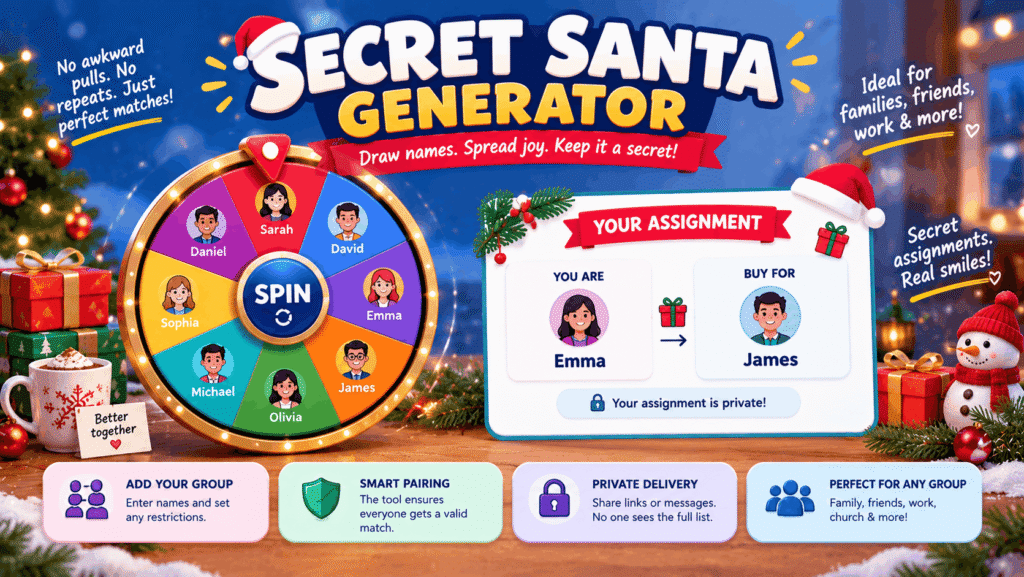
How Do You Run a Secret Santa Draw Online, Step by Step?
Running a Secret Santa draw online takes five moves: label the draw, enter the people, add rules, write the details, and send each person their result. Most organizers I have helped finish in under two minutes, and the order below is the one that avoids redoing work.
- Group name first, so every message people receive is labelled with the right event, which helps when office and family draws overlap.
- Names must be unique in the list, and each one should be typed exactly the way that person will type it later, because some tools ask people to enter their own name to find their result.
- Exclusion rules come next: keep couples apart, or anyone else who shouldn’t draw each other.
- Note to participants carries the budget and the exchange date, so nobody needs a separate reminder.
- Private link delivery finishes the job: each person gets one that shows only their match, or an email arrives the moment you draw.
On some tools the event link appears only once, right after creation, so save it right away in a note or bookmark. If you close the tab before copying it, the only fix is starting a new event and sharing again through any channel your group already reads.
Which Details Should You Set Before Drawing Names?
Before drawing names, set the people list, any exclusions, a budget, a date, and the number of presents each person buys; everything except the names and your own contact details is usually optional. Most forms only require a title, your name and email, and the participant list, which you can type one per line or paste a list copied from a chat.
The budget is the setting I would never skip. Pick a spending limit everyone is comfortable with, and if your circle spans several countries, choose one currency so everyone sees the same amount. One tool offers about two dozen currencies, which mattered when cousins in New Zealand, the Philippines, and the United States joined our draw.
Then Set Your Rules. Exclusions let you block any pair, and a short note with house rules (“wrap it, no gift cards”) travels on every pick email, so nobody can claim they missed it.
Plans change, so check which organizer controls you get afterward. A sensible setup lets you edit the event note and resend the same link when the date moves, while a clear event name keeps everyone sure which exchange they belong to.
What Features Come With an Online Secret Santa Generator?
An online Secret Santa generator typically bundles random matching with self-match protection, pair blocking, private delivery, wish lists, and options for bigger groups. The table maps each feature to the problem I have watched it solve at real exchanges.
| Problem at a real exchange | Feature that handles it |
|---|---|
| Someone pulls their own name | Automatic drawing that ensures nobody draws themselves |
| The same two coworkers match every year | Pair blocking applied before the draw runs |
| A large office wants more than one gift each | Presents per person, set from 1 to 5 |
| People need to see their match privately | A personal draw link for each participant |
| Someone loses their link | An Email me my link option, plus a recovery link for the host |
| Nobody knows what to buy | Shared wish lists, plus email reminders and wishlist updates |
Sharing is the quieter feature. A copy-invite button lets you drop the link into email, Slack, or a family chat in seconds, which matters more than it sounds when you are herding forty people toward one deadline.
Offline access surprised me most. On one app, once it is installed to the phone, your match and their list stay viewable without a signal; edits are saved on your device and synced when you reconnect.
How Do You Plan a Secret Santa Budget, Date and Wish List?
Plan a Secret Santa by confirming who is in, fixing the date on the day you draw, and asking each person for a short, specific wish list alongside the agreed budget. I treat it as a sequence because each step removes a reason for someone to drop out.
- Minimum of three people is the floor on some tools, so confirm the headcount before anything else.
- Gift exchange date goes in when you draw, not later; a date set afterward tends to slide.
- Two or three specific ideas per person beats a vague list, with sizes and preferences noted.
- Product page links or pictures people attach save the buyer from guessing and let them browse quickly.
The point of a list is that shopping stays personal without turning into a guessing game. I have seen a perfect gift come from a single line like “size M, loves green tea, no candles,” which took the buyer ten minutes instead of an afternoon.
Keep the mood light as well. The draw should feel joyful and enjoyable, so leave room for wrapping presents together at the swap itself; in my experience that half-hour is what people remember.
Which Secret Santa Features Are Free and Which Cost Extra?
On most Secret Santa generators, drawing names, rules, private links, and email delivery cost nothing, while text and messaging-app invites are the usual paid extra. One service I checked puts everything needed to run an exchange in its free tier, says those features stay free, and still includes photo wishlists and Free Email Invites at no charge.
The paid upgrade there covers one thing: sending invites by text message and WhatsApp. It is a per-group paid add-on, not a subscription, so a family that only ever uses email never meets it.
Accounts are the other line between basic and extended. A quick one-off draw needs no sign-up or password on several tools. A registered account adds saved groups and repeat draws, so you can rerun the same office list next year without entering forty names again.
How Do Secret Santa Generators Keep Your Data and Wish Lists Private?
Secret Santa generators protect privacy mainly by collecting very little: some store only the group and participant names, need no email address, and show each person only the name they drew. One tool states it gathers the minimum needed to work, is not an affiliate storefront, and spells the rest out in its Privacy Policy.
Assignment privacy is the second layer. Each person’s link works only for them, and a participant never sees the full list or who has them. Another tool describes itself as safe by default, with matches visible only to people holding the link, and a third asks for no personal details at all.
Be realistic about links, though. One generator openly says its links are not encrypted; they hide the name from a casual look, but anyone you pass them to can open them. I send each link in a one-to-one message rather than the group thread for that reason.
Why Do So Many Organizers Draw Secret Santa Names Online?
Organizers draw Secret Santa names online because a generator sets up in about two minutes, applies every exclusion automatically, and works for people who are not in the same room. I would add a fourth reason from experience: the host no longer has to know everything.
Paper draws break down in predictable ways. A spouse pulls their partner, two siblings match for the third year running, or a phone gets passed around so everyone can tap a screen. An online name picker that respects every rule avoids all three without a redraw.
Cost is rarely a barrier either. No account needed is the norm on several tools, and one lists unlimited groups among its core features, so a single person can run the office gift swap, the book club, and the family draw side by side.
Do Participants Need an Email Address or Account?
No, most Secret Santa generators let participants see their match without an email address or account, because the organizer simply shares a link. One tool builds its whole pitch on this: you post a single link in group chats on Messenger or Facebook, or hand out a printed QR code at the office party.
Other tools send results by email, which needs addresses but still no account for a quick standalone draw. Paying is not part of it either, since one service needs no card at any point.
The trade-off is recovery. Without accounts, people can join from anywhere, yet if someone deletes the message holding their link, the host has to send it again, so I keep a copy of every invite until the exchange is over.
How Does Each Person See Their Secret Santa Match?
Each person sees their Secret Santa match by opening a personal link or an email that shows only the one name they drew. On link-based tools the final step is literally called Share & Reveal: the person opens the link, types their name, and the match appears with no login or app download.
Email-based tools label their last step Draw & done. Results land in inboxes right away, and even the organizer cannot see who has whom.
Either route beats a shared phone passed around the room. I usually send links through whatever messaging app the group already uses, one person at a time, so nobody taps the wrong name and spoils a pairing before the party.
Are Secret Santa Private Links Secure?
Secret Santa private links are private enough for a gift draw but not truly secret: they hide the match from casual view, yet anyone holding the link can open it. The security of a draw therefore depends more on how you send links than on the tool itself.
A link is generated immediately when the event is created, and on one tool the data stays within the event, with no extra login steps to slow people down. The flip side is that a link works for whoever receives it.
My routine is simple. On the organizer screen, never press Reveal. Copy each link without looking and forward it directly to its owner, so the only name you ever see is the one you are buying for.
What Happens If the Secret Santa Draw Can’t Work?
If your rules leave no possible assignment, a Secret Santa generator stops and tells you, rather than producing a broken match. That warning is a feature, not a bug, and it usually means the rules have grown faster than the group.
Conflicts pile up quicker than people expect. Ban married couples from each other, keep children away from their parents, and add a few specific pairings among family members, and a group of six can run out of options.
Built-in conflict handling checks the whole set before sending anything. Group size matters too: one form needs at least 2 participants before it runs, and exclusions only unlock at three. When the tool flags a problem, I drop the least important rule first, usually the cousin-level one, and try again.
Can You Stop Couples or Relatives From Drawing Each Other?
Yes, Secret Santa generators let you block pairs such as partners or relatives from drawing each other, usually once you have 3 or more participants. One tool calls the feature Smart Conflict Resolution and applies rules like “couples can’t draw each other” on its own.
The generators I checked also prevent anyone drawing their own name, so you only need to enter the pairs that matter to your group.
Rules stack, so pile on enough and a valid draw becomes impossible. Tools tell you when that happens; you remove a rule or adjust the rules and run it again. In my office draw we block only partners and direct managers, because anything more starts to feel staged.
Can Participants Add a Wish List or Gift Ideas?
Yes, most Secret Santa generators let participants add a wish list on their own page, though some email-only draws need a free account first. A quick one-time draw on one tool skips lists entirely, while others build them in with photos and items sent straight from a shopping app.
Ask for three gift ideas rather than a long list. A wishlist guide I have used offers prompts and templates that push people toward items their Santa can actually shop from.
For anyone stuck, a gift ideas generator helps, and so does thinking in personalities: thoughtful or cozy picks for quiet friends, experience-based gifts for the restless ones who already own everything.
Does a Secret Santa Generator Work for Remote Teams, Large Groups and Other Countries?
Yes, a link-based Secret Santa generator works for remote teams, large groups, and international families because everyone draws from their own device. One tool describes itself as remote-friendly and built for any circle, working across time zones and languages.
For big lists, letting people add themselves through a shared link saves typing, and it suits online communities and community events where the host does not know every name.
Money is the usual snag. Budgets can be set in pounds, euros, Australian dollars, Canadian dollars, or pesos, which kept our several households on three continents talking about the same figure instead of converting prices in their heads.
What If You Close the Page or Lose Your Secret Santa Link?
If you close the page before saving the event link on a show-once tool, that link is gone and you must start over, while tools with recovery options let you get it back by email. That difference is the first thing I check before choosing a generator for a big group.
Email-based tools store each person’s address, so you can resend it later and do it without retyping a thing. Nobody has to dig through old messages or ask the host for a second copy.
A shared group page helps too, because it lists who has joined, so you can spot the person who never opened their link before the deadline and nudge them early rather than the night before the party.
Can the Organizer Take Part and Still Be Surprised?
Yes, the organizer can join the draw and stay surprised, as long as the tool hides assignments from the admin view. On one generator a checkbox called Hide who is buying for whom keeps the Manage page clear of pairings, while you can still resend picks and correct emails.
Link-based tools work differently: you keep admin access from any device, but you never open anyone’s link. A link only hides the name from a quick glance, so send it straight to its intended recipient.
I do the same with my own link and open it last. Finding out who I am gifting to at the same moment as everyone else is half the fun of hosting.
Will You Ever Have to Pay to Run a Secret Santa Draw?
You usually never have to pay to run a Secret Santa draw, because paid options cover extras like text invites rather than the draw itself. One service includes conflict rules, organizer announcements, and wishlists in its no-cost plan and charges only for an optional upgrade on a single group.
Size does not trigger a fee either. One tool lists no group size limit, and another says thousands of groups have already organized their exchanges through it.
My own rule is blunt: if a generator asks for payment before it shows you the draw, close the tab and pick another one, since the basic job is handled well at no cost elsewhere.
Can You Send Secret Santa Invites by Email?
Yes, many Secret Santa generators send invites and results by email for free, and some deliver each pick by email the instant you press draw. Email also lets people open their result whenever they check their inbox, which suits busy weeks.
Email is still the most dependable channel for older relatives in the UK, Australia, Canada, or Ireland who never joined the family chat. Everyone gets the same message format, budget included.
Worried about marketing emails? One tool promises no inbox spam, and an optional account keeps all your groups in one place if you run several exchanges each season.
Can You Use a Secret Santa Generator Beyond the Holidays?
Yes, a Secret Santa generator works for any event where people need secret one-to-one assignments, not only December gift exchanges. The same engine suits these groups:
- Church groups and ministry teams running a gift exchange after a service.
- Office teams and school celebrations, where classroom reminders about the budget keep things fair.
- Families and friend gatherings spread across several cities.
- Group projects, team assignments, and party planning, where you need unbiased partners.
I have used the same tool for a spring book swap and for pairing volunteers at a charity bake sale. The mechanics never change: a list goes in, private assignments come out, and nobody can accuse the host of rigging it.
Can You See Your Secret Santa Match on a Phone With No Signal?
Yes, on generators that install as an app, you can see your Secret Santa match and your recipient’s wish list with no signal. Add the app to your home screen once while you are connected, and the match stays available offline.
That helps people who shop when it suits them, whether in a basement mall, on a train, or in a store with patchy reception. I have stood in a shop with one bar of signal and been glad the list loaded anyway.
Not every generator offers this, so check before relying on it. Email-based tools depend on whatever your mail app has already downloaded.
Is Your Personal Information Safe With a Secret Santa Generator?
Your personal information is generally safe with a Secret Santa generator that collects little and does not make money from your data. One tool says it has no affiliate links or sponsored gift suggestions and does not sell or share data.
Another calls itself privacy-focused and says its team acts on feedback because it runs its own exchanges. Neither approach needs your address, phone number, or payment card for a basic draw.
My habit is to read the site’s terms once before entering a whole office of names. If a tool asks for more than names and an email, I assume the extra data is being used for something other than my draw.
Is a Secret Santa Generator the Same as a White Elephant Exchange?
No, a Secret Santa generator runs a classic assignment draw, while a White Elephant exchange is a swap where everyone opens gifts in turn and can steal from each other. In classic Secret Santa, each person buys for one assigned participant, or several in multi-gift draws.
| Attribute | Classic Secret Santa | White Elephant |
|---|---|---|
| Who you buy for | One assigned person, or more | Nobody in particular |
| Secrecy | The giver stays hidden | Gifts are opened one by one in front of the group |
| Stealing gifts | Not part of the game | Allowed |
Some tools support both, plus Dirty Santa, Yankee Swap, Pollyanna, Kris Kringle, T-Shirt Exchange, and Office Secret Santa formats, and one site links a separate rules guide for the swap version.
Gift tone differs as well. Office gift swaps and team building events lean funny: one coworker gift guide lists 50 desk-friendly pranks, mugs, and stocking stuffers chosen for laughs.