What Is a Random Emoji Generator and How Does It Work?
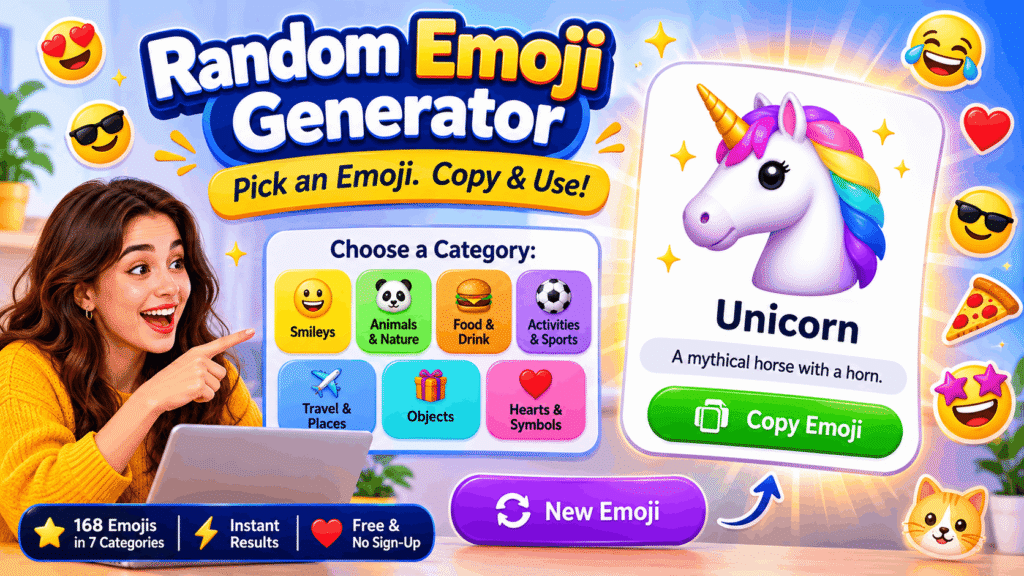
A random emoji generator picks an emoji for you at random, shows it big with its official name, and lets you copy it in one click. Choose a category, press New emoji, and in seconds you get a result such as 🦄 Unicorn or 🍕 Pizza, ready to paste into texts, messages or posts.
This generator holds 168 popular emoji in seven categories: Smileys, Animals and nature, Food and drink, Activities and sports, Travel and places, Objects, and Hearts and symbols. Each category has 24 emoji, so you get plenty of variety without obscure ones that won’t display.
People use it for emoji games like charades, drawing challenges, captions, writing prompts and classroom warm-ups. It’s also a fun way to make a small decision or start a conversation, and you might land on anything from Star-struck or a Cowboy hat face to a Gem stone or the Tokyo tower. Every emoji is a standard Unicode character, the same one you’d find on your phone keyboard.
The generator is free, needs no sign-up, and works on a phone or laptop. For a classic spinning wheel with your own options, start from the main spin the wheel page.
Why Use a Random Emoji Generator?
A random emoji generator adds fun and creative inspiration to anything you write, draw or play. It breaks the habit of using the same three emoji in every message.
Most people rely on a handful of favorites, like the Face with tears of joy or the Red heart. A random pick brings in a surprise, such as a Melting face, a Crystal ball or a Volcano, which adds whimsy to a post and helps set the tone or intent of a message.
It’s great for icebreakers too. Ask a group to explain what a random emoji says about their day, and the conversation starts itself. Teachers use it for warm-ups, friends use it for party games like guess the movie, story chain and Pictionary, and artists use it for drawing prompts.
You can even use it for a small decision: give each category a meaning, then let the result decide. For a clearer answer, the yes or no wheel gives a simple yes or no with one spin, and every result is fair, with no bias toward any emoji.
How Do You Get a Random Emoji?
You get a random emoji by choosing a category, pressing New emoji, and copying the result.
- Pick a category from the chips: Smileys, Animals and nature, Food and drink, Activities and sports, Travel and places, Objects, or Hearts and symbols.
- Press New emoji, or tap it on a phone.
- Read the result. The emoji appears big, with its official name underneath.
- Press Copy emoji to copy it to your clipboard, then paste it anywhere.
- Press New emoji again for the next one.
Each category works like a shuffled deck, so there are no repeats until you’ve seen all 24. A small note shows how many cards left there are, and when the deck runs out you’ll see Deck reshuffled before the next round starts.
Other tools need a Unique Emojis or prevent duplicates toggle; here it’s built in. A Smiling face with sunglasses, a Winking face with tongue or a Taco will come up once per round. That makes it fair for games, because nobody gets the same Pizza or Rocket twice in a row by chance. Switch category at any time to start a fresh deck, and the result shows in seconds.
Which Emoji Categories Can You Pick?
The generator has seven categories, each with 24 emoji, for 168 in total.
| Category | Examples |
|---|---|
| Smileys | Grinning face, Thinking face, Partying face, Ghost |
| Animals and nature | Dog face, Fox, Unicorn, Sunflower, Fire |
| Food and drink | Pizza, Sushi, Avocado, Bubble tea |
| Activities and sports | Soccer ball, Video game, Trophy, Party popper |
| Travel and places | Rocket, Airplane, Statue of Liberty, Volcano |
| Objects | Light bulb, Crystal ball, Crown, Magic wand |
| Hearts and symbols | Red heart, Sparkles, Hundred points, Infinity |
These follow the groups set by the Unicode Consortium, the same ones you see on a phone keyboard. You’ll also find the Cat face, Panda, Octopus, T-Rex and Rainbow, plus the Game die, Puzzle piece and Artist palette. Other generators add People and Body and Flags categories, with 1,906 emoji from Unicode 16.0, 1,869, or more than 3,700; this one keeps to well-supported favorites that display on every device.
Pick Smileys for reactions and feelings, Food and drink for menus and party themes, and Hearts and symbols for captions. Animals and nature works well for kids, and Activities and sports is great for game nights.
Which Smileys and Faces Are Included?
The Smileys category has 24 faces, from happy to scared, which makes it the best category for emotion games.
| Mood | Smileys |
|---|---|
| Happy | Grinning face, Smiling face with smiling eyes, Rolling on the floor laughing, Face with tears of joy |
| Love | Smiling face with heart-eyes, Smiling face with hearts, Pleading face |
| Cool or silly | Smiling face with sunglasses, Star-struck, Winking face with tongue, Cowboy hat face, Clown face |
| Thinking | Thinking face, Face with rolling eyes, Shushing face, Exploding head |
| Tired or upset | Sleeping face, Loudly crying face, Enraged face, Face screaming in fear, Melting face |
| Other | Partying face, Smiling face with halo, Ghost |
The Melting face is one of the newer favorites, used when something is awkward or overwhelming. The Ghost counts as a smiley on most keyboards, even though it isn’t a face.
Faces are also the most used. The Face with tears of joy was Oxford Dictionaries’ Word of the Year, SwiftKey ranked it first, and a University of Michigan study of 1.2 billion Kika Keyboard messages agreed. Use Smileys for emotion recognition and feelings vocabulary with kids.
Which Animal, Food and Object Emoji Can You Get?
The Animals and nature, Food and drink, and Objects categories each have 24 emoji, and they’re the most popular for drawing and story games.
Animals and nature includes the Dog face, Cat face, Panda, Fox, Frog, Lion, Penguin, Unicorn, Octopus, Butterfly, T-Rex and Spouting whale, plus nature emoji like the Cactus, Sunflower, Mushroom, Rainbow, Star and Fire.
Food and drink covers meals, snacks and drinks: Pizza, Hamburger, Taco, Sushi, Doughnut, Birthday cake, Avocado, Popcorn, Croissant, French fries, Bubble tea, Hot beverage, Hot pepper, Pancakes and Grapes.
Objects mixes everyday items and magic ones: Mobile phone, Laptop, Camera, Light bulb, Books, Key, Gem stone, Teddy bear, Magic wand, Crystal ball, Top hat, Crown, Telescope, Test tube and Kite.
The aubergine, named Most Notable Emoji by the American Dialect Society, isn’t on this list. Together these make great mash-ups, or mash-up monsters, where each result is one element of the picture. Add a Ferris wheel or Snowman from the travel list for a scene. Get one from each category and you might land on a Fox, a Taco and a Crown, which is a perfect drawing prompt. For more object ideas, the random object generator adds everyday things to draw or describe.
Which Activity, Travel and Symbol Emoji Are There?
The Activities and sports, Travel and places, and Hearts and symbols categories round out the set with 72 more emoji.
Activities and sports includes the Soccer ball, Basketball, Tennis, Bowling, Skateboard, Video game, Game die, Puzzle piece, Artist palette, Guitar, Microphone, Trophy, Party popper, Balloon and Wrapped gift. It’s ideal for picking a hobby or a party theme.
Travel and places takes you around the world with the Rocket, Airplane, Locomotive, Sailboat, Camping, Statue of Liberty, Tokyo tower, Castle, Ferris wheel, Roller coaster, Volcano, Desert island, Snowman and World map.
Hearts and symbols has every heart color, from the Red heart to the Purple heart and Sparkling heart, plus Hundred points, Sparkles, Collision, Check mark button, Cross mark, Recycling symbol, Peace symbol, Infinity, Musical note and High voltage.
Pair a Telescope with a Rocket, a Teddy bear with a Balloon, or a Hot pepper with Fire. Hearts suit bios, usernames and comments, and a Smiling face with hearts makes an aesthetic set. These work well for captions and reactions. A Hundred points or Sparkles result can finish a post, and a Check mark button or Cross mark is handy for quick votes in a group chat.
How Do You Copy and Paste an Emoji?
You copy an emoji by pressing Copy emoji, which puts just the emoji on your clipboard, then paste it anywhere with your usual paste command.
Paste with a long press on a phone, or Ctrl+V or Cmd+V on a computer. The emoji keeps its meaning wherever you paste it, because it’s a standard character, not an image.
Phones have an emoji keyboard, Windows 10 added the Win+. shortcut to open the emoji panel, and Macs use Control+Command+Space. Chat apps like Discord, Slack and GitHub also accept a shortcode, such as :fire: for the Fire emoji.
The copied emoji is identical everywhere, though the newest ones can show as boxes on old devices. Some emoji are sequences joined by a zero-width joiner, or ZWJ, like Microsoft’s Ninja Cat, and flags may fall back to Twemoji artwork under CC-BY 4.0. Developers sometimes need the code instead. Each emoji has a Unicode codepoint, such as U+1F600 for the Grinning face, and HTML entities let you place it on a web page. Some generators show these formats; this one copies the emoji itself, which is what most people need for texts and social media.
What Emoji Games Can You Play?
You can play emoji charades, guess the movie, emoji story chain, emoji Pictionary and quick speed challenges with a random emoji generator.
| Game | How to play |
|---|---|
| Emoji charades | Get an emoji and act it out in a 30-second round |
| Guess the movie | Pick three emoji and invent a movie title others must guess |
| Story chain | Each player adds a sentence using a new emoji |
| Emoji Pictionary | Draw the emoji while others guess |
| Speed challenge | Name a word for each emoji as fast as you can |
| Opposite Day | Act out the opposite of the emoji’s feeling |
For icebreakers, start with Rolling on the floor laughing or Face screaming in fear. Students can also use five emoji as story starters. These party games work for any age and need nothing but a phone. Smileys and Activities and sports are the best categories for charades, while Objects and Food and drink suit Pictionary.
Play online too: share your screen, or post each result in a group chat and let everyone reply with a guess. For a ready-made acting game, the random charades generator gives words and phrases to act out, and our party games list has more ideas.
How Do Artists Use Emoji for Drawing Prompts?
Artists use random emoji as drawing prompts by combining several results into one picture. It’s known as the emoji drawing challenge, often shared with the EmojiChallenge tag.
Get three emoji: one for the base, one for an element and one for the mood. A Fox, Fire and Sleeping face becomes a sleepy fire fox. A Rocket, Pizza and Ghost becomes a space ghost delivering pizza. These mash-up monsters are fun to draw and fun to share.
Make it harder with difficulty levels:
| Level | Emoji | Time | Rule |
|---|---|---|---|
| Beginner | 2 | 30 minutes | Any style |
| Intermediate | 3 | 20 minutes | One cohesive scene |
| Expert | 4 | 15 minutes | A set style, such as anime |
| Insane | 5 | 10 minutes | Must tell a story |
For a classic look, try pixel art in 12×12 pixels, like Shigetaka Kurita’s first emoji in 1999. Draw Opposite Day versions too, or do a 30-second sketch of a Pleading face, Exploding head, Enraged face or Smiling face with halo. Try style roulette too: draw the same emoji in cartoon, realistic and anime styles. For colors, the random color wheel picks a palette to use with your emoji prompt.
How Can Teachers Use Random Emoji?
Teachers use random emoji for vocabulary practice, emotion recognition, story starters and quick classroom warm-ups.
With younger kids, get a Smiley and ask students to name the feeling and share a time they felt it. This builds emotional vocabulary and helps children talk about feelings. With older students, get five emoji as story starters and ask them to write a paragraph that uses all of them.
For language lessons, get an emoji from Food and drink or Animals and nature and ask students for the word, then an adjective, then a full sentence.
For a quick history lesson, explain that NTT DoCoMo’s i-mode phones got 176 emoji, which MoMA added to its collection in October 2016. Act out a Face with rolling eyes or a Shushing face, run a speed challenge, or try style roulette in anime. Emoji also make good writing prompts and journal starters. Pair one with the journal prompts page for a daily reflection, or with the creative writing prompt generator for a creative task. Because the deck doesn’t repeat until all 24 are used, every student gets a different emoji in a class of up to 24.
How Do You Use Random Emoji on Social Media?
You can use random emoji on social media for captions, bios, usernames and challenge videos. A surprise emoji makes a post feel fresh.
Try a one-emoji caption: post a photo with only the random result as the caption, and let followers guess the connection. For bios and usernames, combine two or three results into an aesthetic set, such as Sparkles, Crescent moon and Sunflower.
Creators use random emoji for video ideas on TikTok and YouTube, such as “24 hours using only the emoji I get” or “drawing the emoji my followers choose.” On Instagram, a random emoji can set the theme for a week of posts or stories.
On Discord or Slack, type a shortcode like :fire:, and tag drawings with EmojiChallenge. Meaning can shift: Apple turned the pistol into a water pistol in iOS 10 in August 2016, and most others followed by 2018, so followers on Google, Samsung or Microsoft devices may see different art. In comments, a random reaction adds fun to a long thread. For more caption words, the random word generator adds a word to pair with your emoji.
Who Invented Emoji?
Shigetaka Kurita is often credited with inventing emoji. In 1999 he created a set of 176 colorful emoji, each just 12×12 pixels, for NTT DoCoMo’s i-mode mobile internet in Japan.
He wasn’t the very first. SoftBank released 90 monochrome emoji on the J-Phone SkyWalker DP-211SW in 1997, and the Sharp PA-8500 from 1988 had an early set too. But Kurita’s colorful set became the most famous, and the Museum of Modern Art, MoMA, added it to its collection in October 2016.
The word emoji comes from Japanese: e means picture and moji means character. It looks like emotion and emoticon, but that’s a coincidence.
Emoji then went global: Gmail added them in October 2008, Apple Color Emoji arrived on November 21, 2008, a 2009 proposal suggested 625 emoji for Unicode, Unicode 6.0 standardized 722 in 2010, and iOS 5.0 opened the keyboard worldwide in 2011. Emoticons came first, though. In 1982, Scott Fahlman suggested typing 🙂 to mark jokes online. Emoticons are made from keyboard symbols, while emoji are single picture characters, which is why you can copy one with a single click.
How Many Emoji Are There?
There are 3,953 emoji in Unicode 17.0, released in 2025, including skin-tone and gender variations. They use 1,438 characters across 24 blocks.
The count grew in stages. A 2009 proposal to the Unicode Consortium suggested 625 new emoji, and Unicode 6.0 in 2010 standardized 722. Unicode 7.0 in 2014 added about 250 from Webdings and Wingdings, and Unicode 8.0 in 2015 added 41 more plus five skin tone modifiers based on the Fitzpatrick scale. By 2017 there were 2,666.
That’s a long way from 90 monochrome icons on SoftBank’s 1997 J-Phone, or the Sharp PA-8500 from 1988. Most emoji sit in the Supplementary Multilingual Plane. Some parts are built from smaller pieces. Flags use 26 regional indicators, keycaps use 12 keycap bases, and skin tones apply to 133 human emoji. Unicode stopped taking new flag proposals in 2022.
Generators count differently. Some list about 1,906 base emoji from Unicode 16.0, others 1,869, and some say more than 3,700 with variations. This generator keeps 168 well-supported favorites, which is plenty for games and prompts.
What Are the Most Popular Emoji?
The Face with tears of joy is the most popular emoji in the world. Oxford Dictionaries even named it Word of the Year in 2015.
Studies agree. SwiftKey found it was the most used emoji worldwide, and a University of Michigan study of 1.2 billion messages on the Kika Keyboard ranked it first, the Red heart second and the Smiling face with heart-eyes third. Apple’s data for English-speaking Americans put the Red heart and the Loudly crying face just behind it. Among younger users, the skull is now a common way to say something is hilarious.
The skull rules TikTok and YouTube comments, and the trend is huge on Instagram too. Fans celebrate on World Emoji Day, July 17, and long before emoji, Scott Fahlman’s 1982 emoticon did the same job. Some emoji have their own fame. The American Dialect Society named the aubergine its 2015 Most Notable Emoji. Researchers also found that women use emoji more often, while men use a wider variety.
Emoji are serious science too. MIT Media Lab’s DeepMoji, trained on 1.2 billion emoji, spotted sarcasm better than humans, and researchers at Ruhr-Universität Bochum found that emoji replacing words take about 50% longer to understand.
Why Do Emoji Look Different on Each Phone?
Emoji look different on each phone because every company draws its own artwork. Apple, Google, Samsung and Microsoft all use the same codes, but their pictures vary.
In iOS 10, in August 2016, Apple changed the pistol into a water pistol, and by 2018 most platforms had followed. In 2020, actress Jameela Jamil noted that the face with hand over mouth looked neutral on Apple but giggling elsewhere. The dancer looks female on some platforms and male or neutral on others, and Apple’s 2016 peach redesign was reversed after complaints.
Some emoji are combinations. A zero-width joiner, or ZWJ, glues emoji together, such as a family made of separate people. Variation selectors decide whether a symbol shows as text or as a color emoji.
Apple’s calendar emoji even shows July 17 because of iCal in 2002, and fans met at Emojicon in November 2016. Flags use 26 regional indicators, and Unicode stopped new flags in 2022; skin tones apply to 133 human emoji, and keycaps use 12 keycap bases. Flags are the trickiest. Some Windows computers show flags as two letters, so sites use Twemoji artwork under CC-BY 4.0. The emoji you copy stays the same everywhere.
When Is World Emoji Day?
World Emoji Day is July 17. The date comes from Apple’s calendar emoji, which shows July 17, the day Apple announced its iCal app in 2002.
Emoji reached the West in steps. Gmail added emoji in October 2008, Apple released Apple Color Emoji on November 21, 2008, and the emoji keyboard became available outside Japan with iOS 5.0 in 2011. The first emoji convention, Emojicon, took place in November 2016.
Celebrate the day with a game. Get one emoji for each person, then ask them to use it in a sentence, a drawing or a short story.
New emoji arrive each year: Unicode 7.0 in 2014 added symbols from Webdings and Wingdings, Unicode 8.0 brought 41 more plus skin tone modifiers on the Fitzpatrick scale, and there were 2,666 by 2017. Send a Sparkling heart or High voltage, and use a Check mark button or Recycling symbol in a quiz. It’s also a good day to try something new, such as using only random emoji in your messages for 24 hours. For more fun facts to share, the free random animal generator pairs nicely with the Animals and nature category.
Which Generator Settings Matter?
The settings that matter most here are the category, New emoji and Copy emoji, because they decide what you get and how quickly you can use it.
| Feature | This generator | Some other tools |
|---|---|---|
| Amount | One emoji at a time, shown big | 1 to 1,000, 1 to 200, 1 to 100, or 5, 10 or 15 at once |
| Repeats | No repeats until a deck is used up | Unique Emojis or prevent duplicates toggles |
| Copy | Copy emoji copies just the emoji | Copy All for a whole grid |
| Extras | Category chips and a cards-left count | Show All, Download PNG, a share link with a seed, Space or R shortcuts |
The cards left count and the Deck reshuffled note tell you where you are. For drawing challenges from Beginner to Intermediate, Expert or Insane, with 30 minutes, 20 minutes, 15 minutes or 10 minutes, one emoji per press keeps it clear. Other tools show a Unicode codepoint like U+1F600, HTML entities or GitHub codes. Spin wheels for emoji add their own features, such as an elimination mode and up to 6 wheels at once.
You can see how randomness on the site is checked on the randomness audit page.
Will the Emoji Work on Every Device?
Yes, almost always. Every emoji here is a standard Unicode character, so the copied emoji is identical on every device, even if the artwork looks different.
Very new emoji can show as empty boxes on older phones or computers that don’t have the artwork yet. That’s why this generator uses popular, well-supported emoji rather than the newest ones. Most emoji sit in Unicode’s Supplementary Multilingual Plane, which every modern system can display. When you need a fresh idea for something else, start from the ideas hub.
Unicode 17.0, from 2025, has 3,953 emoji built from 1,438 characters in 24 blocks. Artwork still varies: Jameela Jamil pointed out in 2020 that the face with hand over mouth looked different on Apple, and the dancer and peach vary too. Variation selectors decide whether a symbol shows as text or color. Used well, random emoji add creative inspiration, whimsy, and help show the intent behind a message. To learn more about the history and codes, see the emoji article on Wikipedia.
Is the Random Emoji Generator Free?
Yes, it’s completely free. There’s no sign-up, no account and no download, and it works in any browser on a phone, tablet or laptop. Get as many emoji as you like for games, captions, drawings or just for fun, one click at a time. Just tap New emoji. It runs in any modern browser and needs nothing installed or updated, and a Clown face or skull result is always just a press away.
On a computer you can also open the emoji panel with Win+. on Windows 10 or later. Other tools offer 1 to 1,000, 1 to 200, 1 to 100, or 5, 10 or 15 at once in a grid, with Show All, Copy All, Download PNG, a share link with a seed, Space or R shortcuts, an elimination mode or up to 6 wheels. Emoji research is fun too: MIT Media Lab’s DeepMoji spotted sarcasm better than people, and Ruhr-Universität Bochum found emoji that replace words take 50% longer to read.