What Is a Dandy’s World Toon Wheel and How Does It Pick Your Toon?
A Dandy’s World Toon Wheel is a spinner loaded with the game’s Toon names that picks one at random, so the slice it lands on becomes your assigned character for the next trip into Gardenview. Every version I tested is fan-made, and the better ones try to carry every major toon rather than just the six or so that most lobbies already default to.
Most people find the tool because they want a run decided for them. The surprise is how many use it for things that never touch a match at all. One page lists three such uses: a Roleplay picker, an Art prompt generator, and a Stream spotlight for choosing the face of the day.
A Dandy’s World Toon Wheel is, at heart, a fun way to break a habit. If you always grab the same Toon, the prompt to Meet your next Toon is usually the push you need. When people tell a friend to spin the wheel, they are handing the choice to chance and agreeing to live with it.
How Do You Spin the Dandy’s World Toon Wheel for Your Next Run?
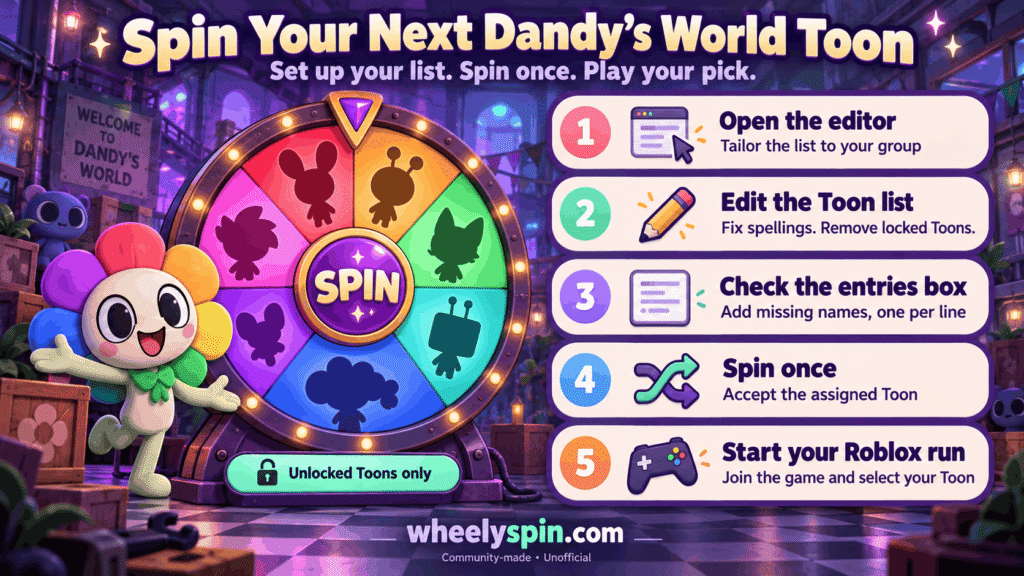
You spin a Dandy’s World Toon Wheel by loading the names, setting it up, pressing spin once, and then playing whichever Toon comes up without bargaining. The setup matters more than the spin, so I keep it to five steps.
- Editor first. Before any spin, tailor the list to your group, because a list built for someone else rarely matches who owns which Toon.
- Edit items next. Fix spellings and remove a few Toons nobody in the party has unlocked yet.
- Entries box check. If a Toon is absent, type the toon’s name on a new line, one name per line.
- Randomly assign a Toon. Spin once and treat the result as final for the next match.
- Roblox last. Open it, join the survival horror game, and pick the Toon the wheel gave you.
The order is the point here. In my own sessions, skipping steps one and two caused more arguments than any bad roll did, because someone always got a Toon they could not select.
Which Dandy’s World Toons Can the Wheel Land On?
A Dandy’s World Toon Wheel can land on any Toon its creator entered, and the fullest lists on the pages I checked run past forty names. One page also lets you narrow the pool with a filter of All, Main, Regular, or Event Toons, which is handy when a squad wants only one tier.
The group labels below come from one of the pages, which sorts its roster into four buckets. I have kept its exact names in each row:
| Group on the page | Toons named in that group | What the page says about the group |
|---|---|---|
| Main Toons | Boxten, Poppy, Dandy, Goob, Scraps, Shrimpo | The starting set, open from day one |
| Popular Characters | Blot, Sprout, Vee, Ginger, Bobette, Bassie | Picked for their abilities, playstyles and story |
| Unlockable Toons | Teagan, Rodger, Flutter, Glisten, Cosmo, and others | Characters you work toward in play |
| Newest Additions | Eclipse, Gigi, Flyte, Brightney, Soulvester, Fruitcake | The most recent arrivals |
These buckets are a page’s own sorting, not the game’s official tiers, so treat them as a rough map. If you Stay updated with patch notes and add new arrivals by hand, your wheel will stay closer to the live roster than any preset does.
Why Let a Wheel Pick Your Toon Instead of Choosing Yourself?
A wheel picks your Toon better than you do when the goal is range, because it removes the comfort pick and forces you into kits you have been dodging. I noticed my own play got sharper after a week of spins, mostly because I stopped leaning on one Toon’s unique skills to cover my mistakes.
There is a fair argument against it. The original cast is available from the start, and new players who are still learning the game probably need a stable pick more than a surprise. For them, a spin only makes sense once each Toon’s unique abilities feel familiar.
Past that point, a random pick stops being a gimmick. Different Toons have distinctive playstyles, and you only learn where you perform best by getting stuck with ones you would never choose for your next run.
The same logic carries outside the match. Artists use a spin for storytelling and crafts, sketch groups trade drawing prompts built from the result, and anyone hoping to Create Content finds that challenge videos feel more engaging when nobody, including the host, knows the outcome.
Which Random Toon Challenges Actually Test Your Skill?
The random Toon challenges that test skill are the ones that remove your escape routes, such as banning rerolls or forcing a whole squad to play the result. Here is how I sort the formats I have tried, from casual to punishing:
| Format | How the spin works | What it tests |
|---|---|---|
| Challenge Friends race | Each player spins once, then everyone lines up survival times side by side | Who can survive with any toon |
| Chat pick | Viewers vote on when to spin, with chat-driven picks | Staying calm when the crowd decides |
| Spin Again ladder | A continuous loop: a new Toon every floor or every run | Being prepared for any kit |
| Comfort ban | Remove your top three, then spin | Playing Toons you normally avoid |
The race is my default, because it is easy to compete and Share results in a group chat afterward. The ladder is harder, since pure RNG can hand you two weak picks in a row.
Each format is a way to Practice for Any Scenario. The quiet benefit is that you start building unique survival strategies for Toons you would never pick on purpose.
How Do You Edit and Tailor a Toon Wheel for Your Group?
You tailor a Dandy’s World Toon Wheel by trimming it to the Toons your party actually owns, adding any that are missing, and then deciding how the odds and repeats should work. A Toon wheel that matches the real lobby gets used, and one that does not gets ignored after two spins.
Odds come next. You can Add weights to favor certain Toons, which is useful when a friend wants to Discover Hidden Gems they didn’t know you’d enjoy without abandoning their main. For a Main-toon-only run, delete everything outside that tier instead of weighting it.
Repeats are the next choice. A removal setting lets the wheel cycle through everyone without repeats, which is the cleanest way to Build Versatility across a full roster.
When the list is ready, a single Click on share creates a shareable URL. You can publish it and send it to friends, so they Press Spin on the very names you prepared.
What Features Matter Most on an Online Toon Wheel?
The features that matter most on an online Toon wheel are fair randomness, adjustable odds, a stream-friendly view, and some way to save or move your list. Below are the ones listed on the pages I checked, in the order I would look for them:
- True Randomness: Results come from the browser-native crypto.getRandomValues() function, with no server-side rigging, which the page calls 100% fair and unpredictable.
- Weighted Choice: Weights make a Toon more likely to win. The page even jokes about a rigged wheel for tiered prizes or rare drops.
- OBS Streamer Mode: A Green Screen background for overlays, and the page says it works with Streamlabs.
- Elimination Mode: The winning Toon is automatically removed after each spin.
- Share Links: A link to the wheel that others can open and use.
- Auto-Save & Sync: Your list is kept in Local Storage, so it is always ready on the same device.
- Import / Export: Save a backup as JSON and restore it in one click.
From my own use, local saving is the feature I miss most when a page lacks it. Rebuilding a forty-name list by hand after a cleared browser cache takes longer than any spin.
Is the Dandy’s World Toon Wheel an Official Game Tool?
No, the Dandy’s World Toon Wheel is a community-built page with no link to the game’s developers. Each free online random toon picker I found is made by a third party, so the people who build the game do not maintain it.
That changes how you should read any random character picker. A label like 2026 character wheel is the creator’s own wording, and streamers in particular should check the list before going live.
What you can expect from a well-built version is the same as from basic wheel spinners: clear rules and fair results. Anything beyond that, such as how complete the Toon list is, depends on how recently the creator updated it. I treat every preset as a draft and correct it before I share it.
Can You Add a Missing Toon or Edit the Toon List?
Yes, you can add a Toon or edit the list on most Dandy’s World Toon Wheel pages, usually by typing each name on its own line in the text area that holds the entries. One page says this directly, and it is the quickest fix whenever the game adds a new Toon.
The lists show why this matters. Waxwell, Squirm and Ribecca show up on only one of the rosters I checked, and Eggson on two, so recently added Toons often lag behind on presets until someone types them in after they are released.
Editing also lets you change the order of names. A page with fast editing turns the same text area into a Wheel of Names, a food wheel, or a custom raffle wheel in seconds, which I find handy when a Dandy’s World night turns into choosing snacks.
What Exactly Is the Dandy’s World Toon Wheel?
The Dandy’s World Toon Wheel is a browser spinner filled with Toon names that chooses one for you at random. People use it for content creation, quick challenges, challenge runs, roleplay nights, and picking stream mascots.
Some pages go beyond one wheel. A Simultaneous Multi-Wheel feature lets you spin up to 6 wheels at once, the way you would set up Truth or Dare or other party games. For Dandy’s World, I pair a Toon wheel with a second wheel of rules.
The appeal is speed. A decision that could take a lobby five minutes gets settled in seconds, and you let fate choose instead of debating.
Artists get a second use from it. A spin can inspire a sketch, and adding a pose, outfit, or mood turns a single Toon name into a full drawing brief.
Who Are the Most Popular Dandy’s World Toons?
The Dandy’s World Toons the wheel pages name as crowd favorites are Boxten, Vee, Shrimpo, and Eclipse on one page, and Blot, Sprout, Vee, Ginger, Bobette, and Bassie on another. That page links their pull to massive search volumes, their kits, and their lore.
Popularity is a poor guide to your own results, though. If you Can’t decide or feel stuck choosing, the tips I find useful are to Learn Each Toon’s Abilities, Adapt Your Strategy to the Toon you get, and Master the Meta and Anti-Meta so a crowd favorite and a forgotten pick both feel playable.
Comparing the crowd pick with the Toon you actually win with is useful. Different playstyles suit different players, and some of my best runs came from Toons I had to earn through gameplay and had ignored.
Can You Use a Toon Wheel for Dandy’s World Videos and Streams?
Yes, a Dandy’s World Toon Wheel works well for videos and streams, and one page lists content creation as a main use. A Random toon run with no rerolls is the simplest video format, because the roll itself becomes the hook.
On stream, a Stream challenge where chat decides when to spin gives viewers a reason to stay for the result. I have also used a spin to pick today’s mascot or a theme character, which tells regulars whose story gets the spotlight next.
If you Record Your Runs, keep a simple log of the Toon, the floor you reached, and the date. Over a month, that log becomes its own content, and it shows which Toons hold up under pressure.
Is the Dandy’s World Toon Wheel Updated for 2026?
The dated Dandy’s World Toon Wheel pages I checked all carry 2026 dates, but each one stopped updating at a different point, so none can promise the latest roster. Since none of them is official and all are not connected to the studio, updates depend on the page owner, not its makers.
The best clues are inside the lists. One roster mentions holiday and event exclusives, and its entries for Coal, Rudie, Cocoa, and Gourdy carry festive emoji such as a sled, a reindeer, a bunny, and a pumpkin. Those event Toons are the ones I check first, because they are the easiest to leave out.
One page calls its starting Toons the cast that started it all, and that core rarely changes. Event releases change most often, so I check the official update notes once a month and add any new names by hand.
How Do You Make Some Toons Show Up More or Less Often?
You make some Toons show up more or less often by giving them weights, which raises or lowers their share of the wheel. A heavier weight means a bigger slice, and a lighter one means that Toon comes up less.
I use weights in two ways. I turn down the fan favorites that everyone already plays, and I turn up the underused Toons that nobody picks, which keeps a group run competitive without banning anyone.
Weights do not help when every result has to be different. For raffles, classroom pickers, team drafts, and any draw that needs unique winners, a removal setting works better than weights, because weights only shift the odds and never guarantee a new name.
Can You Stop the Same Toon Coming Up Twice in a Session?
Yes, you can stop the same Toon coming up twice by switching on the wheel’s removal setting, which takes each winning Toon off the wheel after its spin. One page puts this as a checkbox labeled Remove the winner, so each friend ends up with a different Toon.
This is the setting I use most for a Squad shuffle, where every player spins once before the match starts. Without it, two people will eventually draw the same Toon and someone has to spin again.
When the session ends, reset the list so the next round starts with the full roster. I keep a saved copy of the full list for this, because rebuilding it by hand is slow and easy to get wrong.
Can You Share Your Own Version of the Toon Wheel with Friends?
Yes, you can share your own version of a Dandy’s World Toon Wheel by creating a link to it, and anyone who opens that link sees the exact same list and settings. Nobody has to rebuild your edits.
Shared links are useful beyond your own crew. Creators drop them into polls and collabs, and one page says its spinner works for Twitch and YouTube Live streams and for TikTok giveaways.
Before you send a link, check the Toon names once more. A shared link keeps your mistakes as well as your fixes, and I have watched a whole lobby spin a list that still included a Toon nobody could pick.
How Many Dandy’s World Toons Are on the Wheel?
The number of Dandy’s World Toons on a wheel depends on the page, and the presets I checked hold between 20 and 41 entries. None of them matches another exactly, so the honest answer is to check the list before you spin.
| Preset | Toon count it states or holds | Date shown |
|---|---|---|
| Large 2026 roster page | Claims “40+”, lists 41 entries | August 23, 2026 |
| August roster page | Claims “all 38 Toons”, lists 40 | August 2026 |
| Customizable Toons page | 36 entries | July 9, 2026 |
| Short starter wheel | 20 entries | Not shown |
The larger page calls itself updated for 2026. Its list goes beyond the Toons in the group table above and includes Astro, Razzle & Dazzle, Shelly, Tisha, Toodles, Pebble, Gardenia, Yatta, Finn, Dyle, Looey, Connie, Brusha, and Delilah.
My rule is to trust the list, not the stated count. Count the names yourself, delete any that are not Toons, and add whatever the latest update brought in.