What Is a DTI Theme Wheel and How Does It Pick Your Dress to Impress Theme?
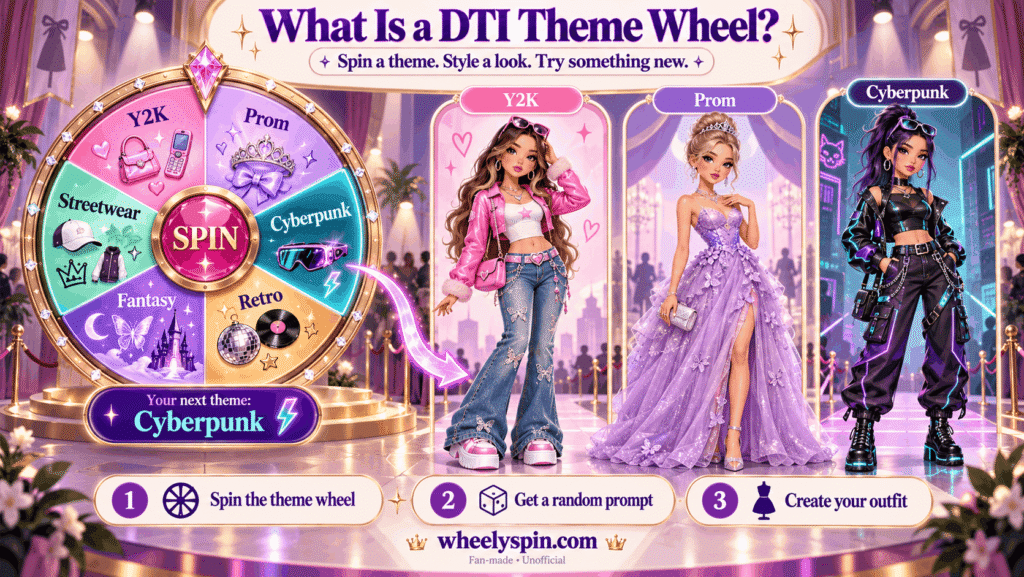
A DTI theme wheel is a spinner filled with Dress to Impress theme prompts, such as Y2K, Prom or Cyberpunk, that lands on one at random so you can style a look for that prompt in the Roblox game.
I started using one after noticing I kept dressing for the same handful of prompts every session. Most wheels arrive preloaded with a long list, and the size varies a lot: one carries 94 slices, another lists 198 once the repeats are counted. The exact number matters less than the fact that the pick is out of your hands, so you try styles you would normally skip.
The fairness of that pick is worth a second look. Better tools lean on True Randomness through the browser-native crypto.getRandomValues() call instead of a fixed order. Some also add a Weighted Choice setting with weights, so a favorite prompt lands more likely than the rest, which is handy when a group wants more of one kind of look.
That randomness is what pushes players past the comfort zone the game’s lobby tends to reward. Treat the wheel as a fan-made practice room that sits beside the game, not a copy of it. The game keeps its own rotation, while the wheel decides what you rehearse, what your group plays and what your viewers watch.
How Do You Spin a DTI Theme Wheel and Style the Result?
You spin a DTI theme wheel by pressing it once, letting it settle on a single theme, and then dressing your Dress to Impress avatar to match that result before your agreed time runs out.
The flow below is the one my group uses, and it works the same in a private server as it does in a public lobby:
- Theme plus challenge: decide whether you want a plain theme or a rule stacked on top, like One color only, for a round harder than usual.
- Entries tab: skim the loaded themes and cut anything the group already played to death.
- Elimination Mode: switch it on if you want each pulled theme gone, since the winner is removed from the list automatically.
- Friends’ runway: everyone dresses for the same random theme, then the group picks a winner and goes again.
The result appears in a post-spin pop-up, and that box is where most people lose time. Close the box, start the timer, and start dressing straight away.
Seasoned challenge players usually add a second rule only after a few clean rounds. The Challenges setting turns ordinary outfit challenges into a tougher round, so I keep it off until everyone knows the wardrobe well.
Which Dress to Impress Themes Can the Wheel Land On?
A DTI theme wheel can land on 252 different Dress to Impress themes once the lists below are merged, covering eras, aesthetics, events, holidays, fantasy, pop culture, jobs, places, moods and colors.
Each group of themes tests something different, which is why I sort them before a session. Decade Themes demand era-specific fashion, Aesthetic Themes check your grip on internet fashion culture, Event Themes cover occasions that call for glamorous or spooky looks, and Fantasy Themes pay off imaginative execution. Together they reach every major category in the game.
| Theme group | Themes on the wheel | What the group tests |
|---|---|---|
| Eras and decades | 1920s, Roaring 20s, 1950s, 1980s, 1990s, 2000s, 2014 Vibes, 2020, Decades, Y2K, Retro Style, Rococo, Renaissance, Regency Era, Medieval, Old Hollywood, Disco, Historical People, Time Traveler, Wild West, Cowboy, Rock and Roll | Period cuts, hairstyles and accessories from one time |
| Aesthetics and styles | Academia, Dark Academia, Cottagecore, Coquette, Soft Style, Grunge, Gothic, Gothic Romance, Goth, Pastel Goth, Emo, Scene, Kawaii, Gyaru, Harajuku, Lolita Fashion, Old Money, Preppy, Baddie, Softie, Boho, Hipster, Ethereal, Cyberpunk, Steampunk, Street Wear, Avant-Garde, Minimalist, Maximalist, Trendy, Basic, Formal, Casual, Elegant, Glamour, Futuristic Elegance, Freestyle, Fav Aesthetic, Euphoria, Doll, Athletic, Sport | Knowing a named style well enough to read it at a glance |
| Events and nights out | Prom, Met Gala, Red Carpet, Award Show, The Oscars, Wedding Day, Graduation, Birthday, Party, Tea Party, Garden Party, Slumber Party, Masquerade, Carnival, Circus, Music Festival, Rave, Celebrity Event, Fancy Dinner, Casting Audition, Miss Universe, Game Night, Movie Night, Picnic, Book Club, Spa Day, Bestie Hangout, Self Care Sunday, Tennis Match, Country Club | Dressing for a dress code and a setting |
| Holidays and seasons | Halloween, Christmas, Valentine’s Day, Valentines Heartbreak, New Year’s Eve, Holiday, Holiday Break, Festive Holiday, Fav Holiday, Spring Break, Back to School, Summer, Summer Sadness, Winter, Spring, Fall/Autumn, Ski | Weather, layering and holiday color cues |
| Fantasy, myth and royalty | Fantasy, Fairy, Fairy Costume, Fairytale, MERMAID!!, Under the Sea, Lost at Sea, Angel, Angels vs Devils, Greek God/Goddess, Mythology, Mythical Creatures, Vampire, Witch, Zombie Apocalypse, Horror, Enchanted Forest, Royalty, Modern Royalty, Prince or Princess, Queen of Hearts, Pirate, Superhero, Villain, Clown | Wings, tails, crowns and props that sell a character |
| Space and the future | Sci-Fi, Outer Space, Aliens, From Another Planet, Robot, Dystopian, Me in 10 Years, Me in 50 Years, Future Career | Inventing a look nobody has seen yet |
| Pop culture and fame | Barbie, Disney, Disney Princess, Disney Villains, Harry Potter, Alice in Wonderland, Peter Pan, Tinker Bell Characters, Toy Story, Inside Out, Scooby Doo, Winx Club, Wizard of Oz, Mean Girls, Chick Flicks, Famous Movie, Favorite Show, Cartoon, Anime, K-Pop, Popstar, Rock Star, Movie Star, Celebrity, Famous, Hollywood, Fictional Character, Cosplay, Roblox Avatar, Fav Artist, My Idol, Cover of Vogue, Magazine Cover, Top Model, Model Photoshoot | Making a known character or star recognizable |
| Jobs and roles | Going to Work, Business Person, Secretary, Teacher, Doctor, News Reporter, Fashion Designer, Secret Agent, Spy, Cheerleader, Dream Job, Childhood Dream, Opposite Gender, Twins, Brats, Sweetheart | Uniform details and believable workwear |
| Places and activities | A Day in Paris, Airport Outfit, At the Beach, Jungle, Safari Adventure, Museum Visit, Arcade, Gym, Fitness, Shopping, Countryside, High School, School | Practical clothes that fit a location |
| Moods and personal prompts | Happy, Sad Day, Crazy Day, Tired, Cozy, Bright, Just Woke Up, Going to Sleep, Me Right Now, Nobody Is Gonna See Me, I Would Never Wear This, Got It Wrong, I Just Came From…, Apology Video, Zodiac Sign, Your Culture, Favorite Item, Animals | Telling a small story with one look |
| Colors, prints and fabrics | Pink, Blue, Red, Yellow, Green, Black/White, Dark Colors, Light Colors, Dark or Light, Single Color, Neon, Pastel, Monochrome, Favorite Color, Florals, Patterns, Elements, Camouflage, Animal Print, Jeans and Denim, Khaki, Leather, Lace, Velvet, Sparkle | Building a full look around one swatch or texture |
The table mixes scene themes with outfit themes on purpose, since a prompt like At the Beach asks for a setting as much as a garment. Coquette is a good example of why the groups help: the style draws on French fashion and leans playful, flirty and full of feminine aesthetics, so it sits with the aesthetics rather than the events.
Why Let a Random Wheel Choose Your DTI Theme?
A random wheel is worth using for DTI because it removes your own bias from theme choice, which makes solo sessions, group games and recorded content more varied than picking themes by hand.
For solo practice, the wheel acts as a source of daily theme ideas that spark creative ideas you would not reach alone. The same list works away from the game, too, as creative inspiration for photo shoots, parties and cosplay nights.
For group challenges, the pick gives everyone the same target, so players compete on equal terms and the best look wins on merit. A quick vote settles each round, and the host moves to the next round without arguing over whose turn it is to choose. A fashion contest on stream runs the same way.
Streamers and other content creators get a second benefit. A single result can be posted with the Share icon, which creates a results link for social media or player profiles, so viewers who missed the moment can still see which theme came up.
What Features Should a DTI Theme Wheel Have?
A good DTI theme wheel should let you edit the theme list, sort and restyle the wheel, and show it cleanly on a broadcast, because those controls decide how well it fits your group or channel.
Streaming support is the feature I check first. The best example I have seen is an OBS Streamer Mode that adds a one-click green screen background and works with Streamlabs, which saves building a scene by hand.
For layout and editing, these are the controls worth finding before your first session:
- Entries window: change the number of entries by adding or deleting lines.
- ABC icon: sort alphabetically, or use Shuffle to restore order to a mixed sequence.
- Gear icon: pick a color scheme from about 50 options.
- Sun button: switch the day/night mode.
- Add background image and Add center image: place art behind the wheel or a center image in the middle.
- Globe icon: change language for the wheel’s labels.
None of these touch the fairness of the result. They only change how readable the wheel is on a phone screen or a stream layout, which matters when friends are watching the slices pass.
How Do You Score Well on a Random DTI Theme?
You score well on a random DTI theme by reading what the theme means first, then building the simplest outfit that makes that meaning obvious to voters at a glance.
Random themes test range, which is the whole point. You will not master them all, and expecting to nail every prompt is close to impossible, but each spin helps you Build Versatility and Prepare for Anything the game throws at you later.
The prompts that scare people most are the ones outside their usual range. I have found that a style I didn’t know you liked, as a friend put it after a Rococo round, often turns into a favorite, which is how you Discover New Styles without planning to.
When you style an outfit for a chosen theme, treat the wheel’s pick as the brief. Build your outfit around one clear idea, check it against the prompt, and keep practicing the weak categories. That habit tends to reward players more than piling every item onto in-game outfits.
How Do You Customize the Look and Entries of a DTI Theme Wheel?
You customize a DTI theme wheel by editing its entry list, choosing a mode for text or pictures, and saving or exporting your version so it stays the same between sessions.
Before changing anything, check the entries and adjust the design one step at a time. Most editors take one entry per line, so pasting a list from a group chat works if each theme sits on its own line.
| Control | What it changes | When I use it |
|---|---|---|
| Original mode | Keeps the starting list, which you can edit or shorten | Quick games with no setup |
| Image mode | Uses the Painting icon and Add image as entry to load pictures from a gallery or camera | Theme boards with outfit photos |
| Custom mode | Mixes text entries, images and small icons on one wheel | Kid-friendly or mixed groups |
| Simultaneous Multi-Wheel | Runs up to 6 wheels at once | Theme, color and challenge spun together |
| Auto-Save & Sync | Keeps your wheel in Local Storage on the same device | Returning to a personal list |
| Import / Export | Lets you back up configurations as JSON and restore them later | Moving a wheel to a new laptop |
My own setup runs the theme list in one wheel and a color list in a second wheel, side by side. That pairing gives a prompt like Halloween plus Yellow, which forces far more thought than either alone.
Where Can You See Your Past DTI Wheel Results?
You can see past DTI wheel results in the wheel’s results history, which keeps each landed theme so you can check what came up earlier in the session.
History matters for fairness disputes. When someone swears a theme came up twice, the record ends the argument in seconds, and I scroll it before every tiebreak.
A record is also the best way to track which themes your group has covered over a week. Some wheels go further with a Shareable link offering Copy Link and Save & Share buttons, but those links are deleted after 365 days if left unused, so I copy anything worth keeping into a note.
How Do You Share a DTI Wheel Result with Friends?
You share a DTI wheel result by using the share option in the result box or the wheel’s share link feature, which sends either the single theme or your whole wheel to friends.
The fastest route is the pop-up that appears after a spin. It offers Spin Again and a share button, so you can share the theme with the group chat before anyone starts dressing.
For records, open the Results tab to the right of Entries, which lists past answers as the wheel’s spin history. The Clear the list button wipes those saved results, so I clear it at the start of each new session.
Share Links go one step further and send the whole wheel, entries and all. That is the option I use when a friend wants to run my exact theme list in their own lobby.
Can You Use a DTI Theme Wheel on a Livestream?
Yes, you can use a DTI theme wheel on a livestream by adding it to your broadcast software as a spin wheel overlay, with OBS being the usual choice.
A Stream Contest works well here, since chat votes on the best outfit after each spin. That format turns a theme pick into a segment viewers stay for, and it gives quieter viewers an easy way to join in without typing much.
I find streams with a visible wheel produce more engaging videos in later edits too. If you Create Content from your sessions, recording the spin and the reveal gives you ready clips for content creation without extra filming. A short clip of the spin landing is often the part people rewatch.
What Exactly Is a DTI Theme Wheel?
A DTI theme wheel is an online spinner that shows random theme names for Dress to Impress, the Roblox fashion game, so players can style looks for prompts they did not choose.
Think of it as a random theme picker and the ultimate tool for breaking a styling rut. It is usually a free online tool holding dozens of outfit themes, and it doubles as a host for games and challenges with friends.
Using one needs no special knowledge. You press the Spin area, the wheel turns through dozens of sections, and it stops on one option after a few seconds.
How Many Themes Does Dress to Impress Have?
Dress to Impress has no single fixed theme count on fan wheels, but one theme list describes 362+ official themes, while most wheels carry far fewer entries.
The wheel numbers vary widely. One editor ships with more than 180 themes, a separate list is labelled 183+, and another wheel holds about 213 entries.
One wheel page shows an update date of July 9, 2026, which is a reminder that these counts shift as the game adds prompts. I treat any number on a wheel as a snapshot, not a full catalog. If a theme you saw in a lobby is missing, add it yourself rather than waiting for a list update.
What Is the MERMAID!! Theme in Dress to Impress?
MERMAID!! is a fantasy theme in Dress to Impress, and one theme guide says the MERMAID!! theme appears every 2 hours, which makes it a prompt worth rehearsing on a wheel.
The theme calls for a clear sea-creature silhouette. Tails, shells and fin shapes work as accessories, and a sea-glass color palette of blues and greens sets the mood faster than any single item.
Players who practice it on a wheel tend to have a ready look when it comes up live. I keep a saved version of my best attempt so I can rebuild it quickly instead of starting from nothing.
Is the DTI Theme Wheel Updated for 2026?
Fan-built DTI theme wheels are often updated for 2026, but no wheel can promise it matches the game, because the theme list changes as new prompts arrive.
The safest approach is to research the newest prompts yourself and add or remove themes to keep your copy current. Many wheels let you add your server’s own themes to the entries box, which covers inside jokes and fresh releases alike.
I review my list after each big game update. That takes ten minutes and saves rounds where nobody recognizes the prompt. I also delete prompts my group has voted out, so the wheel only holds themes people enjoy.
Is the DTI Theme Wheel an Official Dress to Impress Tool?
No, the DTI theme wheel is not an official tool from the game or from Roblox, and the themes on it are popular themes players use rather than a list pulled from the game’s code.
That independence is a strength. A fan wheel can carry retired prompts, community jokes and custom rules that the game itself would never include.
It also means you should not expect perfect overlap with what the live game shows. Check a wheel’s list against your own play before relying on it for practice. In my experience the gaps are small, usually a few new prompts that have not been added yet.
Does the DTI Theme Wheel Use the Exact Themes from the Game?
No, a DTI theme wheel does not use the exact themes from the game, because it is a community list that may match many live prompts but is not built or checked by the game’s makers.
A wheel is not made by the Dress to Impress team and isn’t connected to the game, so treat its list as a starting point. The core themes, from Y2K to Met Gala, overlap heavily with what players see in lobbies.
Whatever list you use, the scoring advice holds. Keep it simple, because plain outfits sometimes score better than crowded ones, and remember that the right detail can make or break a look on any prompt.