How Does a Halloween Costume Picker Choose Your Costume?
A Halloween costume picker chooses your costume by landing at random on one idea from a list, such as a Vampire, a Witch or an Astronaut, and you then keep that pick, change the list, or spin again.
The randomness is more honest than most people expect. Well-built pickers draw each result from the browser’s secure random generator, so every slice holds an equal chance until someone deliberately changes the weights. I trusted that claim more after watching a wheel land on the same Mad scientist slot twice in a row, which is exactly what fair randomness looks like.
List size shapes the night more than the spinning does. The templates I compared run from 20 slices up to 32 entries, 35 entries and 40 entries, and the longest ones tend to bury the classic monsters under novelty picks. A tight set of last-minute costumes often serves a rushed household better than a giant menu. To finish the night, the horror movie generator picks a scary movie, or a horror comedy if you want something lighter.
Not every picker is a wheel, either. Text generators hand you descriptive mashups each time you press the Generate button, so you keep clicking, request a batch through a 5/10/15 Costumes selector, and scan it with Show All. Portrait tools go a step further and render your own face in costume, in a women’s or men’s style.
Which Costumes Show Up on a Halloween Costume Wheel?
A Halloween costume wheel usually blends mythical creatures, famous movie personalities and spooky professions with a handful of trendy pop culture characters, so one list covers both creepy and whimsical picks.
The pop-culture end is where these lists date fastest. Recent wheels name Dracula, Wednesday Addams, Deadpool and The Joker outright, which tells you the people building them watch what teenagers actually wear in October. A list with no current names reads like a costume-shop catalogue from years ago, and teens skip it.
The quieter half of every good list is the closet half. The wheels I keep coming back to always include outfits built from clothes you already own, because a result nobody can afford gets vetoed on the spot. Most of these looks take minutes and rely on common household items:
| Closet character | Pieces to pull together |
|---|---|
| Tourist | Loud shirt, sunglasses, a folded map and a camera around the neck |
| Lumberjack | Flannel shirt, jeans and a beanie |
| Rock star | Black clothes, borrowed shades and messy hair |
| Chef | White shirt, an apron and a wooden spoon |
Matching a wheel to the Halloween mood of the evening matters as much as the names on it. A gore-heavy list suits an adult crowd, while a list stocked with closet looks keeps mixed ages spinning, and treating the default as a starting point for embracing your imagination beats spinning it untouched.
What Kinds of Costume Lists Can You Load Into a Picker?
You can load a picker with themed lists built around horror legends, folklore beasts, film characters and job-based looks, and each theme changes what kind of night the wheel sets up.
Horror lists lean on names that need no explanation: Frankenstein’s monster, the Mummy, the Werewolf, a Ghoul, a Goblin, a shrieking Banshee and the Boogeyman. Their staying power comes from instant recognition at a doorway, where nobody wants a costume that needs a speech.
Folklore lists are the conversation starters. A Kraken, a Basilisk and a Kelpie sit beside the Pegasus, the Unicorn and the Leprechaun, with the Yeti, the Sasquatch and any Cryptid rounding out the set. I load this list when the crowd enjoys obscure picks more than polished ones.
Film lists borrow straight from the screen: Freddy Krueger for slasher fans, Jack Skellington and Sally from The Nightmare Before Christmas for pairs, and Coraline for anyone who wants eerie without gore. Job-themed lists swap in the Plague doctor, the Grim reaper and the plain Farmer.
Generators widen this into a vast exhibition of combinations, and mixing and matching two themes is where the oddest ideas come from. Switching themes on a wheel takes seconds if you paste a themed list into the entry box instead of typing names one at a time.
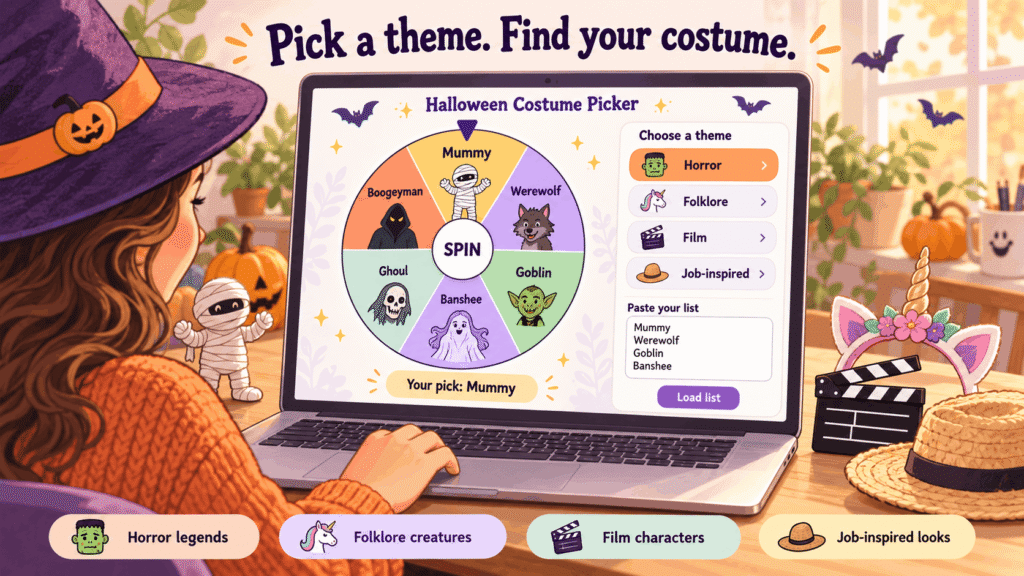
How Do You Use a Halloween Costume Picker Step by Step?
You use a Halloween costume picker by loading a list, trimming it to costumes you could actually make, spinning once, and acting on the result before second thoughts set in.
The order matters more than the tool. When I skip the trimming, the wheel lands on something impossible and the whole exercise turns into a debate. This sequence has held up for me across several Octobers:
- Custom wheels: Start from a ready Halloween template or build one, then open Edit to see every slice, typing your own ideas one per line.
- Adjust the items: Delete anything that needs sewing skills you lack, so a Crow or a Beast stays while a full Death shroud might go.
- Spin once: Let the pointer stop and read the slice aloud, so nobody pretends they missed it.
- Quick decisions: Allow one re-spin per person, and if the Devil comes up twice, take the hint.
Two questions decide how strict that trimming should be: where you’re going and how much time you have. For spooky parties booked weeks ahead, I accept bolder results, while last-minute trick-or-treating calls for closet looks. For small kids, I also strip slices that need props, or allow only short, soft and flexible ones.
Treat the tool like one of the evening’s games and the result sticks better. A pick made in seconds and laughed about gets worn, while a pick negotiated for an hour gets abandoned. Anyone who doubts the spin can test the generator on a randomness audit page first.
How Do You Run a Costume Wheel at a Halloween Party?
You run a costume wheel at a Halloween party by giving each guest a turn and removing every winning slice, so no two people arrive in the same outfit.
Assigning outfits at random fixes the oldest party problem: three people turning up as the same character. With each winner automatically removed, the wheel guarantees unique winners, so one guest draws the Ninja, the next the Cheerleader, then the Pirate, the Alien and the Superhero in turn. It also kills the awkward costume planning group chat.
Low-pressure slots help shy guests. A Career costume, a Silly costume and an open Cosplay slot let people opt into something easy, and anyone after solo inspiration can spin privately before arriving. I add one practical filter for long evenings: guests should be able to sit down and eat without unpacking themselves.
Groups that want to match flip the method. One landed result can become a shared theme at any group size, as long as each guest is free to interpret the result their own way. I have watched a single slice become a Victorian ghost, a modern one and a cartoon one in the same photo.
Bigger households can pull from group and family costumes instead, such as a box of crayons with one color each, a deck of cards or chess pieces. Pairing the costume spin with a Truth or Dare round once everyone arrives keeps the focus on having fun rather than on who looks best.
How Do You Edit, Save, and Share Your Own Costume Wheel?
You change, save and share a costume wheel by opening its editor, reworking the slices, saving that copy, and sending its link to whoever needs to spin the same list.
Themed copies save the most time. For theme nights, I keep three trimmed versions of one master list rather than rebuilding each October:
| Theme | Slices kept | Best for |
|---|---|---|
| Spooky only | Ghost, Demon, Swamp monster, Sea monster, Spider, Bat, Skeleton | Late adult parties with low lighting |
| Cute only | Black cat, Pumpkin, Angel, Fairy, Princess, Snowman, Dinosaur | Younger kids and mixed ages |
| DIY only | Scarecrow, Robot, Nerd, Clown, Jack-o’-lantern, Doll | Cardboard and thrift-store builds |
The control panel hides more than people use. Shuffle mixes the slice order, Sort lines entries up alphabetically, Add image puts a picture on a slice for kids who cannot read yet, Advanced changes how the spin behaves, and Browse Styles swaps the color scheme. A Download button keeps a copy for venues with poor signal.
Sharing is the last step. Share Links builds a shareable link you can publish on a group page or send it to friends directly, so everyone spins an identical list without retyping a single slot.
Can AI Show You Wearing a Halloween Costume Before You Buy It?
AI can show you wearing a Halloween costume by turning one face photo into a set of costume portraits, so you can judge a look on yourself before spending money on fabric.
The usual workflow behind AI costume portraits runs in a fixed order: you Choose and pay, upload a face shot, and the tool returns 20 AI portraits covering 10 looks, with 2 of each. Getting two takes per look matters, because one version almost always flatters more than its twin.
Regal and fantasy looks render cleanly in the samples I have tried: a Queen, a King, a Prince, a Wizard, a Mermaid or a Ballerina. Era-hopping looks like a Time Traveler or a Knight add range. These previews talked me out of two costumes that looked great on a hanger and flat on my face.
A sharp request beats a long one. Describing a futuristic vampire standing above a neon city, plus a couple of details about fabric or lighting, gives the model a clear target. My own observation is that a well-lit source shot improves results more than any extra wording.
How Should You Describe a Costume Idea to Get Better Suggestions?
You get better costume suggestions by naming a character, giving it a setting or season, and adding one or two concrete details, because vague prompts return generic looks.
Portrait samples prove the formula. A Ghostly host, a Midnight magician, a Forest guardian and an Autumn scarecrow each pair a role with a time or place, and that pairing is what separates them. How closely results resemble you varies by photo, so spend your words on the outfit, not on your face.
Text generators reward the same habit, and the contrarian lesson is that longer is rarely better. Ideas like a Gothic Jester or a Glowing Shadowy Mime work because each adds a single texture or light quality to a familiar role. When I write my own slices, I copy that shape: role, texture, place.
Softer requests need optional instructions. Asking for a friendly character changes the facial expression and palette without dropping the Halloween theme, which matters at family events where small children will see the results.
How Do You Turn a Random Pick Into a One-of-a-Kind Costume?
You turn a random pick into a one-of-a-kind costume by keeping the wheel’s result as the base and adding one twist, such as an era, a genre or a material.
Generator outputs show the twist method clearly. A Wicked Queen and a Cursed Queen both start from royalty, a Wicked Zombie Nurse adds the undead to a uniform, and a Steampunk Witch adds brass and gears to a classic. A Twisted Alice bends a storybook, while a Ghost Ship Captain and a Sinister Vampire Hunter put a haunted angle on ordinary jobs.
Dancewear takes twists especially well. A Creepy Skeleton Ballerina and a Haunted Ballerina share one tutu with different face work, and a Mystical Gothic Fairy shows how far one adjective can push a gentle look. I once paired a mysterious vampire cape with a charming fairy wing set, and it won a neighborhood contest mainly because nobody else had tried it.
Pairs can spin twice and combine results, or skip the wheel’s chaos and load matched pairs. Whichever route you take, dramatic long capes, robes and dresses need a quick hem to stop tripping, so a twist you can enjoy all night turns classic costume inspiration into something that is clearly yours.
How Do You Choose a Halloween Costume You Can Enjoy All Night?
You choose a Halloween costume that stays comfortable from start to finish by matching it to the event, the hours you have to prepare, the people you are with, and how easily you can move in it.
Venue is the first filter. Sidewalk routes and nighttime outings call for bright colors or reflective tape, while a packed living room punishes wide wings. I narrow the wheel before spinning, and porches lit with candles are a good reason to look for flame resistant labels on anything long or fluffy.
Prep time is the second filter, and loading the right list saves the argument:
| Situation | List to load | Example picks |
|---|---|---|
| Under an hour to prepare | Funny costumes | Banana, Hot dog, Taco, Toaster, Avocado, Inflatable dinosaur, Bubble wrap with a Do not pop sign |
| Young trick-or-treaters | Easy costumes for kids | Firefighter, Ladybug, Friendly witch, a robot from a cardboard box, a superhero of your own invention |
| Two people | Couples costumes | Salt and pepper, Peanut butter and jelly, Bee and flower, Chef and pizza |
| Adult horror night | Scary costumes | Creepy doll, Headless horseman |
Company is the last filter. For under-tens, the kids’ list keeps every result suitable, and among adults, putting two favorites on one wheel is the quickest way I know to settle debates before anyone spins.
How Do You Keep a Halloween Costume Safe?
You keep a Halloween costume safe by making sure the wearer is visible after dark, can move without catching fabric underfoot, stays clear of open flame, and carries nothing hard or pointed.
Visibility comes first for anyone out on the street after sunset. A Zombie in grey rags fades into the dark, so I add strips that throw headlight beams back and at least one pale layer. It is worth the effort to check your closet for a light jacket before buying anything new.
Movement is the second test. Anyone who cannot walk up a flight of stairs or see comfortably through the eye openings will pull the costume off within an hour. For little ones, skin-safe makeup beats a full rubber head covering, and testing a small dab on the arm the day before avoids a rash on the night.
Fire and crowds round out the checks. Loose synthetic fabric near lit porch lanterns is the main hazard, so read garment labels for fire ratings. Indoors, a costume with wide sleeves that spills drinks at a crowded party gets bumped all evening, so I keep accessories small, bendy and light.
Can I Customize the Halloween Costume Options or Add My Own Ideas?
Yes, you can customize the Halloween costume options by changing the default slices and typing in extra ideas, with each new costume entered on its own row. Changes save as a custom version you can reopen later. Auto-Save also keeps the list in Local Storage on the same device, even if you never press save. The Weighted Choice setting can then make a new entry more likely to win than the defaults. If none of the costumes fit, the random character generator invents a character you could dress up as.
How Do I Make Some Costumes More Likely Than Others?
You make some costumes appear more often by giving them a larger weight, which widens their share of the wheel compared with the rest. You set weights in the list panel. Equal weights keep the odds even, while weighted items steer a group toward realistic choices and practical outfits when budgets are tight. I give cheap closet looks double weight in late October, which still counts as fair picks because everyone agreed to it.
What Is Elimination Mode Good For?
Elimination mode is good for handing every person a different costume, because each result drops off the wheel once it has been picked. It turns a pile of ideas into a fair group assignment at a party. The same setting suits tiered prizes in a costume contest, or rare drops where only one guest gets the showpiece outfit. Teachers use it in classrooms so no two students repeat a pick.
Can I Share My Customized Wheel With Friends?
Yes, you can share a customized costume wheel by copying its link and sending it, so friends spin the exact same list on their own devices. Passing on the wheel’s URL lets guests open it on their phones, whether they run Android or iOS. Companion apps on Google Play and the App Store add saved history and offline access. The same link works for classroom pickers, team drafts, small raffles and giveaways.
Are Halloween Costume Picker Ideas Kid-Friendly?
Most Halloween costume picker ideas work for children, and switching to a children’s list keeps every possible result age-appropriate. For cold trick-or-treating, I steer toward looks that fit over warm clothing, such as a Cowboy with a fleece under the vest. With young children, face paint instead of masks keeps their vision clear. A patch-test on the wrist the day before rules out a skin reaction.
Can a Costume Picker Choose Couples Costumes?
Yes, a costume picker can choose couples costumes, either by running two separate spins and joining the outcomes or by loading a list of ready-made pairs. Pairs that land well include Astronaut and alien, Scarecrow and crow, Vampire and bat and Ghost and ghost hunter. Cowboy and horse and Gardener and garden gnome suit couples who enjoy a sight gag. Two random spins produce the more unique costume, while preset pairs read instantly.
What Is the Easiest Last-Minute Halloween Costume?
The easiest last-minute Halloween costume is a bedsheet spook made from an old white sheet with eye holes big enough to see through, because it needs one item and no sewing. A cat look takes a headband with paper ears and eyeliner whiskers. A wrapped look uses white clothes with loose toilet paper or bandages. A sea-raider look needs a striped shirt, a bandana and a paper eye patch.
How Does a Group Pick One Costume Together?
A group picks one costume together by spinning a single time and having each member dress as a different version of whatever lands. The group costume trick works because three captains from different eras read as a theme rather than a clash, and it makes spinning with others quick. Large crowds split into smaller teams with a Random Team Generator, and each team takes an idea such as planets of the solar system, a fruit salad, a rainbow or Zombies and survivors. Another team can become the weather as sun, cloud, rain, snow and lightning.
Got a bigger group? Use the Random Team Generator to split everyone into smaller teams, then let each team spin its own costume.
Is a Halloween Costume Wheel Really Random?
Yes, a well-built Halloween costume wheel is random, drawing each result from the browser’s cryptographic number source so no slot is favored unless you add weights. Left as-is, the built-in list gives every slot the same share. Streaks still happen, and a wheel can land on one slot twice running. If that bothers you, tweak the weights openly rather than re-spinning in secret.
Every spin uses your browser’s secure random generator, so each idea has the same chance. You can test it on our randomness audit page.
What Comes in an AI Halloween Portrait Pack?
An AI Halloween portrait pack gives you twenty portraits split evenly across ten costume looks, sold as one bundle after you choose a styling. The pack of 20 portraits is listed at $7, and existing credits can cover it instead of a new charge. Expect variation: some buyers get 10 out of 20 lookalikes and others only 1–2. The provider can’t guarantee a number.
How Many AI Portraits Will Look Like Me?
The number of AI portraits that look like you varies from person to person, and no fixed count is promised. The examples in the gallery show the best case, not the average. Because results vary, I scroll the whole set and download favorites individually rather than saving everything. It pays to check results closely before posting any of them.
What Do I Need to Do to Get AI Costume Portraits?
To get AI costume portraits, you pick a look, pay, log into an account and upload a single sharp photo of your face. You can add instructions before creating to steer the outfit. Images then arrive in real time, at roughly 10–30 seconds per image.
Which Photos Am I Allowed to Upload?
You may upload only photos you have the right to use, which in practice means your own face or the face of someone who has agreed to it. You sign in or create an account first, then upload one clear face photo. Using a friend’s picture without asking breaks the upload rules, however harmless the costume idea seems.
How Soon Do AI Halloween Portraits Appear?
AI Halloween portraits appear within about half a minute each, streaming in as they finish rather than arriving all at once. If a request fails partway, the pack stops but the completed portraits stay available. A favorite can later go through an AI video generator to become a short animated scene.
Can I Change the Clothes, Background, or Style of a Portrait?
Yes, you can change the outfit, setting and art style of a portrait by adding written direction before you start the batch. Describing the idea in one line also returns 10 free AI suggestions to compare. Use that line to set the mood. Notes like playful rather than frightening or no blood shift the tone too.
Do I Need a Photo of Myself Already in Costume?
No, you do not need a costumed photo, because the tool builds the outfit from a plain face shot. Your everyday clothes and an ordinary background are fine. Notes you add apply to the first 20 portraits. Refinements after that use credits shown before you create.
Can I Make an AI Halloween Look Less Scary?
Yes, you can soften an AI Halloween look by asking for a gentler tone in your written notes. Since you need no costume or special backdrop in the upload, softening is purely a wording job. I ask for a kid-friendly expression on a classic Halloween look, with warmer colors, when the portraits are for a younger sibling.
Can I Pay Once Instead of Subscribing?
Yes, you can pay once, because single purchases are offered alongside optional subscriptions. If a pack disappoints, refunds are not promised. You can still ask the provider for a review and a fair solution.
What Happens if Generation Fails or I Dislike the Results?
If generation fails, the run halts and the portraits already finished remain yours, and if you dislike the results you can contact the provider. That is one reason I start with one-time payments before committing to monthly plans. Those plans give discounts to regular creators who make portraits often.
What Happens to My Uploaded Photo?
Your uploaded photo is used only while the portraits are created, is not saved to your account, and is not used to train AI. The source photo drops out once creation ends, and you can delete saved portraits from your storage area at any time. Every upload must respect the Terms, applicable law, any needed permissions and consent, and your legal right to the image.
More Halloween fun
- Truth or Dare Generator for a Halloween party game
- Would You Rather Generator with kid-friendly and funny questions
- Random Movie Picker to choose a film for your Halloween movie night
- Random Team Generator to split guests into teams for a costume contest
- Punishment Wheel for harmless forfeits during party games