Workout Wheel: How Does a Spin Pick Your Next Exercise?
A workout wheel is a spinner filled with exercises and rep counts, and each spin lands on one move for you to do on the spot, so a run of spins adds up to a training session you never had to plan.
Working backwards from that answer, the clever part is not the exercise list at all. Most people who skip a session do not lack moves; they stall on choosing them. Hand that choice to a wheel, pick your first exercise by spinning, and let the next round decide itself. The planning step disappears and only the effort is left.
The lists themselves tend to be short and practical. One published set of default items runs to 13 slices, while a longer roster stretches to 27 slices of reps, planks and jumps. I have trained with both sizes, and the longer wheel feels less predictable, though the smaller one is easier to tune when you only have a few minutes. To cool down, the random yoga pose generator gives a pose with a simple how-to cue.
Fairness matters more than people expect, because a wheel that keeps landing on the same lunge set gets abandoned fast. Wheels built on true randomness use a browser-native RNG, such as crypto.getRandomValues(), so the result is picked on your device with no server-side rigging. One tool describes its spins as 100% fair, and from a user’s seat that simply means every slice keeps a real chance each round.
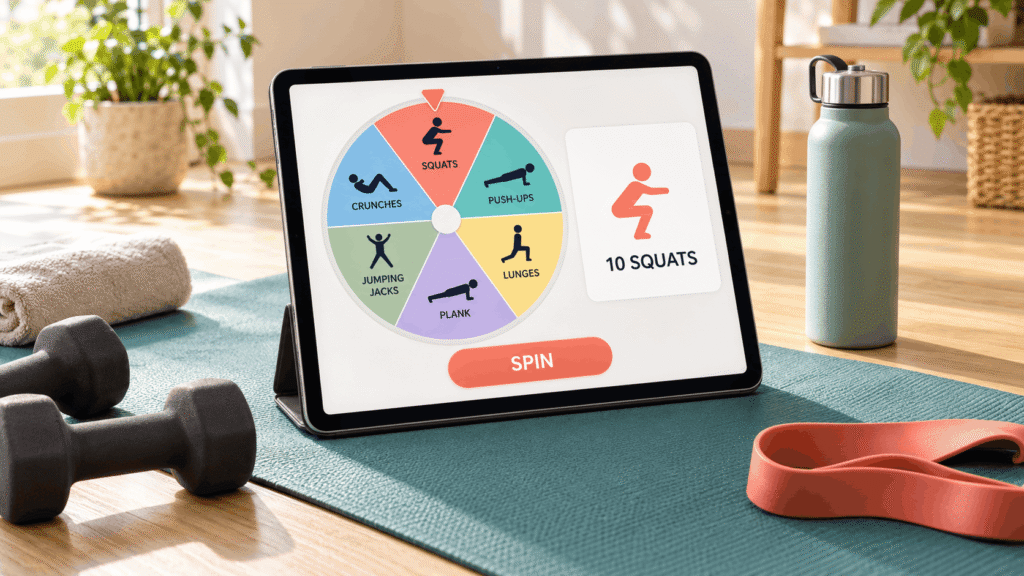
What Exercises Are on a Workout Wheel?
A workout wheel usually carries bodyweight exercises such as jumping jacks, squats, lunges, burpees, sprawls, crunches, planks and high knees, each written with a rep count or a hold time.
That mix is not an accident. The people who build these lists pick no-equipment moves that need a patch of floor and nothing else, which is why the same names keep turning up across different wheels. Counts on the shorter lists sit between 5 and 20, while the longer lists push skipping jumps into triple digits.
Read each label as one of the wheel’s clear rules rather than a suggestion. A slice that says 40 means 40, and a plank slice gives seconds instead of reps. Some wheels lean gentle and suit warmups at an easy pace; others are stacked for HIIT bursts with jump-heavy slices.
Neither label tells you much about your own fitness level, so a glance at the slice list before the first spin can save a sore knee later. Page titles stay plain, along the lines of fun exercise ideas or random workout exercises, and the honest appeal is unpredictable results. In my sessions the dreaded slot is always the burpee one; lists built for fewer burpees-adjacent moments simply drop burpees or give them a lower count.
How Do You Run a Session With a Workout Wheel?
You run a session with a workout wheel by choosing a category, spinning, doing the move it lands on, taking a short breather, and repeating until you reach your planned number of spins.
The structure fits on a sticky note: spin, sweat, spin again. One guide puts the maths plainly: ten spins make roughly a 15-minute session, which turns the wheel into a quick no-equipment workout for a lunch hour. Working one spin at a time also keeps your attention on the current set instead of the whole routine.
Sorting the slices into full body, core and cardio groups is the step most people skip, and it changes how a session feels. If a slice has no count, set a timer for 20–40 seconds and work until it beeps. Here is how the slices from three published default wheels sort into those groups, with a separate legs row:
| Group | Slices from the default wheels |
|---|---|
| Full body | 10 burpees, 5 burpees, 25 burpees, 15 burpees squat jump, 40 sprawls, 20 sprawls, 5 sprawls, 10 sprawls squat jumps, 5 up/downs, 5 push ups, 5 windmills |
| Legs | 5 squats, 40 squats, 10 air squats, 10 cossack squats, 10 lunges, 40 lunges, 20 split lunges, 10 side lunges, 20 side lunges, 30sec wall sit, 60 calf raises |
| Core | 25 situps, 40 crunches, 20 crunches, 20 toe-touch crunches, 25 leg raises, 20 flutter kicks, 20 russian twists, 10 supermen, plank 70s, plank 35s |
| Cardio | 10 jumping jacks, 20 jumping jacks, 50 jumping jacks, 20 high knees, 50 high knees, 20 mountain climbers, 30 climbers, 50 climbers, 15 high jumps, 10 tuck jumps, 100 skipping jumps, 5 run in place |
I keep the cardio group on its own wheel for days when my legs are already tired from running. Mixing every group on one wheel works too, but expect streaks where the pointer lands on three leg slices in a row.
What Can You Use a Workout Wheel For?
A workout wheel works for solo training, desk breaks, group games and live streams, anywhere a random pick makes exercise feel less like a chore.
The everyday use is answering the what should I do next moment halfway through a session, when motivation dips and the plan runs out. HIIT intervals are the other natural fit, since every new round needs a fresh move and the wheel supplies one instantly. Even a quick break from a laptop gets easier when the decision takes three seconds.
Group play is where wheels get loud. A simultaneous multi-wheel setup can spin up to 6 wheels at once, borrowing the logic of truth or dare: one wheel names the person, a second names the exercise. At birthday party games I have watched this turn a reluctant crowd into a squat contest within minutes.
Streamers use the same trick. An OBS streamer mode with a one-click green screen background lets the wheel sit over a webcam feed on Twitch or YouTube Live, and in streams I have watched, viewers enjoy picking the host’s reps. The same overlay is pitched for TikTok giveaways, so a creator could tie each entry to a short burst of jumping jacks.
How Do You Customize the Moves on a Workout Wheel?
You customize a workout wheel by opening its editor, changing the moves and counts, then deciding how often each slice should land and whether winners stay on the wheel.
Order matters a little, because changing the list after setting odds can undo your work. This is the sequence I follow:
- Edit moves first: swap any slice you dislike and set counts that match your current strength.
- Add equipment moves next, such as kettlebell swings or dumbbell rows, if the gear is within reach.
- Remove moves that bother your joints; a jump that aggravates a knee has no place on a daily wheel.
- Adjust weights last, so favourite slices land more or less often.
- Switch on elimination mode when each move should appear only once per session.
A weighted list is technically a rigged wheel, and for training that is perfectly fine, since nobody is betting on the outcome. Tools that advertise fast editing earn their keep at this stage; if every change takes several clicks, people stop adjusting the list and the wheel goes stale.
How Do You Save a Workout Wheel for Tomorrow?
You save a workout wheel through the link it generates or through your browser’s storage, so the same list loads next time without retyping.
Most tools lean on auto-save & sync, which writes your list to local storage and keeps it current on the same device. That works until you clear your browser data or switch from phone to laptop, which I learned after losing a carefully tuned leg-day list. After a session, the random fruit wheel can pick a quick post-workout snack.
A safer habit is a file backup. Look for import / export buttons that hand you a JSON file; one tool promises you can restore your wheel generator in one click from it. The file also helps when you want to share your wheel with a training partner who prefers loading a file over clicking a link.
Treat any random picker as disposable until you have saved it somewhere you control. Pasting the link into a notes app takes ten seconds and survives a cache wipe.
What Other Features Can a Workout Wheel Have?
Beyond the spin itself, a workout wheel can offer an editor, a saved link and a display view for groups, and those extras separate a no-nonsense exercise picker from a novelty toy.
The editor does most of the heavy lifting. You click edit to tweak reps/time, rename items such as a vague “Plank” into something more exact, and reorder the list so similar moves sit apart. A simple workout randomizer without those controls gets stale within a week, in my experience.
Saving is the second feature worth checking. A good random exercise generator stores your customized wheel behind a shareable URL, so you can bookmark it for tomorrow and open it the moment you are ready to move.
The display option is underrated for coaches. Being able to project the wheel on a gym screen and let the group follow along saves shouting slice names across the room; I have used a hall projector for exactly this.
Can You Change the Reps or Time for Each Exercise?
Yes, you can set the reps or the hold time on every slice through the wheel’s editor, so a slice reading 10 can become 25 or turn into a timed hold.
Counts are the dial most people forget to turn. For warmup roulette, I trim every slice to low numbers and take 3–5 picks before the main set. For a mini HIIT block, swapping counts for seconds works better, because you pick a new move each round and the clock sets the pace instead of the tally.
Adjusting numbers also keeps the wheel a fast way to choose your next move as you get fitter. A list that felt brutal in January should feel ordinary by March, so I raise counts a notch every couple of weeks. Leave timed slices clearly marked with an “s” so nobody mistakes a 35-second hold for 35 reps.
How Do Weights Work on a Workout Wheel?
Weights on a workout wheel change how often a slice lands, so a heavier slice comes up more often and a lighter one appears rarely.
The feature is usually labeled weighted choice, and it makes chosen slices more likely to win without deleting anything from the list. The usual pattern gives each exercise a number; a slice set to 3 should land about three times as often as a slice set to 1.
I weight core slices up during weeks when my back feels stiff, and the wheel handles that bias without overthinking on my part. The weights stay invisible on the spin itself, so the session still feels random to anyone watching. Set a weight to its lowest value rather than deleting a move you might want back later.
What Is Elimination Mode Good For in a Workout?
Elimination mode is good for building a circuit where every move appears once, because each winner is automatically removed after it lands.
The feature was designed for classroom pickers, team drafts and raffles, anywhere you need unique winners. In class or team training that translates neatly: twelve slices, twelve stations, and nobody repeats a move.
Coaches running small groups also get fair results that are easy to defend, since nobody can claim the wheel keeps handing out burpees. I use it for Friday sessions when I want variety guaranteed; once the wheel is empty, the session is over and everyone knows it.
Can You Share a Custom Workout Wheel With Friends or a Class?
Yes, you can share a workout wheel by copying its link, which carries your exercises so anyone who opens it sees the same slices.
Tools call this feature share links: you generate a shareable link, publish the wheel and send it to friends through any chat app. A family challenge works well this way, with everyone opening the same list on their own phone and comparing who got the hardest slice.
At work, I once ran an office break wheel with colleagues, one spin every hour, posted in our team chat. The tools pitch their wheels for decisions, games, and fun, and a shared fitness wheel quietly covers all three. Before sending, double-check the counts suit the least active person in the group.
Is a Workout Wheel Suitable for Beginners?
Yes, a workout wheel suits someone new to training, provided the slices are matched to what that person can do comfortably today.
The trick is setting things up before the first spin. For a first home workout, this order keeps things manageable:
- Change the reps or time on every slice to roughly half the default count.
- Swap any specific items you cannot do yet for gentler versions.
- Spin and do the exercise shown, then rest 30 seconds before the next spin.
- Stop at 8 to 12 spins, which one guide counts as a full workout.
Switching on removal gives a clean circuit with no repeats, which stops a new exerciser from hammering one muscle group. Save the result as a custom exercise wheel and raise the counts as sessions start to feel easy. It is one of our free random idea tools, all in one place.
Can You Add Your Own Exercises to a Workout Wheel?
Yes, you can add your own exercises to a workout wheel: edit the list, type the new moves, and the changes are saved in your browser for next time.
Any free online exercise generator or random wheel spinner generator treats your own exercises the same way as the defaults, so a stretching slice can sit right next to burpees. Moves can also be made easier for beginners, such as push-ups on your knees instead of full push-ups, or shorter planks instead of long holds.
Two safety rules come straight from one guide: stop if anything hurts, and check with a doctor first if you have a health condition. Once the list is ready, share it with friends or a class so everyone trains from the same slices.