How Does a Random Name Picker Choose a Name Fairly?
A random name picker takes the names you enter, one per line, and hands the choice to a random number generator, so every entry carries an equal probability of being selected.
I have run name draws for staff rooms, quiz nights and a few tense office meetings, and the part people care about is never the visuals. They want to know nobody steered the result. A well-built random name picker answers that worry with a cryptographically secure source of randomness instead of a hand rummaging in a hat.
The scale shows how ordinary the habit has become. One popular wheel of names logged 462,479,318 wheel spins in 2026, adding up to 1,280,253 hours of on-screen turning. Most of that traffic is casual: settling dinner, deciding who opens the daily standup, or choosing a loyal customer for a thank-you prize.
The rest is everyday picks with slightly higher stakes, like the next question in a lesson or the order of a review meeting. Setup is rarely harder than copying a column from a spreadsheet, since most tools want one per row. A single button, often labelled Pick a Random Name, does the rest, and the interface matters far less than the odds underneath it.
How Do You Set Up a Name Draw Step by Step?
You set up a name draw by loading your roster, deciding how many names you need, and starting the draw, which takes about a minute in most tools.
Before the steps, a quick word on the software. Nearly every option is browser-based, needs no sign-up, and asks you to install nothing, although the page does need JavaScript switched on. Because the logic runs on your own computer, a roster can persist between visits without leaving the device.
- Paste the roster into the entry box, or use file import to load a text file if the names live elsewhere.
- Remove duplicates and strip out empty lines so a blank row never wins.
- How many to pick sets the size of the draw; leave it at one for a single result.
- Wheel tab or List tab: choose the spinning view for a crowd or the plain view for speed.
- Select them all with Ctrl+A on a PC to move the results into your notes.
- Short link sharing gives a co-host the same roster without retyping it.
Timing is the step most guides skip. If you are calling on students or ordering presenters, run the draw right before you need it, because a list drawn hours early invites people to haggle over swaps.
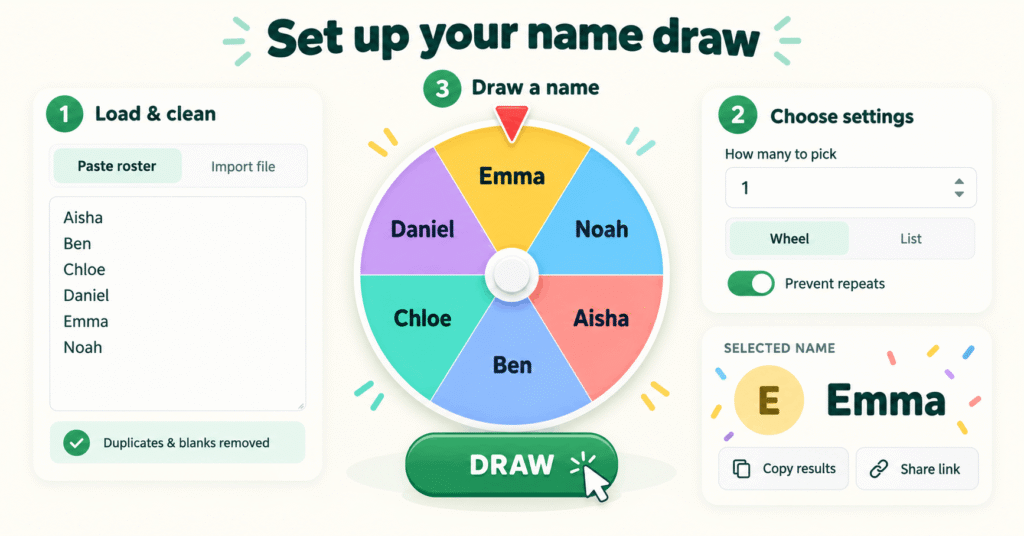
Most tools return a result within a couple of seconds. A built-in switch that blocks repeats keeps project groups from landing on the same person twice. You can customize the look afterwards; getting the order of operations right matters more.
Where Do People Actually Use a Name Draw?
A name draw is used most in classrooms, workplaces and community events, anywhere a group needs a choice nobody can blame on favouritism.
Teachers are the heaviest users I know. Picking one student for a cold-call question, or three volunteers to demo a solution, feels fairer to a room of thirteen-year-olds when the screen decides. A projector makes the choice part of the lesson, and many classroom activities lean on the Random order button to set a full presentation order in one press.
Businesses use the same mechanic with less ceremony. Team selection for a hackathon, a running order for a sales review, or a competition winner at a trade stand all follow one rule: enter everyone and let the software choose. Shops often brand the screen with a center logo and a background image, so the draw doubles as promotion.
Away from work, gift exchanges, contests and distributing prizes at a club night are classic cases, and board games nights use a draw to settle seating. Gamers go further: multi-stage games run multiple rounds and brackets, while streamers roll in-game handicaps such as pistol only or random character builds.
Some groups attach photos to each slot so younger kids spot their own face before the result lands. In my experience that small touch cuts the “it’s rigged” complaints from seven-year-olds almost to zero.
Is a Plain List or an Animated Spinner Better for Choosing?
A plain list and an animated spinner are equally unbiased, so the choice between them comes down to speed versus showmanship.
I reach for list mode when the roster is long or when I need an answer without a pause. The spinner earns its place when an audience is watching: the animation gives people a few beats to lean in, and the name is revealed with a small ceremony that presentations and parties both enjoy.
Neither format matches physical devices for drama, yet both beat a coin or die that may be lopsided. Some tools swap the wheel for a fruit machine layout that cycles through names like reels. One reveal can even sit behind a curtain theme in Red, Blue, Green or Purple, alongside eleven wheel themes.
The table below matches common situations to the format I would choose.
| Situation | Better format | Why it works |
|---|---|---|
| Deciding who goes first or setting turn order at a game table | Spinner | Players watch the outcome form, so nobody disputes it |
| Library period or exam hall | List with mute on | Quiet draws avoid disturbing the room |
| Projected lesson | Spinner in fullscreen mode | The result is readable from the back row |
| Broadcasting through OBS or Streamlabs | Spinner added as a browser source | It runs inside streaming software and is managed from a streaming control panel |
| The same group every week | List | Remember last list reloads the roster instantly |
| Names called one at a time through a long session | List | Each press gives a result with no wait |
Which Features Matter Most in a Name Selection Tool?
The features that matter most in a name selection tool are a trustworthy randomness source, a simple way to clear chosen names, and controls that suit the room you draw in.
Randomness comes first. Stronger tools skip Math.random() and call crypto.getRandomValues(), which pulls from entropy sources inside the operating system, such as hardware timings, mouse movements and keyboard delays. You never see that layer, but it separates a toy from a tool you can defend.
After that, I judge the dull controls. A clear textbox for entries, a Remove button that clears the last result, and a winner popup large enough to read from the back of a hall prevent more arguments than any visual flourish.
Here is how the secondary controls compare in practice.
| Feature | What it controls | Who benefits most |
|---|---|---|
| Spin time | How long the reveal lasts | Retail stands running a monthly giveaway |
| Colors and sounds | Look and audio cues | Hosts matching a brand or mood |
| Save and share | Reusing a roster | Teams rotating to-do items for productivity |
| Slot machine view | An alternative reveal | Groups bored of the standard spinner |
| Video tutorials | Learning the tool | First-time users with no time to explore |
Is the Chosen Name Truly Random?
Yes, the name chosen by a well-built online picker is random in every practical sense, because each draw gives every entry an equal chance and stays independent of earlier draws.
The contrarian point is that streaks are evidence of true randomness, not proof against it. People expect results to spread out evenly, so repeat outcomes feel rigged. They are not; a fair process with no memory will cluster from time to time.
Testing supports this. One tool ran simulations of four million shuffles on a four-item list, then applied a Chi-Square statistical test that confirmed a lack of bias. That kind of transparent check is what I want to see before trusting a selection method with prizes.
Under the hood the approaches differ. Some tools run server-side randomness with Python’s random module, while spinner tools add physics that imitate a physical spinning wheel rather than relying on plain math scripts.
Only weighted wheels break the even odds, and they do it deliberately. Entry weights change segment sizes, giving selected outcomes a higher chance, which is a feature rather than a flaw when you set the weights yourself.
How Can You Prove a Name Draw Was Fair?
You prove a name draw was fair by creating a record before and after the draw that outsiders can check, such as a hashed certificate or a public results page.
Most draws never need proof. A fair coin can land heads five times running and nobody complains. Prize winners at not-for-profit lotteries are a different matter, because losing ticket holders deserve a checkable record. One tool’s certification works in three stages and covers single-winner draws only:
- Server-side link: it stores a masked winner, the total number of names, a timestamp and a fingerprint of the draw, and that record cannot be altered.
- Client-side file: a download holds the full winner name and every participant, showing the roster fed the draw.
- SHA512 hash comparison: run the downloaded file through a hash generator and confirm both values agree.
The draw itself is simple. The tool generates a pseudo-random number between 1 and the roster length, and whoever sits in that slot wins; the names are not kept permanently afterwards. Certification is free in that tool, which removes the usual excuse for skipping it on high-stakes draws.
Honest limits apply. No certificate stops someone rerunning the draw privately or making an edit to the roster before submitting. For provable results, share the roster beforehand and pair it with a public record, which is exactly what platforms built for verifiable drawings do.
How Do You Draw Several Names in One Go?
You draw several names in one go by raising the pick count before you start, so the tool returns one or more distinct names in a single pass instead of making you rerun it.
Creating teams is the usual reason I do this. For two teams, enter all players and select half: with 22 names on a football (or soccer) roster, pulling 11 fills one side and the rest form the other. Anything messier, like four squads with balanced ability, counts among the complex cases better handled by a dedicated random team generator.
Order inside the batch can matter as well. A good tool delivers results at once and lets you shuffle the output or copy it straight into a document. If you draw in rounds instead, tick Remove picked names between them, and keep the original full list on hand to restore later; a name kept as one copy cannot slip in twice.
Gamers use batch draws for loadouts, pulling a character type, skills and a starting weapon in one pass. Past results have no pull on future draws, so a batch is exactly as fair as drawing names individually.
When Is a Quick Online Draw Not Enough?
A quick online draw stops being enough when money, legal rules or public trust ride on the result, because those situations need a record strangers can audit.
For classroom raffles or office giveaways, a no-cost page is plenty. You can run a randomness audit of 10,000 spins to reassure yourself and move on. Choosing from attendees who filled in a survey after a talk sits in the same low-risk bucket.
Charity raffles and larger drawings raise the stakes. A proper giveaway picker collects entries, draws multiple winners, and keeps timestamped records that can’t be changed after the fact. Some hosts also use multi-wheel management to split one prize pool into stages.
The deeper issue is transparency. Even a flawless tool cannot show that an organiser did not run several draws and publish only the favourite result. Data rules count too: serious platforms say they follow GDPR, CCPA, SB 190 and SB 1392, and that their team monitors changes to those laws.
How Widely Are Online Name Pickers Used in 2026?
Online name pickers are used at a massive scale in 2026, with one drawing platform alone reporting more than 100,000 organizers since 2009.
The maths is much older than the web. One of the tools reviewed here builds its draw on work by Richard Durstenfeld, whose 1964 paper “Algorithm 235: Random permutation” appeared in Communications of the ACM, volume 7(7), p.420 (DOI 10.1145/364520.364540). That compact algorithm assigns each name a slot and shuffles fairly.
What changed is reach. A spinning wheel on a screen now works as a raffle selector, a decision maker and a classroom aid in the same tab, with localization into 65 languages and multiple wheels on one page.
Everyday decisions such as where to eat now get settled the same way. In the offices I have worked with, group decision-making by spinner has become an accepted habit rather than a novelty.
Can You Choose More Than One Name at a Time?
Yes, most name pickers let you choose more than one name at a time by changing the pick count before you draw.
One tool asks for a count, then you press Pick names; another uses a Number of names to pick field with a default of 1; a third caps the number of winners at 1 to 10. Within a single pick, nobody comes back listed twice, which suits assigning tasks or picking volunteers.
One simpler tool handles only one name per draw and up to 300 names, so check before counting on several names at once. Formal platforms add backup alternates in case a winner cannot claim.
Why Did the Same Name Come Up Twice?
The same name came up twice because each draw starts fresh, so a name that just won keeps exactly the same odds on the next draw unless you take it out.
Think of coins or dice: they are not biased just because a result shows up again. If you want each person once, remove the winner after every round.
One tool’s no-duplicate setting shows a counter of remaining names and a Start over button, so a class of 28 is fully covered in 28 draws. Streamers running viewer giveaways from chat use the same approach, then reset the roster for the next broadcast.
Does the Tool Store the Names You Enter?
Most name pickers keep your names in your own browser rather than sending them anywhere, though some offer optional online saves.
Browser-only saved lists are not uploaded, and spinner tools often let you save locally or to the cloud, a choice that decides who could ever see the roster. Tools that draw on a server rather than in client-side code keep only a partly masked winner name alongside a certificate.
Closing the tab ends the session, so check whether your tool keeps saved history before relying on it. On a shared classroom laptop, I clear the roster at the end of every lesson anyway, simply because the next teacher has no need to see a list of pupil names. To pick by seat or ticket number instead of name, use the random number picker.
What Happens If a Name Appears Twice on Your List?
A name that appears twice gets two slots, which doubles its odds compared with everyone else.
Position does not matter, so every slot holds the same odds; the duplicate simply owns two of them and behaves like weighted entries. Two classmates called Sam need middle names or initials to stay distinct.
A related trap is drawing repeatedly without No repeats. In a list of 28, a name has roughly a 48% chance of never coming up across 20 draws, and ticking Remove picked names from the list fixes that. I scan every roster for doubles before any draw that involves a prize.
How Many Names Can You Enter?
You can enter anywhere from a few hundred names to 200,000, depending on the tool.
The maximum varies widely: one picker takes 10,000 names and returns up to 1,000 names per draw, another handles 200,000 names, and spinner tools import thousands of names from Google Sheets for large groups. Behind the scenes, names receive incremental integer IDs, so the total count sets the range the draw covers.
For long lists, clear out duplicate lines first unless you kept them on purpose. Paid tiers usually unlock higher limits. For a school year group or a staff roster, any of these caps is more than enough; capacity only becomes the deciding factor for big online giveaways.
Does a Name Picker Cost Anything?
Most name pickers cost nothing for everyday use, and the paid options mainly add record-keeping for formal drawings.
One spinner gives away all its premium features with no paywalls and stays free by showing fewer ads than most sites, plus a Close ads button. Its stated security follows industry best practices for data encryption and backups.
Costs appear when you need registration forms, anti-fraud measures, or the documentation and fairness requirements that paid raffles often carry. For a class, a team meeting or a family game night, the no-cost versions have covered everything I have ever needed. Pay only when a regulator, sponsor or charity board will ask how the winner was chosen.
Can You Hide the Advertising While Drawing?
Yes, you can usually hide advertising, either with a dismiss button for the current visit or by paying for an ad-free tier.
In one classroom tool, a premium membership brings no advertisements, personal branding and access to all templates. Other platforms split into free plans and paid plans, with paid tiers unlocking more features.
Whichever route you take, check that the page loads over HTTPS and that your roster is not shared with third parties. For quick classroom draws I simply go fullscreen, which keeps banners off the projected view. Paying makes most sense for teachers who use the tool daily and want their school’s name on screen.
Can Streamers Run a Name Draw on a Live Broadcast?
Yes, streamers can add a spinner to a broadcast as an overlay and run draws on stream without leaving their setup.
The spinner sits inside the broadcast, so viewers watch the suspense build in live time. One tool ships an audio library of 150+ music tracks and sound effects, all fully licensed, which saves worry about copyright strikes.
Match the color theme to your overlay, or drop the embed code into a website instead. Some streamers rack up hours of spinning rolling a character class for every new run. Test the overlay in a private broadcast before going public, since a mis-sized window can cover your webcam.
Is a Free Name Picker Enough for Ticketed Raffles?
A free name picker is usually not enough for ticketed raffles, because official raffles and sweepstakes need records that outsiders can verify.
Platforms built for compliance give each drawing a unique link and proof of fairness, logging every one of the entrants along with when and how the result was produced. Certified tools add a downloadable HTML file holding the complete participant list, plus a hash check that shows the file matches the fingerprint recorded at draw time.
A quick fairness test reassures you as the host. It does not reassure a regulator or a ticket buyer who lost, and that gap is exactly what the paperwork closes.
Can You Install a Name Picker Like a Phone App?
Yes, some name pickers install like a phone app because they are built as a PWA you can add to your home screen.
There is usually no separate mobile app to download; the page runs in desktop, tablet and mobile browsers alike. One tool, last updated Aug 12, 2026, keeps the last roster in local storage, so names are never uploaded even from a phone. Classroom tools offer a web shortcut or a QR code so pupils open the same page.
Large rosters are not a problem either. In one server-side tool, lists under 50,000 return instantly, 100,000 names take about 5 seconds, and the biggest rosters need 10 to 15 seconds. Spinner tools also let you decorate slots from Unsplash, a gallery of millions of images.ce. Want a quick tiebreak between your favourite results? Put them on the spin the wheel page and spin once.