Yes or No Wheel: How Does One Spin Answer Your Question?
A yes or no wheel is an online spinner that holds equal numbers of Yes and No slices, so every spin gives a 50/50 answer to one yes-or-no question, and switching to Yes, No or Maybe adds a third, neutral landing spot.
That is the whole mechanic, and its plainness is the point. Several of these spinners offer two input modes, the straight pair and the three-way version, and the slices are painted to look like a classic wheel even though only two simple outcomes matter. When I would normally flip a coin but want to see answers pile up, the wheel wins because it keeps statistics on screen.
The value sits less in the spin and more in simplifying complex thoughts into one line you can answer. Phrase it so both sides are meaningful answers, and a spin can settle small everyday choices such as cooking at home or ordering in. Many people also notice a flash of truth in how they feel when the pointer stops, and that feeling is often louder than the leftover doubt.
The limits matter as much as the mechanic. A yes or no wheel is built for entertainment and light calls, never for questions about health, safety, finances, or legal matters, where facts and a qualified person should decide.
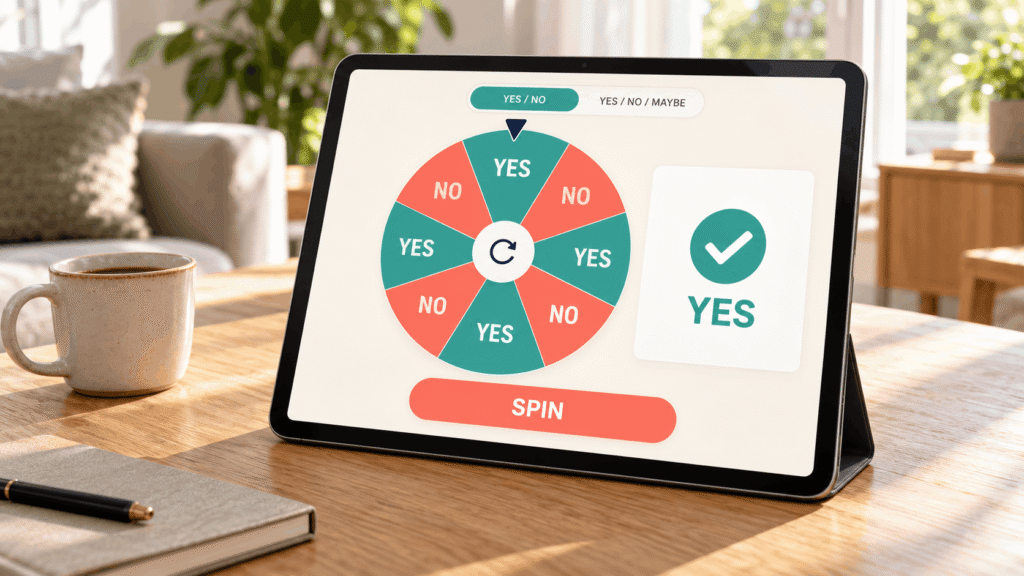
What Is a Yes or No Wheel and How Does It Pick an Answer?
A yes or no wheel is a random yes/no generator that randomly selects one of the entries shown on its face each time you Press Spin, so the answer depends only on how the slices are divided.
Under the paint, the tool is a binary outcome machine. One version carries 16 segments that are split evenly between the two answers, while another works from a bare pair of slices. Both give Yes and No the same chance, because the total area for each word matches.
Tool makers describe the default as giving equally weighted results, or two equally weighted outcomes, and the wording holds for an untouched wheel. A random selection on that layout carries no hidden tilt toward either word, no matter how the colours are arranged.
The entries themselves are plain text, which matters once people start editing them. The third mode swaps the pair for a neutral third outcome, Maybe, and the maths shifts with it. What never changes is the core idea: the slice layout fixes the odds before the wheel moves, and the spin only shows which slice comes up.
How Do You Use a Yes or No Wheel Step by Step?
You use a yes or no wheel by writing one question, picking a mode, fixing your spin rule, spinning, and reading the tally that builds below the wheel.
This is the order I follow on most tools:
- One clear question: write it down first; on some wheels the Title button lets you place it in the tool title so everyone in the room can read it.
- Mode options: pick the plain pair or the three-way version that adds Maybe.
- Number of Input Sets: set it anywhere from 1 through 5 on wheels that offer the setting.
- Choose your rule first: decide before starting whether one spin is final or the group plays best of three.
- Scores: spin, then read the accumulated counts for each answer during your current visit.
- Reset Counts: wipe the tally when a new question begins.
Be careful with that last step. On one tool, Clear Results deletes all records in a single click, and on another a reset wipes the totals and the recent history together and cannot be undone. I copy the tally somewhere first whenever the outcome of a long session matters to someone.
Does the Number of Slices Change the Yes or No Odds?
The number of slices does not change yes or no odds as long as both answers own the same total area, so a wheel with sixteen slices and a wheel with one slice each both give each answer a 50% chance.
I checked this the boring way, by counting. A sixteen-segment board with 8 Yes slices and 8 No slices of the same size is an exact 50/50 split, and the colours alternate mostly because the result is more fun to watch than a half-and-half disc. Switch on Maybe and each answer drops to a one-in-three chance.
Where people get confused is the outcome log. Short runs are rarely evenly split, and streaks like Yes, Yes, Yes happen naturally without any fault in the code.
The odds only move when the slice mix is uneven. A Pre-K classroom wheel built on an open-ended template carries six No slots against five Yes slots, plus two re-spin slots and one wildcard, so its odds belong to that list rather than to a clean coin-style split. On a Preschool board, that uneven mix is part of the activity rather than a flaw.
How Do You Get a More Useful Answer From a Yes or No Wheel?
You get a more useful answer from a yes or no wheel by framing a question with exactly two possible answers, fixing the spin rule ahead of time, and committing to accept the answer you get.
The wheel cannot rescue a vague prompt, so tie each outcome to an action before you spin:
| Setting | Question to spin | If Yes | If No |
|---|---|---|---|
| Everyday decisions | Dinner out tonight? | Eating out | Cook at home |
| Evening | Workout before the show? | Going to the gym first | Watching another episode |
| Shopping | Buy the jacket now? | Buying an item today | Wait for payday |
| Weekend | Try the new café? | Trying something new | The usual place |
| Classroom and group activities | Ready to move on? | Moving to the next question | Giving another chance |
| Class review | Run it twice? | Repeating an activity | An extra challenge instead |
| Work and team activities | Pause now? | A short break | Keep going |
| Team meeting | Open the floor? | An optional activity or icebreaker round | Continuing a discussion |
Your spin rule matters just as much as the wording. A best-of-three rule is fine when everyone knows it beforehand, but inventing it after a No is only delaying a decision.
Watch your gut response as well. If a Yes lands and you feel let down, that tells you your preference more plainly than the wheel did, and that clarity is often the real outcome of the spin.
Why Does a Yes or No Spin Help When You Overthink?
A yes or no spin helps when you overthink because it swaps an open-ended debate for one concrete result you can respond to.
Overthinking usually starts when both paths are equally acceptable and you keep rehearsing them. Getting stuck there is tiring, and a spin is a cheap way to break the loop. The wheel does not replace your judgment; it strips away the noise so you can hear that judgment again.
What I watch for is the reaction. If you dislike the result, the feeling shows what you really want, and you can take the other option without guilt. The randomness is only the trigger for that moment.
Calling a spinner the ultimate decision maker oversells the tool. People seeking answers from a wheel are mostly looking for permission to stop deliberating, and a spin hands over that permission faster than another list of pros and cons.
When Should You Reach for a Yes or No Wheel?
A yes or no wheel is the right tool for low-stakes choices where a two-option choice has no clear winner, and the wrong tool for consequential decisions you would never rely on chance to make.
In classroom activities the wheel often carries more than two words. One preschool board lists 14 items, mixing Yes and No with spin again and pick the one above this, which turns a plain answer into a small turn-taking rule.
For games and streams, the appeal is speed plus a bit of fun on screen. At work, a quick spin can cut through repetitive thinking patterns in a stand-up when nobody wants to make the call.
Pressure from deadlines or social commitments is where one source says the spin earns its keep, and I agree for small calls such as whether to RSVP to a casual dinner. Groups get extra value from the tally: running multi-round decisions and keeping the votes visible shows the group’s lean over an evening.
How Can You Customize a Yes or No Wheel?
You customize a yes or no wheel by opening its editor, where you can edit the entries, change the look, adjust sound and timing, and then press Save to keep your version.
Text changes are the fastest win. On the better editors the wheel redraws as you type, and a list pasted from notes or imported from spreadsheet files fills the rim in one go. Swapping No for “Not today” sounds trivial, but on a shared screen the wording sets the mood.
Sound and motion come next. Ticks and end cues can usually be turned off individually, so you can mute everything or keep only chosen cues. The spin duration and slice colours sit in the same panel on most tools I have tried.
The design edits you keep do not touch the public version of a shared wheel. Your copy lives on as its own link, which means a teacher’s tweaks never spill into the wheel a whole class opened from the same page.
How Do You Track, Save and Share Yes or No Results?
You track yes or no results through the tally panel under the wheel, and you keep them by exporting a link or image before the page closes, because many tools forget everything on reload.
Most spinners show counters for each answer and a results tally that grows with every spin. One compact two-choice decision tool shows a running count plus the last 6 spins, which is enough to see a pattern forming during a lesson.
Other tools park the log in a Results tab, where each outcome is displayed in order, and some add a reset button that wipes the list. Saving is where the tools differ most: some let you send the whole session as a page or picture, while others keep nothing once the tab reloads.
For a bit of drama, a Mystery Result hides the answer until you click or press Enter to reveal it. That pause works nicely when a class is leaning forward waiting for the call.
Is a Yes or No Wheel Better Than Flipping a Coin?
A yes or no wheel is not more random than a coin toss, since both give an even split, but the wheel is better when you want control over the spin, the look, and a record of what happened.
Across the tools I compared, the extras stack up like this:
| Feature | Coin toss | Yes or no wheel |
|---|---|---|
| Motion | Your thumb | Spin Behavior settings: speed from lvl1 to lv10, duration 1s to 30s, a manual stop button, spin count, random initial angle and initial spinning |
| Look | Heads or tails | Tool Colors, themes, spin button animation with color changing, and five wheel-type icons including a Plain wheel |
| Suspense | None | A Mystery Wheel that hides every slice behind “?” |
| Record | Memory only | A Results Link to a shareable results page, a downloadable results image, and a share icon once the result is announced |
None of those features improve the odds. They change the experience, which is worth something in a classroom or on a stream where people watch the spin.
The coin still wins in a pocket or during a power cut. And when a question really has multiple possibilities, neither tool helps much; a list wheel or a short analysis of pros and cons fits better than squeezing it into two answers.
How Can You Prove a Yes or No Spin Was Fair?
You prove a yes or no spin was fair by using a wheel that logs the spin with a replay and proof, because an ordinary result on screen is only your word.
Many wheels pull answers from a cryptographic random generator in the browser, which is fine for fairness but leaves no trail. Some go further on saved wheels and produce verified replays, each tied to a Replay ID and verification information that another person can re-run. A verifiable replay of the recorded spin is worth more than any number of visual results on your own monitor.
The weak point is storage. On one tool the stats are not saved locally, and refreshing or closing the page resets everything to zero. A screenshot helps, or you can record them manually, but neither counts as proof.
That gap is why I keep yes or no wheels away from anything with a financial prize attached unless the spin leaves a checkable record behind it.
Can You Put the Yes or No Wheel in Full Screen?
Yes, some yes or no wheels offer a full-screen view on tablets and desktops that hides the editor and leaves the wheel and its log on display.
If full screen is missing on your device, a toggle button can hide the Inputs section and center the wheel instead, which gets you most of the way there. Show All Results still works in the larger view, so the log is never lost behind the bigger wheel.
For projectors I tidy the look first. The Page Color, Tool Background and its transparency are easy to change, while a background image or Banner/Logo is a Premium extra on at least one tool.
Teachers can also load classroom prompts as titles. Each result title will cycle in order on every spin and loop back to Title 1, and a Restart Sequence button starts the run over for the next group.
How Do You Map a Yes or No Spin to Study Conditions and Cite It?
You map a yes or no spin to study conditions by deciding in advance what Yes and No stand for, then running the spin through a fairness-checked setup so the assignment can be checked later.
- Save your own copy of the wheel, because the fairness tools only work on saved versions.
- Provably fair option: switch it on before the spin, never after.
- Verified spins: each run produces a replay and cryptographic proof that others can check.
- Checkable replay: store it with your notes so the trail survives the session.
This provably fair workflow suits simple research randomisation, such as a non-clinical assignment your study design already calls for. An ordinary spin is not one of the verified records a reviewer can audit, so skip it for anything formal.
Complex research could possibly call for specialist methods, and clinical research generally runs on specialist systems built for that job. I treat the wheel as a teaching demo in those settings, not the tool of record.
How Do You Add a Yes or No Wheel to a Live Stream?
You add a yes or no wheel to a live stream by loading the wheel as a browser source in OBS or Streamlabs, following the tool’s dedicated setup guide for the exact steps.
Once it sits on the canvas, the wheel becomes one of the easier stream viewer triggers to run. Chat asks whether you play another round, whether a guest takes a challenge, or whether someone gets another turn, and the spin answers on screen.
For streaming variety shows, I use it for picking between activities and for group choices when chat is split down the middle. Keep the wheel small in a corner during play; the moment of the spin is what people enjoy, not a static disc.
Is There a Yes or No Wheel App for iPhone and Android?
Yes, at least one yes or no wheel ships as an app for iPhone and Android, but the web version also runs on mobile phones and tablets without needing an app or an account.
The browser route is the one I use most. Any mobile browser loads the wheel with no signup and nothing to download, and the phone can be passed around a group at a dinner table without fuss.
Wheels save locally on the device, or you can sign in to sync custom setups across devices. The store app is in English and adds a few extras of its own. Sharing from a phone works the same way as on desktop: tap the share button at the top right and send the link.
Is a Yes or No Wheel Actually Random?
Yes, a yes or no wheel is random in the everyday sense: each spin picks a slice by chance, with equal weighting set before every spin on the default layout.
Each result is independent, so a previous result never makes the other answer due. Several tools draw from the browser’s built-in secure random generator, and one links a fairness test you can run yourself.
Random is not the same as auditable. A front-end random algorithm with no verifiable randomness proof is fine for a dinner choice, but it cannot show anyone after the fact that a spin was clean, so formal draws need a stronger setup.
Are the Odds Really 50/50 on a Yes or No Wheel?
Yes, the odds are really 50/50 on a default yes or no wheel, because neither answer has an advantage in slice area before the pointer moves.
A layout of alternating 16 slices stays balanced for the same reason a coin flip simulator does: each is a binary 50/50 choice. Custom wheels differ, since any extra weighting or added slice tilts the outcome toward one side.
Do not expect your totals to land split exactly in half, though. Small samples wander, and cumulative counts, percentages and a percentage share bar only creep toward even once you spin as many times as you like, well past a handful.
What Changes When You Add Maybe to a Yes or No Wheel?
Adding Maybe gives the wheel a third possible answer, so each outcome drops to one in three and a neutral result becomes possible.
To switch, choose a mode labelled Yes, No or Maybe before spinning. The three-way wheel suits questions where staying undecided is fine, or emotionally unclear situations where forcing a yes or no would only mean negotiating with yourself again.
I find Maybe most handy when both options are reasonable and I have no strong preference; the real value is permission to wait. If you need more than three options, a full list wheel works better, and a Magic 8 Ball or a coin are fun alternatives for quick calls.
Can You Spin the Yes or No Wheel Again for the Same Question?
Yes, you can spin a yes or no wheel again for the same question, and on a desktop Ctrl + Enter fires the next spin without reaching for the mouse.
The catch is honesty. Set your rule and agree in advance with anyone watching; best of three is a game format, and it does not make individual spins any more random than the first spin.
Your feelings give the game away too. Relief when the wheel stops means it picked right, while disappointment points to the other choice, and a re-spin chasing a different answer usually confirms which one you wanted all along.
Why Does a Yes or No Wheel Have So Many Slices?
A yes or no wheel has many slices mainly for the show: more segments make the animation livelier while the odds stay put, as long as both answers keep the same number of slices.
One tool lets you pick 2, 4, 6, 8, or 10 alternating slices. 2 slices give a quick result, while 8 or 10 make a longer, more engaging spin, and a board with 8 slices split four and four behaves exactly like the two-slice version.
Building a bigger wheel by hand is easy too. Text Mode accepts a typed list, Select Import pulls one in from a file, and Fast fill with its First, Last, Step fields fills a numbered range in seconds.
Should You Trust a Yes or No Wheel With Important Decisions?
No, you should not trust a yes or no wheel with important decisions; it is built for low-stakes decisions where either answer is fine.
A spin removes indecision, not risk. That trade works for a simple decision under mild pressure, where delay causes more stress than the choice itself and a result shows up instantly.
Big calls are different. Fear, excitement and other emotions deserve a proper look, not a coin-style shortcut. Formal uses are out as well: one tool states plainly that its wheel is not for notarized or audited uses such as prize draws or legal proceedings. Before any big spin, I ask whether I would be comfortable telling someone later that a wheel made the call.
Can You Mute the Ticking and Winning Sounds on a Yes or No Wheel?
Yes, you can mute the ticking and winning sounds on most yes or no wheels, either one by one or all at once from the settings panel.
On one tool the Ticking Sound, Win Sound and Lose Sound each have their own switch, and a master Enable Sounds toggle silences the lot. Another lets you swap in custom start, spinning, and ending sounds instead.
The same panel usually holds the visual extras: confetti, Win and Lose images, Spinning Time, Spinning Speed and Custom Theme Settings. I turn the audio off in libraries and quiet offices and keep the confetti, which gives the moment some life without disturbing anyone.
Does a Yes or No Wheel Work on a Phone?
Yes, a yes or no wheel works on a phone, since the web version is a free random picker that runs in any phone browser.
For quick decisions at a table, a two-option spinner on a phone is hard to beat. If you want extras, there is an English-language app on Google Play and the App Store with one-tap spinning, spin coins and global leaderboards.
Two limits are worth knowing. Full screen, which enlarges the wheel, is tablet and desktop only on one tool. For group sessions you can send a share link or a Collect link, which gathers participant results into your saved files.
Can You Build Your Own Yes or No Wheel?
Yes, you can build your own yes or no wheel by editing a copy and saving it as a separate wheel, while the original stays unchanged.
Custom labels are the easy start. To change the odds, add more Yes or No entries to the list; three Yes against one No is a deliberate tilt. Hit Save wheel to keep the copy, or Forget this link to drop it.
Some tools also offer Create with AI: describe the wheel, press Generate, and edit what comes back. Even the standard yes or no tool on one site is derived from that site’s general list spinner, so the editing options carry over.
Can You Check That a Single Yes or No Spin Was Fair?
Yes, you can check a single spin when the wheel was saved and set up for provably fair spins before it ran; a normal spin leaves nothing to check.
A completed verified spin can be kept as a Verified Spin Record, which makes the result citable. One tool offers citation styles for APA 7, Harvard, Vancouver, MLA 9 and Chicago, plus reference-manager exports in BibTeX and RIS.
That is overkill for choosing lunch, but it matters for classroom demos on chance, coursework, or any write-up where someone may ask how a group was split. For everyday spins, a glance at the tally is all the checking most people need.
Can a Yes or No Wheel Handle Research Randomisation?
A yes or no wheel can handle simple binary randomisation when Yes and No map to predefined options, but it is not a tool for medical trials.
Typical pairs are Condition A/B, Version A/B or Order 1/2. The wheel acts as a neutral system to assign outcomes, which keeps a tired researcher’s hand out of the choice.
A plain spin is not a verifiable research record, though. Use a saved wheel with the fairness option on, and store the replay with your notes. I would use the wheel for pilot tests or a class demo of how randomisation works, and keep anything involving patients on proper software.
Can You Use a Yes or No Wheel in OBS or Streamlabs?
Yes, you can use a yes or no wheel in OBS or Streamlabs by adding it as a browser source and placing it on your scene.
One tool’s stream panel has a Create overlay link button, with toggles to Spin on stream and Show the winner on stream, and its overlay is 700 x 700. That covers audience challenges, game choices and general live viewer interaction.
The wheel also borrows a trick from games and parties: a two-step game where a Yes sends the player to a truth or dare spin and a No passes play to the next player. Viewers tend to stay for that second spin. For a baby shower or stream guessing game, the boy or girl wheel works the same way, with twins and non-binary options you can add.