What Is a Prize Wheel Spinner and How Do You Use One for Giveaways?
A prize wheel spinner is a browser tool that turns your rewards into slices on a wheel, picks one slice at random each time you press spin, and can take each reward off the board once it is claimed, so the next spin lands only on what is still available.
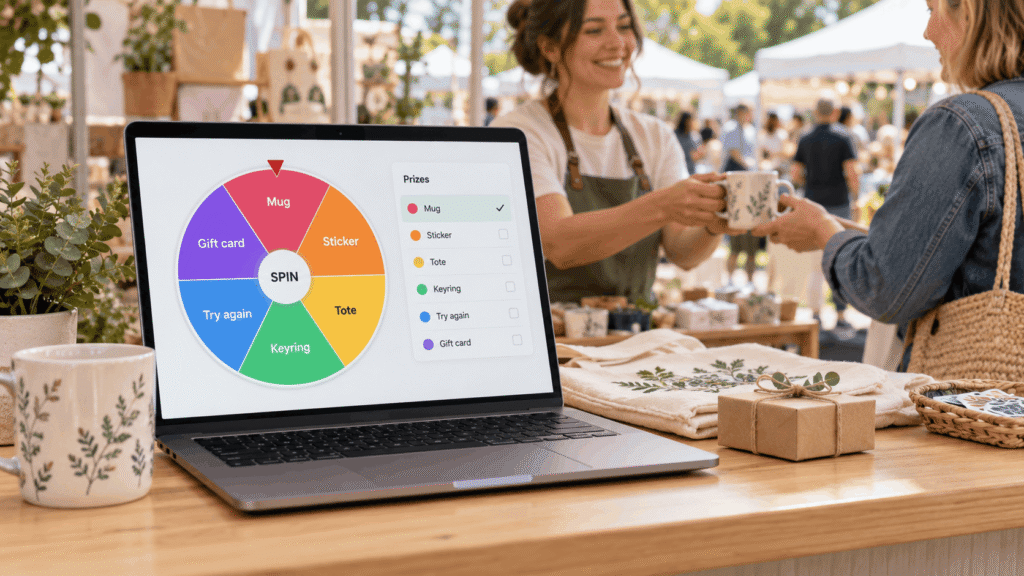
I first ran one at a weekend craft-fair booth, and the crowd taught me something fast: people trust a reward they watched land far more than one pulled from a jar. The spinning animation builds anticipation for the few seconds it turns, and that visible motion reduces doubt before anyone thinks to question the draw.
Setup takes minutes. You paste a CSV file or type entries, add a slot called Try again for spins that give nothing away, and switch between boards if you run separate draws for kids and adults. The page loads in modern browsers on laptops and smartphones, so the same board works at a till or on a stage.
Fairness is what I check first on any new tool. Some sites publish a randomness audit where you can Run 10,000 Spins and compare the spread, and they describe each pick as algorithmic, set by random number generation rather than by where the pointer seems to slow down.
Money changes the rules. If entrants pay to enter, check your local rules, because a paid draw can count as gambling where you live. Free tools cover the spinning itself, a Premium plan mostly adds branding options, and the score totals from a session give you a simple record of who won what.
How Do You Set Up a Prize Wheel Before the First Spin?
You set up a prize wheel by loading or typing your rewards, adding losing slots, choosing timing and removal rules, and putting the board on a screen everyone can see before the first spin.
The order matters more than people expect. I once changed the timer mid-event and a guest accused me of rigging the next pull, so now I lock everything in this sequence:
- Ready-made or typed rewards: load the shop prizes, a classroom set or the stream prizes, or build your own list of prizes in Text Mode, where you can paste multiple lines at once.
- Fun prizes first, headline reward last: list the small giveaways before the big one so you can judge the balance of the board at a glance.
- Spin duration: set anything from 1s to 30s, pair it with a spin speed level, and add a manual stop button only if the host wants to control the moment.
- Spin count: decide how many turns each guest gets and put that on a sign before people queue.
- Shuffle: run it once before going live, because it rearranges all entries and removes any hint from the order on screen.
- Remove the winner after each spin: switch it on for stock that can be won only once, such as a single signed poster.
- Full screen: open it on tablets and desktops so the room sees exactly where the pointer stops.
Step four is the one I skipped the first time, and a teenager took nine turns before anyone noticed. A posted rule ends that argument before it starts, and it costs nothing to print.
Where Does a Prize Wheel Spinner Actually Get Used?
A prize wheel spinner gets used wherever a group needs a pick that everyone can watch, which covers shops, classrooms, streams and office events.
Shops lean on it hardest. Small businesses run a real giveaway at the counter, and event hosts treat the board as a raffle selector when paper ticket stubs feel dated. At trade fairs I have watched stands spin during events every hour, which keeps a crowd around between talks.
Teachers use it as a random name picker for classroom activities and classroom participation, while organisers of remote events share their screen so attendees at home see the same result. Streamers tie it to viewer giveaways and multi-winner giveaways, and contests with several rounds work well when pairing names with tasks or running multi-stage raffles.
The three action modes decide how each of those uses behaves after a win:
| Mode | What happens after a result | Prize event it suits |
|---|---|---|
| Normal (DONE) | The result stays on the board and can be picked again | Discount slices at a shop counter, where repeats are fine |
| Elimination (HIDE CHOICE / HIDE ALL INSTANCES) | The result is removed from the next round | Limited stock, one gift per person |
| Accumulation (ADD COUNT) | Each result’s count builds up across spins | Points games, or tallying which reward appears most |
Picking the wrong mode is the mistake I see most at school fairs. A single gift left in Normal mode can go to two children in a row, and no amount of explaining fixes that moment.
How Do You Make One Prize Harder to Win Than the Rest?
You make one prize harder to win by giving it fewer copies on the board than the cheaper rewards, because every copy is a separate slot with identical odds.
The logic holds because every slot is equally likely. A reward listed twice has twice the chance of a reward listed once, so repeating entries is the simplest odds control there is, and it needs no settings at all. Write one prize per line, copy the cheap lines, and leave the headline reward alone.
Tools with Weighted wheels do the same job without the copy-paste. You set entry weights in the optional fields beside each row, or start a line in text mode with a number and a comma. The pick still gives equal probability per unit of weight, and a fair engine doesn’t favor any segment beyond what you set.
Here is the eight-slot board I use for a small shop draw:
| Slot entry | Copies | Chance of landing |
|---|---|---|
| Sticker pack | 4 | 4 in 8 (50%) |
| Free coffee | 2 | 2 in 8 (25%) |
| No-prize slot (wins nothing) | 1 | 1 in 8 (12.5%) |
| Signed poster | 1 | 1 in 8 (12.5%) |
Once the poster goes, I switch on removal so the board recalculates, and I mark it among the claimed prizes on my sheet before the next customer steps up.
Which Settings Change How a Prize Wheel Looks, Sounds and Moves?
The settings that change how a prize wheel looks, sounds and moves are its color and theme controls, its audio options and its timing controls, and most tools group them in one panel.
On many tools the Customize button opens everything at once. You can change themes, alter the appearance of the pointer and hub, pick segment styles, and add images to slices, which helps young players who cannot read a reward name yet. Sharper HD images usually need a paid tier.
Labels deserve more attention than they get. Customizable label text lets a short word sit on the slice, one field replaces the displayed text so the board can show “Mystery” while your sheet keeps the real reward, and individual slice colors give each reward its own shade. The slice size follows any weight you set, and on some apps labels can be disabled and re-enabled without deleting them.
Sound and motion close the loop. Read Aloud speaks the result, the timer sets the spin time, and you watch the wheel land while the pointer marks the result at a clear stopping position. On one tool, crypto.getRandomValues() rather than Math.random() drives the wheel’s physics, so the motion on screen comes from a secure random value.
The full-screen view enlarges the wheel and hides the inputs section. That is the view I use when I want the board to let it decide without the audience reading the list over my shoulder.
Should a Winner Stay on the Wheel or Come Off After Each Spin?
A winner should come off the wheel after each spin when every reward or person may win only once, and should stay on when repeats are part of the game, such as discount slices or rotating turns.
Classroom lists are where I see this go wrong. With a register of Alice, Bob, Charlie, Diana, Ethan, Fiona, George and Hannah, a teacher picking a pupil for the next classroom question wants each child once per lesson, so the tool should remove a name as soon as it lands. The same goes for choosing volunteers for a job nobody wants twice.
Letting winners stay makes sense in the opposite case. A shop’s discount board can repeat as needed all day, and a regular can win again in future spins without anyone feeling cheated.
When a tool lacks an automatic switch, you can manage it by hand. In Main Mode you can delete rows, duplicate a row to bring someone back, or hide one by wrapping an entry in a tilde in text mode. That works for plain names and for text and image entries, though it is slow when a queue is waiting.
What Is the Fastest Way to Load a Long Prize List?
The fastest way to load a long prize list is to paste it all at once, one reward per line, or import it from a spreadsheet, rather than typing entries one by one.
For short boards, the textbox beside the wheel is enough: you Add Entries, the board updates as you type, and Ctrl + Enter starts the draw on some tools without touching the mouse. That suits quick lists of food choices, team names or what to eat for dinner.
Bigger events need imports. Tools that pull from Google Sheets handle massive lists of ticket holders, and the stated cap is usually just a large number. Readability is the true limit: many users keep to 20 to 50 segments for visibility, because beyond that the labels shrink to slivers on a phone.
Not every list holds rewards. Teachers assign topics or brainstorming topics, friends pick a movie, and party hosts load party selectors or random challenges. For picture slices, some tools let you search Millions of images through an Unsplash gallery instead of uploading your own.
How Do You Save a Prize Wheel and Keep a Record of Who Won?
You save a prize wheel by storing it in a cloud account or sharing it as a link, and you keep a record of winners through the tool’s results log, which you should export before closing the page.
Saving and sharing overlap on most tools. Saved wheels sit in your account, Instant sharing creates a short link, and the Save and share through a link approach lets a co-host open the same board on another laptop. That easy sharing is how I hand a stall over at lunch without retyping a thing.
Records matter most after raffles. When a survey respondent is drawn as the presentation winner, I screenshot the result with the time, because a log answers the “was it fair?” email that always arrives. A tool title names the event, and result titles cycle with each spin, so “First prize” and “Second prize” sit next to each winner.
Storage rules shape what you keep. On some tools only the active wheel loads on your next visit, paid plans add more storage and higher collection limits, and providers that hold your lists cite GDPR, CCPA, SB 190 and SB 1392 compliance, encryption and backups and industry practices in a linked privacy policy.
Can You Run a Prize Wheel as a Phone or Desktop App?
You can run a prize wheel as a phone or desktop app, either through a dedicated mobile download or by installing the web page itself from your browser.
The web version runs in your browser with no download, so you rarely need to install anything for a one-off draw. It needs JavaScript switched on, and it works on desktop and mobile alike, with tapping the wheel standing in for a click on phones and tablets.
Dedicated Android and iOS apps suit hosts who run multiple custom wheels every week. Before choosing, I compare three things:
- Cross-platform sync: whether a board built on a laptop opens on the phone unchanged.
- Global localization: one tool offers its interface in 65 languages, useful for international events.
- Image support: whether picture slices survive the move to a small screen.
Streams count as another platform. The same page loads as a browser source in OBS or Stream labs, and a streaming control panel runs the draw during broadcasts. Scale shows how far the web side has gone: one site counted 462,479,318 spins and 1,280,253 hours of spinning in 2026.
What Do You Get Free, and What Sits Behind a Paid Plan?
Free prize wheel tools cover the full spin-and-remove workflow, while paid plans mainly add storage, larger limits, ad removal and extra styling.
The basic board is free to use on every tool I have tried, and the trade is usually ads. One site lets you Close ads to hide ads for your session and says it runs fewer ads than most websites, while a popular store app contains ads alongside in-app purchases.
The split I see most often looks like this:
| Feature | Free tier | Paid tier |
|---|---|---|
| Saved files (one tool) | Up to 15 files with a free account | Up to 120 |
| Collected results | 10 results, locked from editing | Higher caps |
| File kinds | Three file types: Private List, Share and Collect | Same three |
| AI list ideas | A daily quota that resets after 24 hours | Quota varies by plan |
| Boards per page | Up to five wheels | Same |
| Styling extras | Standard colors | Options such as a custom spin button, Custom colors, page and tool background colors and tool color themes |
My own rule is to stay free until a recurring event needs saved boards and clean styling. A paid plan rarely changes the draw itself, only what surrounds it.
Can You Control the Odds on a Prize Wheel Spinner?
Yes, you control the odds on a prize wheel spinner by changing how many slots each prize takes, since every slot has the same chance of landing. To make a prize rarer, give it one slot and give common prizes several. Three 10% off slots and one Gift card slot make the card a 1-in-4 win on that part of the board. I use this ratio at event raffles because it keeps small rewards moving while the big one stays special. For a raffle with numbered tickets, pick a random number instead of spinning.
Is a Prize Wheel Spinner Allowed for a Real Giveaway?
A prize wheel spinner is fine for promotions and free-entry giveaways, but a draw that charges entrants needs checking against the law where you run it. A shop’s monthly giveaway for a loyal customer, or a comment draw on Instagram, is the typical case. To prove the result afterwards, you can share as a guest, which creates a non-editable link that expires after 60 days unopened or 365 days of inactivity.
Can You Run a Prize Wheel on a Tablet at a Booth?
Yes, a prize wheel runs well on a tablet at an event stand: expand the board to fill the display and let visitors touch it to spin. I mount mine on a TV or tablet depending on the venue and announce the prize out loud while the confetti plays. Sound effects pull a party game crowd over from nearby stalls. Store apps for iPhone and iPad also carry premade presets, which saves setup time on the day.
Is a Prize Wheel Spinner Free to Use?
Yes, most prize wheel spinners cost nothing for the core features, and many need no signup at all. One site advertises zero account requirements and zero hidden fees. App stores follow the same model: one popular decision making app holds 4.8 stars from 146K reviews (its reviews section shows 131K), counts 10M+ downloads and is Rated for 3+.
Can You Remove a Name After It Wins?
Yes, most prize wheels can take a winner off automatically or leave them on for later rounds. You choose to keep the winner or remove them automatically, and removal is how you prevent duplicates in survivor-style rounds or party games like Truth or Dare and icebreaker games. Before clearing anything, open Show All Results to check the results history for that visit. For a game show with points instead of prizes, use the wheel of fortune spinner, which includes Bankrupt and Free spin slices.
Can You Change the Look of a Prize Wheel?
Yes, you can change a prize wheel’s colors, styling and images on nearly every tool. Custom Themes reshape the theme appearance, a center logo puts your shop mark in the hub, a background image sets the scene, and a custom color theme matches your brand. Most sites link video reviews and tutorials that walk through these menus, which helps when you are styling wheels of fortune for an event at short notice.
How Many Entries Can a Prize Wheel Hold?
A prize wheel can hold far more entries than anyone can read, and some tools advertise Unlimited entries for big draws. Tools Built for large groups handle long imports, and AI Ideas can draft a list from a prompt such as “5 Breakfast Ideas”, adding the generated suggestions straight to your inputs. With long boards, the results page and its image download are easier to share than the crowded wheel itself.
Do You Need to Install Anything to Use a Prize Wheel?
No, an online prize wheel opens in a normal browser tab, so a standard draw needs no setup on your device. If you want an icon anyway, Chrome offers Install page as app on desktop, and phones use Add to Home Screen in Safari on iOS or in Chrome on Android. That suits a daily standup run from a locked work laptop. Store versions sit under Entertainment, and the latest update I checked, dated June 14, 2026, listed only Bug fixes.
Can You Spin More Than One Prize Wheel at Once?
Yes, several tools let you run multiple prize wheels on one page and spin them together. Multi-wheel management suits complex raffles and multi-stage games, and it speeds up team assignments or setting a presentation order. Some apps advertise unlimited wheels and a store of user-made wheels to start from, and a board shared from a saved file stays live-linked, so your edits reach everyone holding the link.
Is Your Data Private on an Online Prize Wheel?
Your data on an online prize wheel stays most private when lists live on your own device, while cloud storage and mobile apps vary from tool to tool. One tool autosaves your list to browser local storage, so clearing your browser data wipes it. Others offer Privacy-first storage that saves locally on your machine, and one site claims zero data collection. Store apps differ: one listing says it may share data with third parties, keeps it encrypted in transit and accepts data deletion requests.
Can You Close the Ads on a Free Prize Wheel?
Yes, some free prize wheels let you hide the banners for the current browsing session, and paid plans remove them entirely. Paid tiers sell an ad-free experience, which I find worth it for contest winner selection on a projector. App versions with users interacting in chatrooms disclose ads in their store listing, so check before installing. For faster decisions like yes-or-no calls, a to-do item or a quick way to break ties, a small banner rarely matters.
Can You Use a Prize Wheel in OBS or Streamlabs?
Yes, a web-based prize wheel loads into common streaming software as a page layer, so viewers watch the draw live. For live stream giveaways on YouTube or Twitch, the visible spin adds transparency in streams. A Rich audio library of 150+ fully licensed music tracks saves you hunting for cleared music. With Multi-wheel mode you can load two or more wheels and press Spin All to pick a game and a reward in one go.
Is an Online Prize Wheel Truly Random?
A well-built online prize wheel is random where it matters, because each pick comes from a random value rather than from the visible slowdown. Every entry sits in equal segments, so a random result has nothing to lean on unless you add weight. Some tools copy a physical wheel through Authentic physics, yet speed settings from lvl1 to lvl10 change the show, not the odds. A wheel generator that lets everyone watch the pick adds visual transparency, which is the part a crowd trusts.
Why Did the Same Prize Come Up Twice in a Row?
The same prize comes up twice in a row because each spin is an independent event, and true randomness produces streaks, just as a fair coin can land heads several times in a row. Results can’t be predicted from past spins. On streams, a rule like pistol only from a wheel of in-game handicaps or character builds picked from chat will repeat now and then. If repeats break your game, press the Remove button after each win or switch to a removal mode built for elimination games, and clear the records only after you note the current visit results. Shortlist your best results, then let the wheel spinner pick the winner.