What Is a Genshin Impact Wheel and How Do You Use It?
A Genshin Impact wheel is a spinner that picks one random character from the playable roster, and the same name also covers the in-game Shortcut Wheel that opens menus without a trip through the Paimon Menu.
Most searches mean the character picker. Someone loads the full cast into a free online spin wheel, presses the button, and lets chance choose between Lumine and Aether, between Hu Tao and Zhongli, or between Venti and Raiden Shogun. A spinner treats your main carry and your forgotten bench unit the same way, which no tier list ever will.
I started spinning to break a rut. For close to a year my account ran Bennett, Xiangling and Kazuha in nearly every team, and I had stopped noticing that Lisa, Amber and Noelle were still sitting at level 1. A spin that lands on Barbara makes you reread her kit instead of scrolling past her card.
The picker earns its keep when you challenge yourself with it. Spin before a Spiral Abyss run, or spin four times for a random dream squad, and suddenly Klee, Diluc, Jean, Kaeya, Mona and Sucrose are back in rotation. Friends also use it for small decisions, like whose pick decides the next co-op route.
The second meaning is a menu, not a game. HoYoverse built a radial selector into its Gacha RPG so one button press reaches the screens you visit most. Both wheels are covered here, from the character lists down to the menu’s version history.
Which Characters Are on a Genshin Impact Wheel?
A complete Genshin Impact Wheel holds about 120 names, mixing 5-star and 4-star units from all of Teyvat’s regions and elements, plus a few non-playable figures from the main story.
Older lists run shorter and sometimes contradict themselves. One list advertised over 70 characters in its blurb while carrying 104 slices, and that gap shows how fast a roster goes stale. A list that pairs each slice with an image and needs no sign-up is easier to share than one locked behind an account.
The mix is what makes a list feel complete. A good one seats heroes beside villains, covers every element from Hydro to Pyro, and keeps the newest Natlan and Fontaine arrivals current. One list’s write-up spotlighted Mavuika and Nefer as headline 5-star picks, which says plenty about which names its maker expected people to chase.
The newest names are where my own spins get interesting. Landing on a unit you never pulled sends you off to read their abilities and elemental synergies before you touch the team screen. Character lists also get used for cosplay picks, the Genshin Characters tag makes them easy to find, and one even carries an unlabeled entry, so check every slice before a Random Genshin Character Generator names your favorite character for the week.
How Can a Random Genshin Character Wheel Shape Your Team Challenges?
A random Genshin impact wheel shapes a challenge by forcing you to build a working team around whatever names land, instead of around the units you already trust.
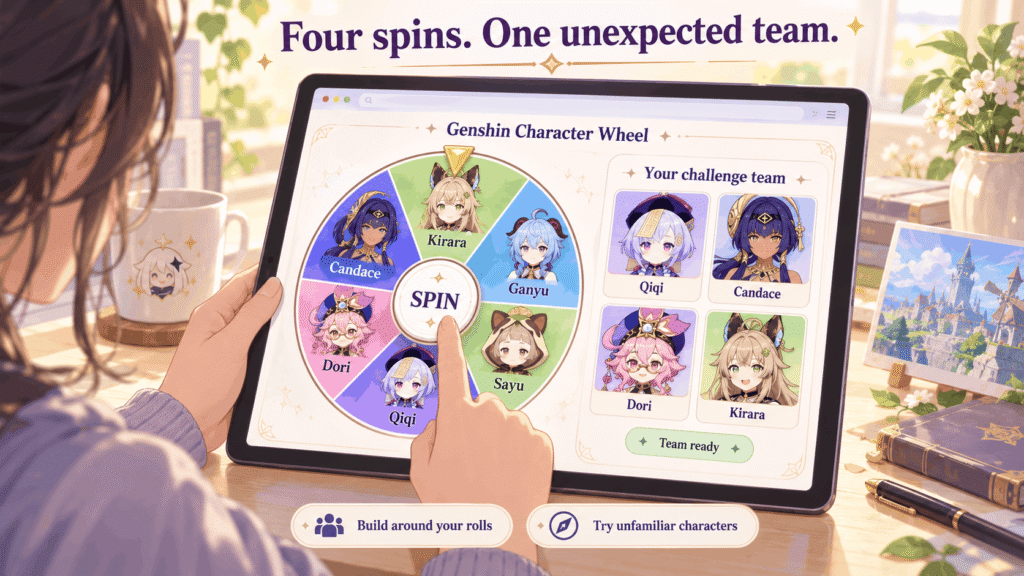
The format I keep returning to is four spins and no rerolls. You spin the wheel once per party slot and randomly select the lineup, which is how I once cleared domains with Qiqi, Candace, Dori and Kirara together. That party was clumsy, yet it taught me more about healing windows than any guide did.
Element clashes are the real test. If four spins hand you Ganyu, Ayaka, Shenhe and Diona, you have a Cryo team by accident; if they hand you Cyno, Fischl, Beidou and Keqing, you have an Electro pile that needs an energy plan. My worst roll paired Collei, Layla, Faruzan and Mika with nobody to heal, while Yelan and Xingqiu sat unused.
Allowing one reroll per element clash keeps the run fair for new players and veterans alike. Popular lists see heavy use: one public character wheel shows 50,111 lifetime spins and 3 days 5 hours of total spin time, published by a verified creator. Planning teams this way also helps with exploring Teyvat on characters you never field, such as Xinyan, Yanfei or Sayu.
What Should You Check Before Picking a Genshin Wheel List?
The most useful thing to check on a Genshin wheel list is its version label, because a list built for one patch quietly leaves out every character released after it.
The labels I have come across span four patches, and the stand-out entries shift a lot between them. Older lists lean toward lore and villains, while newer ones chase the latest banners. The table sorts the most distinctive names by the list label they appear under.
| List label | Stand-out entries | Who it suits |
|---|---|---|
| 5.3 | Pierro (The Jester), Dottore (The Doctor), Pulcinella, La Signora (The Fair Lady), Pantalone, Ei, Makoto | Lore fans who want Harbingers and non-playable figures in the mix |
| Version 6.1 | Marionette, Mizuki, Scaramouche | Players who want a mid-cycle roster |
| v6.2 | Rerir, Manekin, Nicole Reeyn, Paimon, Dainsleif | Spinners who enjoy oddball slices beside the playable cast |
| 7.0 | Zibai, Illuga, Linnea, Lohen, Prune, Odette, Alyosha, Momoka, Liuyun | Anyone who wants the newest names first |
Duplicates are the other thing to watch. One list carries Capitano twice, which doubles the odds of landing on him, and the 6.1 list holds both Wanderer and Scaramouche as separate slices. Two lists say Childe while the other two say Tartaglia, so the same Harbinger can show up under either name.
Gaps matter just as much. The 6.1 list skips Aloy and Rosaria entirely. On the lore-heavy 5.3 list, The Balladeer, The Knave and The Captain appear as bracketed titles, so the Fatui stand out next to Arlecchino, Columbina and Sandrone.
What Is the Shortcut Wheel in Genshin Impact wheel and What Does It Open?
The in-game wheel in Genshin Impact is a radial menu that jumps straight to the screens you open most, so you never have to dig through the main menu.
Two layouts exist: a standard one for regular play and a separate one for the creative hub. Each ships with eight default slots, and the smaller four-slot setting keeps only half of them. The table shows every default slot and which setting keeps it.
| Default slot | Layout | 8-slot setting | 4-slot setting |
|---|---|---|---|
| Wish | Basic Wheel | Yes | Yes |
| Adventurer Handbook | Standard | Yes | No |
| Inventory | Standard | Yes | Yes |
| Character | Standard | Yes | No |
| Map | Both layouts | Yes | Yes |
| Quests | Standard | Yes | No |
| Events | Standard | Yes | Yes |
| Battle Pass | Standard | Yes | No |
| Odes | Miliastra Wonderland Wheel | Yes | Yes |
| Gameplay Guide | Wonderland | Yes | No |
| Wonderland Collection | Wonderland | Yes | Yes |
| Cosmetic Plans | Wonderland | Yes | No |
| My Miliastra Wonderland | Wonderland | Yes | No |
| Popular Miliastra Wonderlands | Wonderland | Yes | Yes |
| Miliastra Pass | Wonderland | Yes | No |
The map is the only slot both layouts keep in their four-slot form. When I tried the smaller ring while leveling Chasca, Citlali, Ororon and Iansan, losing the quest log hurt far more than losing the handbook. Checking Charlotte, Chevreuse, Furina and Neuvillette builds also took one extra press every time.
How Do You Set Up the Basic Wheel in 8 or 4 Directions?
You set up the standard wheel by unlocking customization, choosing between the 8-Direction Wheel and the 4-Direction Wheel, and then swapping any slot you rarely use.
The swap list is wider than the defaults suggest. Under Basic Functions you can add Shop, Archive, Character Archive, Take Photo, Mail and Settings, while the creative hub adds Wonderland Functions such as Miliastra Shop, Lobby, Friends and Party. On my account the photo slot replaced the handbook within a day, because I screenshot Navia, Chiori and Yae Miko builds constantly.
Controller players follow a slightly longer path to reach the hidden slots:
- Adventure Rank 20: reach it first, since the edit option stays locked below that point.
- Remove or replace: open the edit screen and pull out one of the default entries you rarely touch.
- L1+R3: on PlayStation, press this pair to open the Function Menu, which holds every default slot missing from your ring.
- LB+RS: on Xbox, press this pair for the same controller-only menu.
Expect a few days of muscle memory trouble after any swap. I kept hitting the old slot while rotating Lyney, Lynette and Freminet, and again while gearing Thoma, Yoimiya, Ayato and Kokomi. Gorou, Arataki Itto and Kujou Sara never noticed the difference, but my thumb did.
How Is the Miliastra Wonderland Wheel Different?
The Miliastra Wonderland version of the wheel is a separate layout that appears only inside the creative hub, trading combat screens for player-made levels, cosmetics and its own pass.
Both layouts share the same default keybinds: Tab on PC, and PlayStation L1 or Xbox LB on a controller. That consistency matters, because muscle memory from the open world carries straight into the hub without any rebinding.
The Wonderland ring feels built for browsing rather than fighting. I leave character screens off it entirely, since nobody swaps Xiao for Alhaitham or checks Kaveh and Baizhu artifacts while queuing for a custom level. The pass and collection slots get far more use there.
My co-op group has its own ritual before entering. We handle settling debates about who hosts by spinning a list that includes Kinich, Mualani, Kachina and Xilonen, and whoever owns the winner opens the hub. Nilou and Nahida fans in the group always ask for a respin.
What Does the Function Menu Do on Controller?
On controller, the overflow menu lists every default slot you have pulled off the wheel, so nothing you remove is ever lost.
The overflow menu exists because a ring only has eight slots and the game offers more destinations than that. Removed screens wait there until you want them, which gives controller players an interface to quickly access everything without crowding the ring. Keyboard players never see it, since a keyboard already has a key for nearly every screen.
I lean on it most during long sessions with Wriothesley, Clorinde and Sigewinne, when I want the archive for one quick lore check and nothing more. It also saved me while building a team around Emilie, Sethos and Dehya, because the shop slot I had removed was still one combination away.
The trade-off is speed. Every trip through the overflow menu costs one more input than a slot on the ring, which adds up when you are tuning Yaoyao, Heizou, Kuki Shinobu or Tighnari between domain runs.
When Was the Shortcut Wheel Added and Made Customizable?
The Shortcut Wheel was released in Version 1.0, the ability to customize it arrived in Version 2.4, and a later version labeled Luna II also appears in its change history.
For roughly the first stretch of the game, every player saw the same fixed ring. Players who started after customization arrived may not realize how rigid that early ring felt, especially for anyone who used the character screen every few minutes to swap Ningguang, Yun Jin, Chongyun and Eula in and out.
The overflow menu still cannot be customized directly, which keeps the change history short. Personally I think that limit is fine; the ring itself is where layout choices pay off, whether you are tuning Albedo, Razor, Xianyun and Gaming or newer names such as Lan Yan, Skirk, Ifa and Varesa.
Each new patch adds names to the roster screen behind that ring. Escoffier, Dahlia, Varka and Ineffa sit there now, beside Alice, Lauma, Flins and Jahoda, with Durin and Aino close behind. That is also why team-building challenges built on a character wheel keep getting longer lists every version.