What Is a Twitch Giveaway Picker?
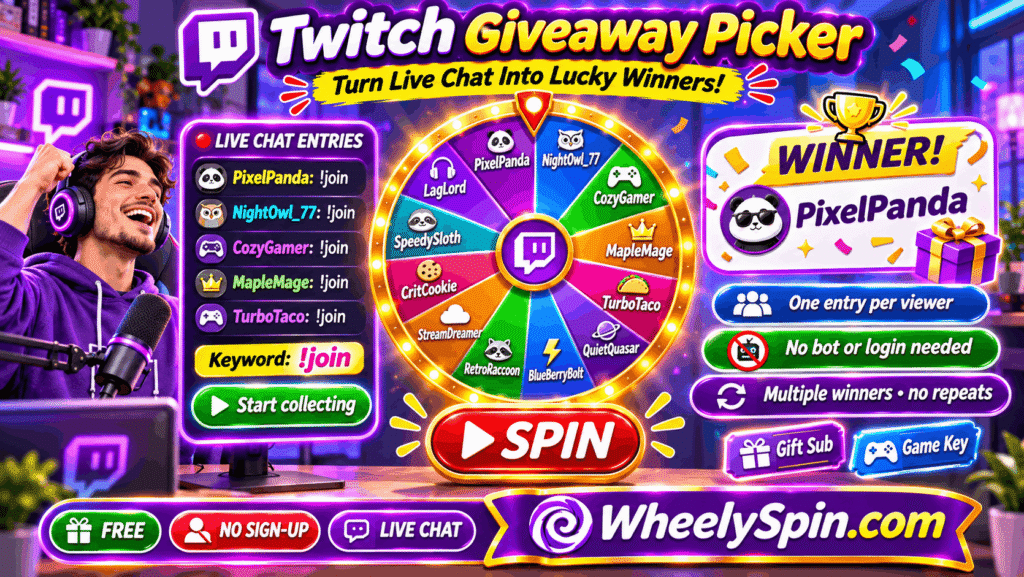
A Twitch giveaway picker is a wheel that collects viewers from your live chat and picks a random winner on stream. Type your channel name, choose a keyword like !join, and every viewer who types it is added to the wheel once. Then you spin, and the pop-up shows “Winner” with their name.
The winner comes off the wheel after each spin, so you can draw several prizes with no repeat winners. There’s no bot to install and no account to connect.
Streamers use it for game keys, gift subs, merch and channel milestones. Because the whole chat watches the wheel spin, everyone can see the draw is fair, which builds trust and keeps people around until the end.
Twitch is a live streaming service owned by Amazon, as Wikipedia explains. This picker is free and works in any browser. For wheels of every kind, start from the main spin the wheel page.
How Do You Run a Twitch Giveaway With This Picker?
You run a Twitch giveaway by opening Live chat entries, typing your channel name, collecting entries with a keyword and spinning once entries close.
- Open Live chat entries and type your Twitch channel name.
- Set the keyword, such as !join, then press Start collecting.
- Tell chat the keyword, the prize and when entries close.
- Press Stop collecting when time is up, then spin.
- Spin again for runner-up prizes.
The wheel fills up as people type, so chat can watch their names appear. Each name is added once, however many times someone types the keyword.
Say the closing time out loud and put it on screen. A short window of three to five minutes keeps energy high, while a longer one gives lurkers time to join.
Once the wheel lands, the winner’s name appears in the pop-up. Read it out, ask them to reply in chat, and you’re done. The giveaway wheel works the same way if you’d rather paste names by hand.
How Does the Giveaway Keyword Work?
The keyword is the word viewers type in chat to enter, and the picker adds anyone whose message starts with it.
The default is !join, but you can use any word up to 40 characters, such as !enter, !win or a word tied to your stream. Matching ignores capitals, so !JOIN and !join both count. A message like “!join good luck” also counts, because it starts with the keyword.
Leave the keyword empty and the picker adds everyone who chats. That suits a thank-you draw for regulars, but it also adds people who chatted without meaning to enter.
Each viewer goes on the wheel once, even if they spam the keyword. That keeps the draw equal and stops chat from filling with repeat entries.
Some bots match the keyword anywhere in a message, and others use a command plus a number, like a guess-the-number giveaway. If you run one of those, the random number generator can pick the secret number.
Pick a short, unusual keyword so normal chat doesn’t enter people by accident.
Which Lists Come With the Twitch Giveaway Picker?
The picker comes with two sample lists so you can try it before going live.
| List | Entries | Examples |
|---|---|---|
| Sample chat names | 12 | PixelPanda, NightOwl_77, CozyGamer, LagLord |
| Giveaway prizes | 10 | Game key, Gift sub, VIP for a week |
Sample chat names shows how the wheel looks with real usernames, including SpeedySloth, MapleMage, TurboTaco, QuietQuasar, BlueBerryBolt, RetroRaccoon, StreamDreamer and CritCookie. Spin it to test your scene and overlay before the stream starts.
Giveaway prizes is a list you can spin on stream to decide what’s up for grabs. It includes a game key, a gift sub, a channel points bonus, a sticker pack, a merch item, VIP for a week, the chance to pick the next game, a shoutout on stream, a custom emote idea and a match with the streamer.
When you start collecting from chat, the live entries replace the sample names. You can also type names into the entries box, one per line, if some viewers entered another way.
What Prizes Can You Give Away on Twitch?
You can give away anything from game keys and gift subs to free perks like a shoutout or a VIP badge.
| Prize | Cost to you | Why viewers like it |
|---|---|---|
| Game key | Price of the game | A real reward |
| Gift sub | One subscription | Emotes and badges |
| Merch item | Your merch cost | A piece of the channel |
| Gift card | Any amount | Flexible |
| VIP for a week | Free | Status in chat |
| Shoutout on stream | Free | Recognition |
| Pick the next game | Free | A say in the stream |
| Play a match with the streamer | Free | Time with you |
| Custom emote idea | Free | A lasting mark |
| Channel points bonus | Free | Extra points |
Free prizes work surprisingly well, because viewers value time and recognition. Paid prizes like a $50 Steam gift card bring in bigger crowds.
Spin the Giveaway prizes list to choose tonight’s prize, then switch to collecting entries. For prize wheels with your own items, try the prize wheel spinner.
How Do You Pick Several Winners in One Giveaway?
You pick several winners by spinning again after the first draw, because the winner is removed from the wheel automatically.
On this page, Remove the winner after each spin is on by default. Spin once for first place, again for second and again for third. Nobody can win twice, and the wheel gets smaller with each draw.
Results keeps a list of every winner, which is handy if you need to send keys after the stream. Export CSV saves the entrants, and Undo reverses the last change if you made a mistake.
Some tools draw up to 10 winners at once or draw multiple winners back to back. A spin per prize is slower, but it keeps the suspense going, and every winner gets their own moment on stream.
If you have more prizes than you want to spin for, draw the main prize on the wheel and use the random name picker for smaller ones.
For a tie or a final decision between two names, a coin flip is quick and easy to show on stream.
How Do You Show the Giveaway Wheel on Stream?
You show the giveaway wheel on stream by sharing your browser window or adding the wheel to your scene as an overlay.
The quickest way is a window capture of your browser in OBS Studio or Streamlabs. Press Full screen, and the wheel fills the window with no clutter around it.
For a cleaner layout, add a browser source. Most overlays use 1920×1080, and the OBS wheel gives you a wheel built for stream layouts.
Keep the wheel on screen while entries are open, so viewers see their names appear. That’s the best proof that the draw is real.
Other tools add countdown timers that change color as time runs out, name-shuffle reveals, confetti and sound effects. Some put an entrant count on screen next to a line like “type !enter.”
Whatever setup you use, spin live and read the winner aloud. A clip of the winner reacting in chat is great content for later.
What Features Do Twitch Giveaway Bots Offer?
Twitch giveaway bots offer extra rules like subscriber luck, follower-only entry and claim timers, which suit big channels with regular giveaways.
| Feature | What it does |
|---|---|
| Subscriber luck | Gives subs 2x or more chances |
| Multipliers | 1 to 10 times for subs, VIPs or regulars |
| Followers only | Only followers can enter |
| Subs only | Only subscribers can enter |
| Watch time | Minimum minutes watched to enter |
| Channel points | Viewers redeem points to enter |
| Bot exclusion | Skips bots like Nightbot and StreamElements |
| Blocklist | Blocks named users |
| Entry timer | Closes entries after 1, 3 or 5 minutes |
| Claim command | Winner must type !claim in time |
| Reroll | Picks again if the winner doesn’t claim |
Some bots also post announcements, schedule giveaways, archive results, run guess-the-number draws or remove viewers who spam the command.
This picker keeps things simple: one keyword, one entry per person and equal chances. If you want follower-only or sub-only draws, ask your mods to remove names that don’t qualify before you spin.
Is Subscriber Luck Fair in a Twitch Giveaway?
Subscriber luck is fair as long as you announce it before entries open, because everyone knows the odds.
Here’s how it works. With 100 regular viewers and 10 subscribers at 3x luck, there are 130 entries. Each sub has 3 chances in 130, and each regular viewer has 1 in 130. Subs are three times as likely to win, but most winners will still be regular viewers because there are more of them.
Some streamers like it because subs pay $4.99 a month to support the channel. Others prefer equal odds, so new viewers feel welcome.
This picker gives everyone one slice. To give subs extra chances, type their names into the entries box twice, or use Slice sizes to make their slices bigger.
Whatever you choose, write it in your giveaway rules and say it on stream. Surprise rules make chat suspicious, even when the draw is random. Clear rules keep the mood friendly.
How Do You Check the Winner Is Still Watching?
You check the winner is still watching by asking them to type in chat within a set time, and spinning again if they don’t.
Many streamers give 60 seconds to two minutes. Bots call this a claim command, often !claim. Some tools show whether the winner has typed since being picked, and after how long.
With this picker, read the name out and watch chat. If they reply, they win. If not, spin again, and the no-show is already off the wheel.
Set the rule before you start. Viewers who stay to the end deserve the prize more than someone who typed the keyword and left. Announce the claim window when you open entries, not after the spin.
Your mods can help. Ask them to message winners for delivery details, such as an email for a game key, rather than asking in public chat. Never ask winners to post personal information in chat.
What Rules Should a Twitch Giveaway Follow?
A Twitch giveaway should follow Twitch’s terms and the laws where you and your viewers live, and it should have clear written rules.
Write your rules in a channel panel: the prize, who can enter, how to enter, when entries close, how winners are picked and how they claim. Say the main points on stream too.
In many places, including the US, a giveaway that requires a purchase can count as a lottery, so keep entry free. Subscriber luck is a gray area, because subs pay for their extra chances. Check the rules for your country before offering paid-only advantages.
Some prizes have age limits, and some can’t be shipped everywhere. State the regions you can deliver to, and any shipping limits.
This picker isn’t connected to Twitch, so you’re responsible for following Twitch’s rules for giveaways. Keep a record of entrants and winners with Export CSV and Results in case anyone asks.
How Do You Run Giveaways on YouTube and Other Platforms?
You run giveaways on other platforms by collecting names from their chat or comments and spinning the same way.
Live chat entries can also read a YouTube live video, so you can collect entries from Twitch and YouTube at once if you stream to both.
For a giveaway on a regular video, the YouTube comment picker picks a winner from the comments. For posts, the Instagram comment picker does the same.
Kick streamers can paste names from chat into the entries box, one per line. Discord communities can do the same with names from a giveaway channel.
If you run giveaways across several platforms, the giveaway tools page lists every picker in one place.
Keep each giveaway separate. Mixing names from different platforms in one draw makes it hard to check who entered and how. If you must combine them, tell viewers first and keep a list of where each name came from.
Why Do Giveaways Help a Twitch Channel Grow?
Giveaways help a Twitch channel grow because they reward the viewers who show up and give new viewers a reason to stay.
Twitch is huge. It launched as a public beta on June 6, 2011, spun off from Justin.tv, and Amazon bought it in August 2014 for $970 million. By 2015 it had more than 100 million viewers a month, and in February 2020 it had 3 million monthly broadcasters, 15 million daily active users and 1.4 million viewers watching at any moment.
With that much competition, small rewards matter. A giveaway at a milestone, such as 100 followers, gives chat something to celebrate.
Giveaways also boost chat activity. Viewers who type the keyword often start chatting, and regular chatters are the ones who come back.
Use giveaways to say thank you rather than to buy attention. Viewers who stay only for prizes tend to leave when the giveaways stop.
Which Wheel Settings Should You Use?
The settings that matter most for a Twitch giveaway are Live chat entries, Remove the winner after each spin and Results.
| Setting | What it does | When to use it |
|---|---|---|
| Live chat entries | Adds viewers who type the keyword | Every chat giveaway |
| Remove the winner after each spin | Takes the winner off the wheel | Several prizes |
| Results | Keeps every winner | Sending prizes later |
| Export CSV | Saves the entrants | Keeping records |
| Undo | Reverses the last change | Fixing mistakes |
| Full screen | Fills the screen with the wheel | Showing the draw on stream |
This wheel also has Shuffle, Sort A to Z, Import CSV, Slice sizes, Auto-spin, Share, Save wheel and themes. Themes help the wheel match your stream colors.
Other tools add sound on or off, a space bar to spin, a share link that carries the entries, a draw history of the last 30 draws or a numbers tab for picking numbers.
Do You Need to Connect Your Twitch Account?
No. The wheel reads your public chat without logging in, and it can’t post, ban or change anything on your channel.
That means there’s no password, no permissions screen and nothing to revoke later. You type your channel name, and the picker listens to chat the same way a viewer would.
Some tools ask you to log in with Twitch so they can post announcements or check follower status. Others run locally as an open-source app. Each approach has trade-offs, but reading public chat is the simplest and safest for most streamers.
It also means your mods don’t need to learn new chat commands. Viewers type the keyword, the wheel listens, and nothing else changes in your chat. For small channels with no bot set up yet, that’s the fastest way to run a first giveaway, and you can add a bot later if you need one. Many streamers never do.
Is This an Official Twitch Tool?
No. It’s a free tool and isn’t connected to Twitch or Amazon. You’re responsible for following Twitch’s rules for giveaways.
It works alongside whatever bots and extensions you already use. Many streamers keep their usual bot for commands and use this picker for the visible draw.
Because it’s not an official tool, it has no special access to your channel. It can’t see subscriber status, follower lists or channel point redemptions. It only sees the messages that anyone watching your stream can see, and it adds names that match your keyword.
That keeps it safe to try. If you close the tab, it stops listening, and there’s nothing to uninstall or disconnect. If Twitch changes how chat works, the picker may need an update, so test it before a big giveaway. A quick test with a friend typing the keyword takes less than a minute, and it shows you exactly what chat will see.
What Is the Best Free Twitch Giveaway Tool?
The best free Twitch giveaway tool is the one that matches your channel: a simple wheel for small streams, or a full bot for big channels with strict rules.
A wheel like this one is best when you want a visible, fair draw with no setup. Viewers type the keyword, watch their names appear and see the spin live.
A bot is best when you need rules. Bots offer subscriber luck of 2x or more, multipliers from 1 to 10 for VIPs and regulars, followers only and subs only modes, and watch time limits. They skip bots like Nightbot and StreamElements, keep a blocklist, run an entry timer of 1, 3 or 5 minutes and reroll when a winner doesn’t claim. Some can schedule a giveaway or archive past results.
Some check follower status through your login, while one open-source app runs locally on your computer.
Many streamers use both: the bot for rules and this wheel for the moment everyone watches. Try the wheel first, and add a bot when you need more control.
How Do You Do a Twitch Giveaway With Chat Commands?
You do a Twitch giveaway with chat commands by choosing an entry command, announcing it and letting viewers type it until entries close.
With this picker, the command is your keyword. Use !join, !enter, !win or any word up to 40 characters. Press Start collecting, and press Stop collecting when time runs out. Give lurkers a minute or two to notice.
Bots add control commands for mods, such as opening, closing and drawing a giveaway from chat. Winners often get 60 seconds to type a claim command.
Whatever command you use, follow Twitch’s terms and local laws. Keep entry free, so the giveaway isn’t treated as a lottery that needs a purchase, and mention any age limits or regions you can’t ship to.
Prizes can be anything from a sticker pack to emotes, badges through a gift sub, a gift card or a $50 Steam gift card. Pin the command in chat so late arrivals know how to enter.
How Many Viewers Do You Need for a Twitch Giveaway?
You don’t need many viewers for a Twitch giveaway. Even five or ten people make a fun draw, and small channels often get the most out of it.
The odds change with size. With 100 regular viewers and 10 subscribers at 3x, there are 130 entries. In a chat of ten, each person has a one in ten chance, which feels exciting.
Scale matters less than consistency. Twitch has grown huge since its public beta on June 6, 2011, as a spin-off of Justin.tv. Amazon bought it in August 2014 for $970 million, it passed 100 million viewers a month by 2015, and by February 2020 it had 3 million monthly broadcasters, 15 million daily active users and 1.4 million concurrent viewers.
In a crowd that size, a regular giveaway gives viewers a reason to pick your stream. Subscribers pay $4.99 a month, so a small sub-only draw is a nice thank-you.
Test with the Sample chat names list first, and write your giveaway rules before the first draw.
Is the Twitch Giveaway Picker Random?
Yes. The wheel uses your browser’s crypto.getRandomValues function, so every entrant has the same chance of winning. You can see how the spins are checked on the randomness audit page.
The winner is decided by the spin, not by order of entry, so typing the keyword first gives no advantage.
Shuffle and Sort A to Z only change how the slices look, not the odds. Import CSV, Share, Save wheel, Auto-spin and themes don’t change the odds either. Other tools add a space bar to spin, a share link, a history of the last 30 draws or a numbers tab, and some draw up to 10 winners at once or back to back.
On stream, show the spin in OBS Studio or Streamlabs with a browser source at 1920×1080. Countdown timers, name-shuffle reveals, confetti, sound effects and an entrant count are extras some tools add.
You can collect from a YouTube live video too, and paste names from Kick or Discord. No account is needed for any of it.
Is the Twitch Giveaway Picker Free?
Yes, it’s completely free. There’s no sign-up, no paid plan and no download, and you can run as many giveaways as you like on a phone, tablet or laptop.
Every spin uses crypto.getRandomValues, so each entrant has the same chance, and the randomness audit page shows how it’s tested.
Save wheel keeps your setup for the next stream, and Results keeps every winner so you can send prizes afterward. There are no limits on entrants, spins or giveaways, so you can run a draw every stream if you like. The same page works for a one-off milestone giveaway or a weekly draw for your regulars, and your chat settings stay saved between streams.
The picker works on any screen, so you can run it from a second monitor, a laptop beside your stream PC or a phone while you play.
Bookmark the page so it’s ready for your next stream.